Zoho CRM Review 2026: Pricing, Free Plan, Features, Pros and Cons
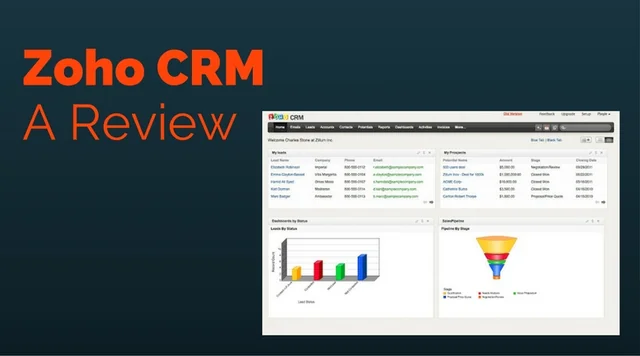
Zoho CRM is a customer relationship management (CRM) tool for tracking leads, contacts, deals and sales activity. It is popular with small and mid-sized businesses because it has a free-forever edition and paid plans that cost less than many big-name competitors. This review covers what the free edition includes, what each paid plan costs at the time of writing (October 2026), the main features, and the strengths and weaknesses users report most often.
One note before you read on: a lot has changed since Zoho CRM's early years. The free edition now allows 3 users, not 10, and the interface was redesigned in 2025. Older reviews that quote different limits are out of date.
Zoho CRM at a glance
- Free edition: up to 3 users, free permanently (it is not a time-limited trial)
- Paid plans: Standard, Professional, Enterprise and Ultimate, from about $14 to $52 per user per month on annual billing
- AI: Zia assistant, with Zia Agents on selected paid plans
- Best suited to: small and mid-sized sales teams, and businesses that already use other Zoho apps
Zoho CRM pricing (October 2026)
These are approximate US-dollar prices per user per month at the time of writing (October 2026), based on several 2026 pricing guides. Zoho changes prices from time to time and they vary by region, so check Zoho's own pricing page before you buy.
| Plan | Annual billing | Monthly billing | Users |
|---|---|---|---|
| Free | $0 | $0 | Up to 3 |
| Standard | About $14 | About $20 | Unlimited |
| Professional | About $23 | About $35 | Unlimited |
| Enterprise | About $40 | About $50 | Unlimited |
| Ultimate | About $52 | About $65 | Unlimited |
Paying annually costs noticeably less per seat than paying monthly. Zoho also sells a cheaper Team User add-on, roughly $9 per month on annual billing or $11 monthly at the time of writing. It is meant for staff in departments like legal, delivery or support who only need to work in their own team's modules, not the whole CRM.
Several pricing guides point out that the licence fee is only part of what you'll spend. Add-ons, data migration, setup and staff training can add a lot, especially if you use the Enterprise or Ultimate features.
What the free edition includes
According to Zoho, the free edition gives you:
- 3 users, free permanently
- Storage for 5,000 contact records
- 150 emails per day
- No Zoho branding on emails you send
- Seven native app integrations
It covers the core CRM records: leads, contacts, accounts, deals, tasks and events. What it leaves out is most of the deeper customisation, advanced reporting and analytics, and the newer team-collaboration features (Teamspaces and Team Modules), which start on the Standard plan. For a team of one to three people with simple sales tracking needs, it is a sensible free place to start. Once you need more users, custom reports or more automation, you will need to move to a paid plan.
Key features
1. Lead, contact and deal management
Zoho CRM keeps leads, contacts, accounts and deals in separate modules and links them together. Each customer's record collects their contact details, activity history and open deals. Higher plans add multiple sales pipelines and forecasting.
2. CRM for Everyone and the redesigned interface
Zoho released its "CRM for Everyone" update to the public in May 2025. It brought a redesigned interface with the main menu moved from the top bar to a vertical left-hand sidebar. It also added a dark mode, an Interactions tab, and more ways to view module records. The update was built so that teams outside sales, such as marketing, support, legal or delivery, can work in the CRM too, through Teamspaces and Team Modules. Zoho says all editions get the new interface, including Free. Teamspaces and Team Modules start on the Standard plan, and some extras, such as Chart View, are only on Enterprise and Ultimate.
3. Zia AI assistant and Zia Agents
Zia is the AI assistant built into Zoho's apps. In the CRM, it can score leads and deals, spot unusual changes in your data, help with forecasts, and answer questions in plain language through Ask Zia. Zia Agents were first shown in 2025. They are AI agents that can carry out sales tasks on their own. You can build your own in Agent Studio or pick ready-made ones, such as a sales development representative agent, from the Zia Agents Store. Sources disagree on which plans include Zia Agents, so check Zoho's edition comparison for current availability.
4. Automation
Paid plans can automate routine work like assigning leads, sending follow-up emails and creating tasks, so sales staff do less manual data entry. The more expensive the plan, the more automation and customisation you get. If automation matters to you, check the exact limits for each edition on Zoho's comparison page before you choose a plan.
5. Reports and analytics
Every plan includes standard reports and dashboards on sales activity and team performance. Custom and advanced analytics are on the higher plans. Ask Zia can also answer data questions in plain language.
6. Mobile apps
Zoho CRM has mobile apps for checking leads, contacts, deals and tasks on the go. Since the CRM for Everyone update, the apps also let you switch between Teamspaces and manage team module records.
7. Integration with other Zoho apps
Zoho sells dozens of business apps, including email marketing, help desk, analytics, projects and finance tools. Zoho CRM shares data with them, which is one of its biggest advantages if you already use other Zoho products or plan to.
Pros
- Useful free edition: a permanently free plan for up to 3 users with 5,000 contact records is enough for many very small teams.
- Affordable paid plans: paid plans start at about $14 per user per month on annual billing at the time of writing (October 2026).
- Highly customisable on paid plans: users on review sites often praise how much you can adjust dashboards, workflows and sales processes.
- Built-in AI: Zia lead scoring, forecasting and Ask Zia come with the platform, and Zia Agents are on selected paid plans.
- Zoho apps work together: data moves easily between the CRM and other Zoho apps.
Cons
- Learning curve: reviewers often say the interface feels complex or cluttered at first, and that the range of options takes time to learn.
- Advanced setup takes effort: advanced reports, analytics and automation can be hard to configure without technical help, and some teams find they need a lot of customisation before the CRM fits their process.
- Free edition is limited: the 3-user cap and the missing advanced features mean growing teams will need to upgrade.
- Support is tiered: free users get basic support only. Classic support comes with any paid subscription. Premium and Enterprise support, with longer hours and faster response times, cost extra, priced as a percentage of your licence fee.
- Total cost can grow: add-ons, implementation and migration can add a lot to the per-user price.
Customer support
Every user can use the knowledge base, user guides and community forums. Paid subscribers get Classic support at no extra cost. Some third-party guides describe it as business-hours support. Zoho also sells Premium and Enterprise support plans for Zoho CRM, which add longer support hours and more guided onboarding. Third-party guides say they are priced as a percentage of the licence fee, with Premium reported at roughly 20%. Check the details with Zoho before you rely on them.
Who should use Zoho CRM?
Zoho CRM is a good fit for:
- Very small teams (up to 3 people) that want a free CRM for tracking contacts and deals
- Small and mid-sized sales teams that want plenty of features at a lower per-user price than many rivals
- Businesses already using other Zoho apps
- Organisations where non-sales teams also need to work with customer records, thanks to Teamspaces and Team Users
It may not suit teams that want a CRM they can use without any setup, or businesses that need 24/7 phone support without paying for a premium support plan.
Verdict
Zoho CRM is still one of the best-value CRM options for small businesses in 2026. The free edition is smaller than it used to be (3 users instead of 10), but it is still a real, permanently free product. The paid plans cost less than many competitors. The 2025 redesign improved navigation, and Zia AI is now part of the platform. The trade-off is that it takes time to learn, and advanced setup and premium support cost extra. If you need a flexible CRM and are willing to spend time configuring it, Zoho CRM is worth considering. Start with the free edition or a trial before choosing a paid plan.
Frequently Asked Questions
Is Zoho CRM good for small businesses?
Yes. Zoho CRM is widely used by small businesses because it has a permanently free edition for up to 3 users and paid plans from about $14 per user per month on annual billing at the time of writing (October 2026). Its main downside for small teams is the learning curve when setting up advanced features.
How much does Zoho CRM cost?
At the time of writing (October 2026), Zoho CRM costs about $14 (Standard), $23 (Professional), $40 (Enterprise) or $52 (Ultimate) per user per month on annual billing. Monthly billing is roughly $20, $35, $50 and $65. Prices vary by region, so confirm them on Zoho's site.
Is Zoho CRM really free?
Zoho CRM has a free edition that does not expire. It allows up to 3 users, stores 5,000 contact records and sends up to 150 emails a day. Advanced customisation, reporting and team collaboration features need a paid plan.
What are the main complaints in Zoho CRM reviews?
The most common complaints are an interface that feels complex or cluttered at first, advanced reports and automation that are hard to configure, and support that is limited unless you pay for a higher support plan.
Does Zoho CRM have AI features?
Yes. Its Zia assistant offers lead and deal scoring, anomaly detection, forecasting and plain-language questions through Ask Zia. Zia Agents, which can carry out sales tasks on their own, are available on selected paid plans; check Zoho's edition comparison for current details.
Do free Zoho CRM users get phone support?
No. Free users get basic support through the knowledge base, guides and community forums. Classic support comes with paid subscriptions, and Premium or Enterprise support with longer hours costs extra.