iPhone Duo Face ID: How iOS 27.3's Face Unlock Works
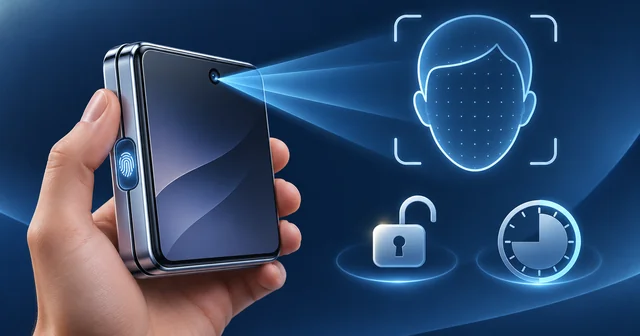
The iPhone Duo does not have Face ID. It uses Touch ID in the side button, but iOS 27.3 beta 2 adds a camera-based face unlock that works on the outer screen when the phone is closed. It needs a recent Touch ID or passcode entry, stops after about 45 minutes of inactivity, and cannot approve Apple Pay or passwords.
What Happened
On Monday, November 16, 2026, Apple released the second developer betas of iOS 27.3 and its sister updates. For iPhone Duo owners, the headline change is a new way to unlock the foldable by looking at it. MacRumors reported the option first, and The Verge, TechCrunch, Wired, Bloomberg and 9to5Mac all followed the same day.
The feature lives in the Settings app under Touch ID & Passcode. According to 9to5Mac, Apple's own description of the switch reads: use the front camera, along with a recent Touch ID or passcode authentication, to quickly unlock iPhone Duo when it is closed, and face recognition data never leaves your device.
The same beta adds a second Duo setting that early owners had been asking for: the phone can now lock when you fold it shut, instead of moving whatever was on the inner screen to the outer one. That toggle sits under Display & Brightness. TechCrunch noted that until now people had been building a Shortcuts automation to get the same behaviour.
Apple also said that more than 200,000 apps are now optimized for the iPhone Duo, up from 100,000 earlier in November. MacRumors explained that this counts apps built with the iOS 27.1 SDK or later, which fill the full width of both displays. The Verge said Apple has previously put the public release of iOS 27.3 in December.
Why It Matters
The iPhone Duo is Apple's most expensive phone. Our earlier report on the iPhone Duo sell-out and January ship dates covered its prices, which start at $1,999 for 256GB. Yet it was the only current iPhone without Face ID. Wired and TechCrunch both explain why: the folding body, with its hinge and layered displays, leaves no room for the TrueDepth sensor array that Face ID needs.
So since launch, every unlock has meant pressing a thumb on the side button or typing a passcode. TechCrunch called Touch ID one of the top complaints from reviewers. For people who have spent years unlocking an iPhone with a glance, reaching for the button every time is friction, and Wired described Apple's decision to ship a lesser face feature as a rare compromise that shows how much that friction has bothered Duo owners.
The change also matters because of what it is not. Apple is careful not to call this Face ID, and it has walled the feature off from anything that protects money or private data. Knowing where that line sits tells you when a glance will be enough and when you will still need your thumb.
How It Works
Face ID on other iPhones uses dedicated 3D hardware. TechCrunch describes it as a flood illuminator plus a dot projector that casts more than 30,000 invisible infrared dots to build a depth map of your face, combined with attention checks so that a photo cannot fool it. The iPhone Duo has none of that. Instead, the new option uses the ordinary front camera above the outer display, which Apple's iPhone Duo tech specs list as a 12MP Center Stage camera.
Wired reports that the feature is adapted from the person recognition on Apple's new HomeView smart display, which can tell household members apart by their faces, and says it is likely not as secure as Face ID. TechCrunch makes the same point: Apple stopped short of letting face unlock work across the whole device for that reason.
Because a flat camera image is easier to spoof than a 3D map, Apple has added several guardrails, as described by 9to5Mac, MacRumors and TechCrunch:
- Lock Screen only. A glance unlocks the phone, nothing more.
- Touch ID still guards sensitive actions. Apple Pay, saved passwords, adding passwords and logins, and unlocking protected apps still need Touch ID or the passcode.
- A recent fingerprint or passcode is required. Face unlock only works if you have recently authenticated the strong way.
- A 45-minute timer. If the phone sits unused for about 45 minutes, face unlock switches off until you use Touch ID or the passcode again.
- Closed phone only. It works on the outer screen. When the Duo is unfolded, you still use Touch ID or the passcode.
In practice, the pattern looks like this. You unlock with your thumb in the morning. For the rest of the session, each time you pick up the closed phone, a look at the outer screen opens it. Leave it on a desk through a long meeting and the next unlock asks for your fingerprint again. Pay at a terminal, and Touch ID is still the gate.
To turn it on once your phone is on the beta, open Settings, go to Touch ID & Passcode, enter your passcode, and switch on the front-camera unlock option. If you also want the phone to lock as soon as you close it, open Settings, then Display & Brightness, and enable the lock-on-close setting.
Apple is not alone in this trade-off. Wired notes that Google's newer Pixel foldables are the only ones on the US market with secure facial authentication, though they are weaker in the dark than Face ID, while Samsung's Galaxy face unlock is not strong enough for sensitive content and is mostly used to open the phone.
What's Still Unknown
This is a developer beta, so the feature could change, gain limits, or be pulled before iOS 27.3 ships. None of the reports cite any accuracy figure from Apple, such as the chance that a stranger or a photo is accepted, the kind of number Apple publishes for Face ID and Touch ID.
It is also unclear how well it performs in low light, with glasses or masks, or for people who look alike. Apple has not said whether third-party apps will ever be able to use it. Bloomberg has reported that Apple wants proper Face ID in the second-generation iPhone Duo, but Apple has not confirmed any model or date.
Frequently Asked Questions
Does the iPhone Duo have Face ID or Touch ID?
The iPhone Duo uses Touch ID. Apple's specs list a fingerprint sensor built into the side button, and the phone has no TrueDepth camera, so it cannot run Face ID. iOS 27.3 adds a separate camera-based face unlock for the closed phone, but Apple does not call it Face ID, and Touch ID or your passcode remain the main way to prove it is you.
How do I turn on face unlock on the iPhone Duo?
You need iOS 27.3, currently in beta and due publicly in December according to The Verge. Open Settings, choose Touch ID & Passcode, enter your passcode, and enable the option to unlock with the front camera. It only takes effect after a recent Touch ID or passcode unlock, and it works from the outer screen while the phone is folded shut.
Why is iPhone Duo face unlock not working?
Check the built-in limits first. Face unlock only works when the phone is closed, so it will not respond on the unfolded inner screen. It also switches off after about 45 minutes of inactivity until you use Touch ID or your passcode again. Make sure the setting is on under Touch ID & Passcode, and remember it is still beta software, so bugs are possible.
Can iPhone Duo face unlock be used for apps and Apple Pay?
No. Apple limits it to the Lock Screen. 9to5Mac and MacRumors report that Apple Pay, saved passwords, adding logins and unlocking protected apps still require Touch ID or the passcode. TechCrunch says Apple kept it off the rest of the device because it is not as secure as Face ID. The aim is a faster unlock, not a replacement for Face ID in apps.
Does iPhone Duo face unlock work when the phone is unfolded?
No. The feature uses the front camera above the 5.4-inch outer display and only works when the iPhone Duo is closed. When you open the phone to the 7.6-inch inner screen, you unlock with Touch ID on the side button or with your passcode, as before. Apple has not said whether this will change in a later update.
Is iPhone Duo face unlock as secure as Face ID?
No, and Apple's limits reflect that. Face ID builds a 3D map from more than 30,000 infrared dots, according to TechCrunch, while the Duo's option relies on a regular camera. Wired says it is likely not as secure as Face ID. That is why it needs a recent fingerprint or passcode, times out after 45 minutes and cannot approve payments.
Will the next iPhone Duo get real Face ID?
Possibly. Bloomberg reported that Apple wants to add Face ID to the second-generation iPhone Duo, and both TechCrunch and The Verge cited that report. Face ID needs TrueDepth hardware that the current folding design has no room for, so it would take a hardware change, not a software update. Apple has not announced anything, so treat it as a report rather than a plan.
How do I make the iPhone Duo lock when I close it?
iOS 27.3 adds a setting for that. Open Settings, then Display & Brightness, and turn on the option to lock the phone when it is closed. With it enabled, folding the Duo locks it instead of moving your app to the outer display. Before this, owners used a Shortcuts automation that ran when the phone was shut.
Related Reading
If you are still deciding on the foldable, our look at why iPhone Duo inner screens crack at the fold explains the hardware risk, and our guide to the best iPhone Duo cases covers protection. The person recognition behind this feature first appeared on Apple's smart display, which we explained in Apple HomeView price, uses and requirements. For more on what the iOS 27 updates have added to Siri, read iOS 27.2 explained: Siri AI's new languages and hidden watermarks.