Keyword Research Guide: How to Do It in 7 Steps (With a Real Example)

Most keyword research guides explain the steps in the abstract and then point you to a tool. This one walks through the same steps with real numbers, including the research behind an article we published on SaveDelete this week, so you can see where the decisions actually get made.
All search volumes and difficulty scores below come from Semrush’s US database, checked on 13 November 2026, unless a different source is named. Volumes are monthly averages and will drift; the method won’t.
You don’t need a paid tool to follow along. Every step has a free option, and the section on tools near the end shows which free sources cover which job.
If you only remember one thing: the numbers tell you whether a keyword is worth targeting, but the search results page tells you whether you can win it.
What Is Keyword Research?
Keyword research is the process of discovering the search terms your audience uses, measuring how often they are searched and how competitive they are, and deciding which ones each page on your site should target. Google’s own SEO Starter Guide makes the same point in plainer terms: think about the words a user might search for and use them naturally on your pages.
It matters because it decides what you write before you write it. Pick a keyword nobody searches, and a perfect article gets no visits. Pick one dominated by giant sites, and it never reaches page one. Pick one where the searcher wants a product page when you wrote a guide, and Google ranks something else.
The Keyword Research Process at a Glance
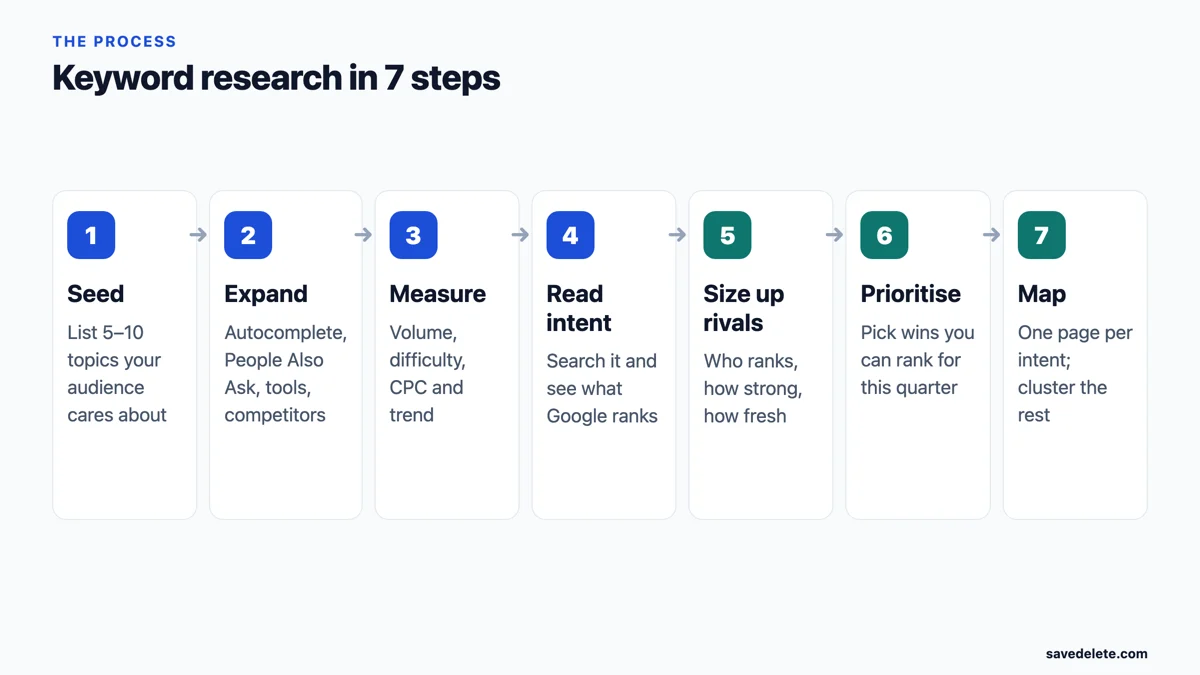
Step 1: Start With Seed Topics
A seed is a short, broad topic that describes what your site covers: “keyword research”, “standing desk”, “budget travel Japan”. Write down five to ten. Good sources are the questions customers ask you, the categories on your site, the products you sell and the topics competitors cover.
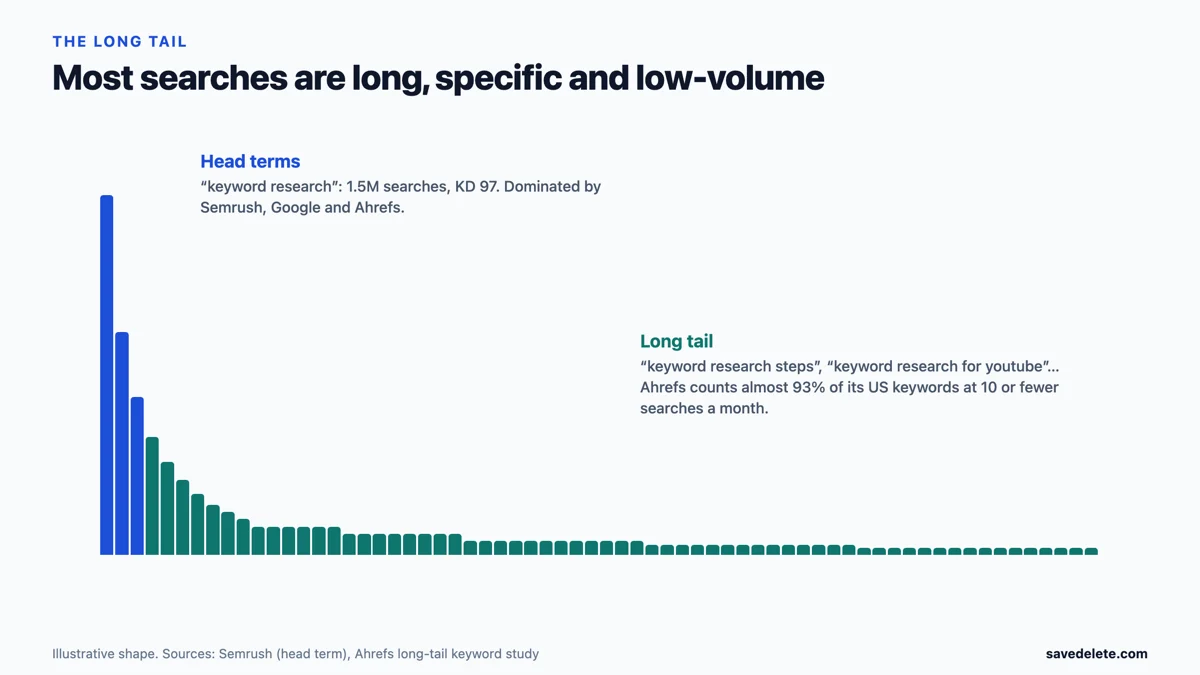
Seeds are not the keywords you will target. “Keyword research” on its own is searched about 1.5 million times a month in the US, but its difficulty score is 97 out of 100 and the first page is owned by Semrush, Google and Ahrefs. Its job is to generate the longer, winnable phrases in the next step.
Step 2: Expand Seeds Into Keyword Ideas
Now turn each seed into dozens of real searches. Use several sources, because each one sees different queries.
- Google autocomplete. Type a seed followed by a word such as “for”, “how” or “vs” and note the suggestions. They are drawn from what people actually search.
- People Also Ask and related searches. The question boxes and the related searches at the bottom of a results page are free lists of follow-up queries.
- Forums and communities. Reddit threads reveal the exact wording people use for a problem, and Reddit’s own search is growing fast as a place people look for answers.
- Competitors’ pages. Plug a competitor’s URL into a keyword tool to see which searches it ranks for; our list of websites for researching competitors covers the options.
- Keyword tools. Our roundup of free keyword research tools and our guide to using Google Keyword Planner for SEO show how to pull hundreds of ideas from one seed.
- Your own Search Console. If your site already gets impressions, the Queries report in Google Search Console lists searches you already appear for, often on page two, where a small improvement pays off.
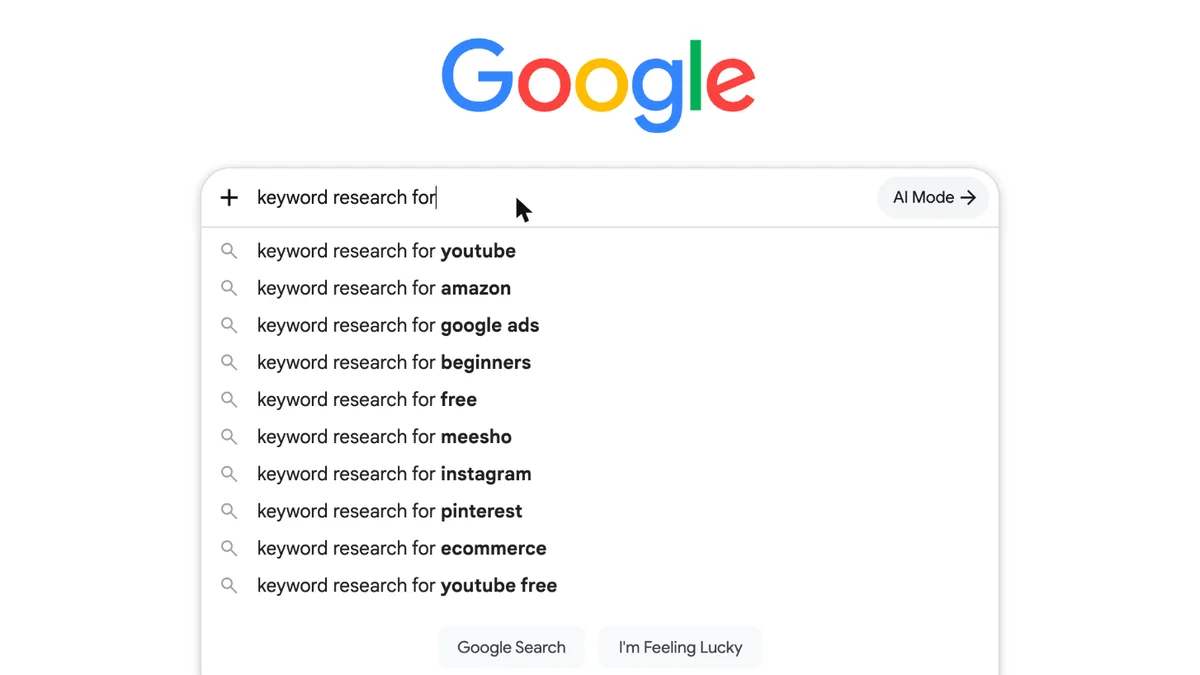
That one autocomplete box already splits the topic into platforms (YouTube, Amazon, Instagram, Pinterest), audiences (beginners, ecommerce) and budgets (free). Each is a separate keyword with its own intent.
Step 3: Check the Numbers
Put your list into a keyword tool and look at six things. Each is useful, and each has a trap.
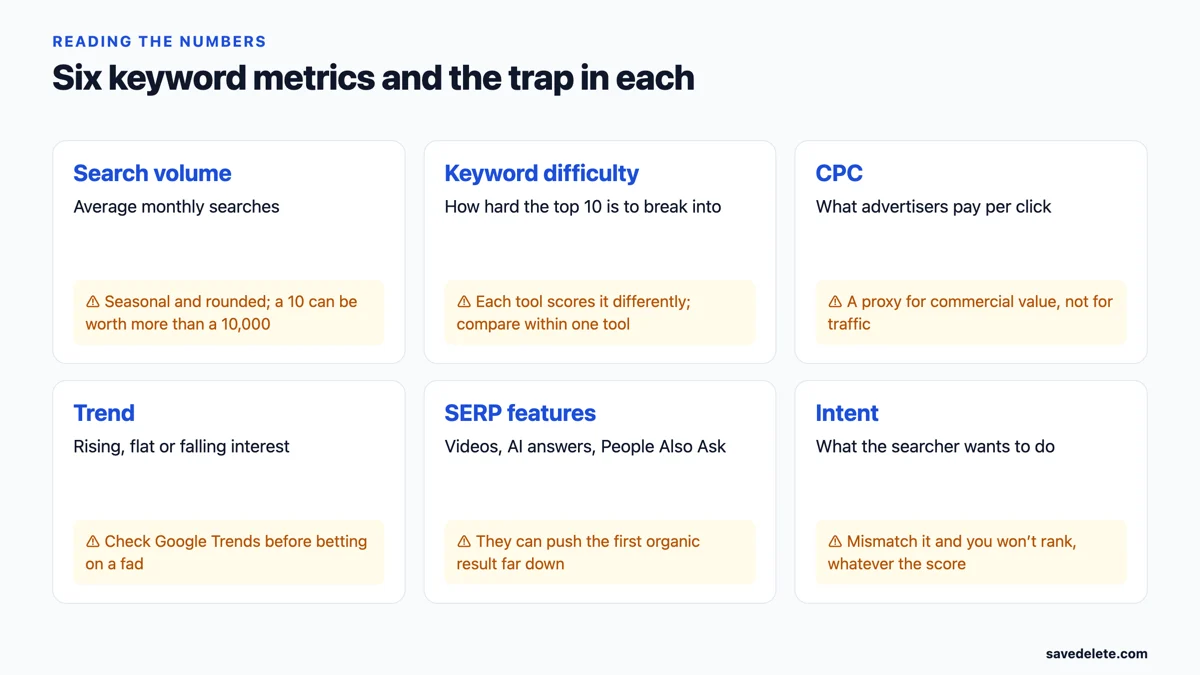
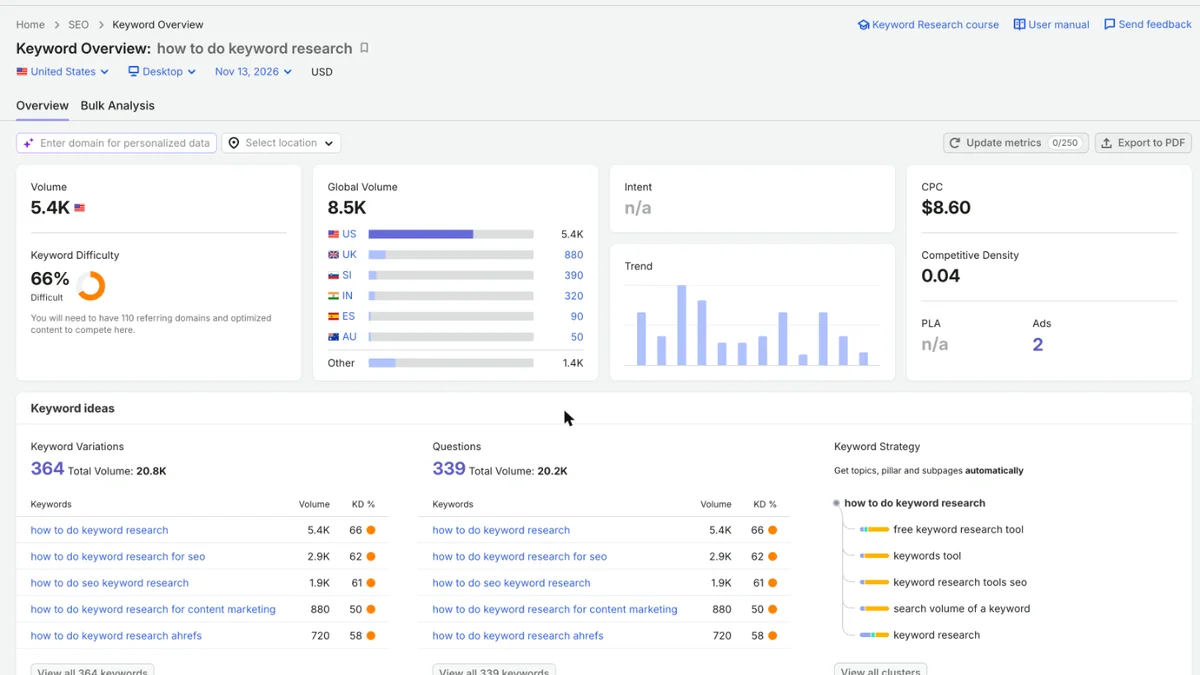
Here is what that looks like for a real keyword. “How to do keyword research” gets about 5,400 searches a month in the US and 8,500 worldwide, with a difficulty of 66%. Semrush adds that ranking would take roughly 110 referring domains plus well-optimised content, a useful reality check for a new site. The $8.60 cost per click tells you advertisers value the audience, even though the searcher is only trying to learn.
Difficulty scores are not comparable between tools, because each one calculates them differently; Semrush explains its own formula here. Pick one tool and compare keywords within it. Our guides to the best SEO tools and to Ahrefs alternatives compare the main options.
Step 4: Work Out the Search Intent
Search intent is what the searcher wants to do. It is the most important check in the whole process, because Google ranks the type of page that satisfies it. A how-to guide will not rank for a query where every result is a pricing page, however good the guide is.
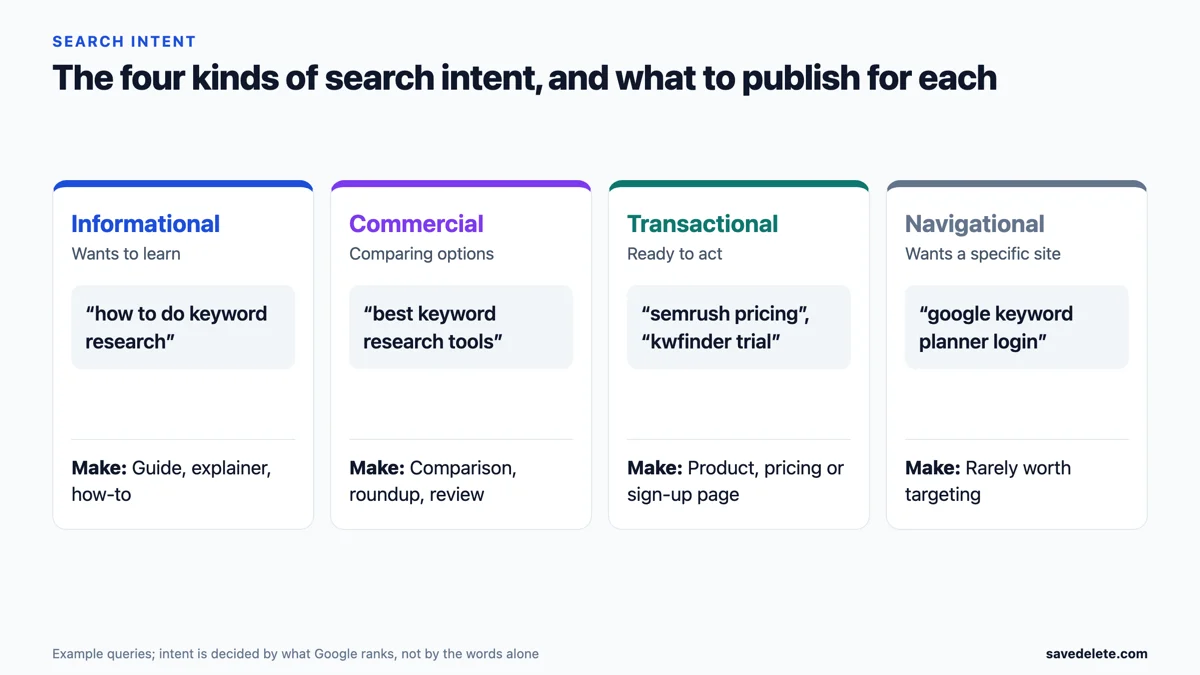
The reliable way to read intent is to search the keyword yourself, ideally in a private window, and look at the top ten. Are they guides, lists, product pages or videos? Are they recent? Is there a video carousel or an AI answer at the top? Search operators help here; our guide to Google search operators shows how to filter results by site, title and date.
Step 5: Size Up the Competition
Difficulty scores summarise the competition in one number; the results page shows you the detail. For each target keyword, look at:
- Who ranks. Big brands and specialist sites with many backlinks are hard to displace; forums, thin pages and small blogs are a sign of an opening.
- How fresh the pages are. A “2026” title on a page last edited years ago is a common weakness.
- Whether the content is accurate. Outdated facts, dead tools and missing sources are gaps you can fill; Google’s emphasis on experience and trust, covered in our E-E-A-T guide, rewards pages that do.
- Where you stand today. Our free Google rank checker shows whether your site already appears for a keyword.
Step 6: Prioritise the Keywords You Can Win
Now plot what you found. Keywords with decent volume and low difficulty are quick wins; high-volume, high-difficulty terms are long-term bets for when your site has more authority. Here are real keywords we checked this week, plotted the same way.
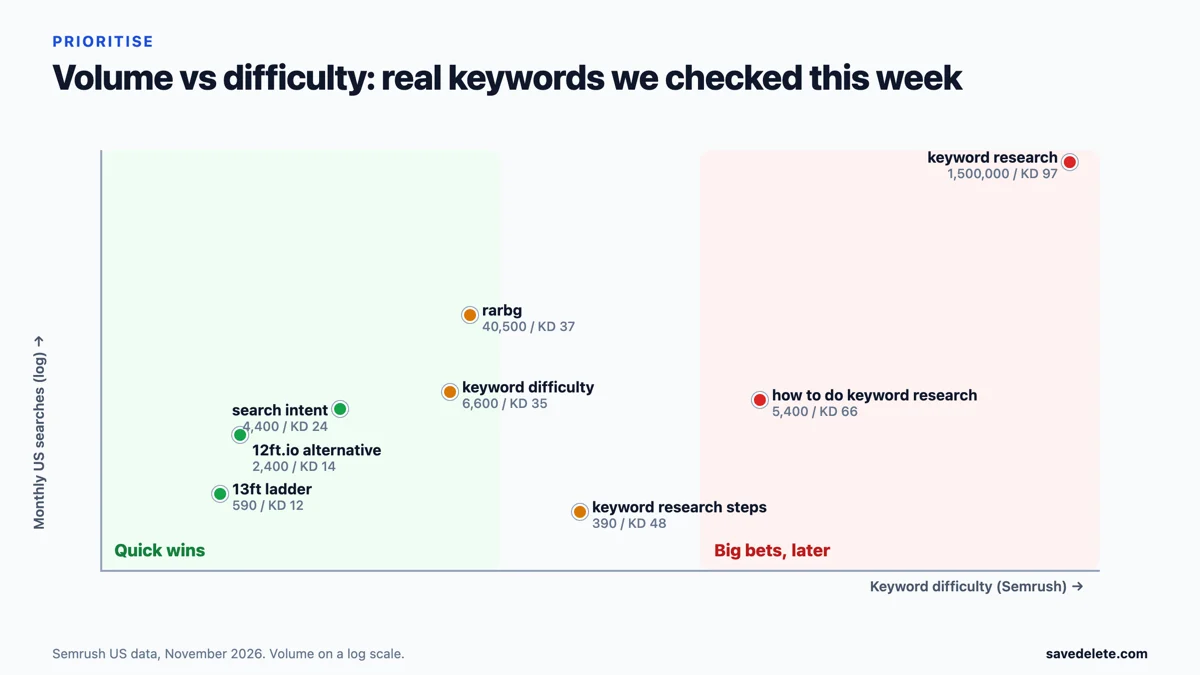
Notice how many good targets are long and specific. Ahrefs found that keywords with fewer than 10 searches a month make up almost 93% of its US keyword database. Individually small, together they are most of search, and they tend to be easier to rank for and clearer in intent. Our guide to long-tail keywords goes deeper.
Step 7: Map Keywords to Pages
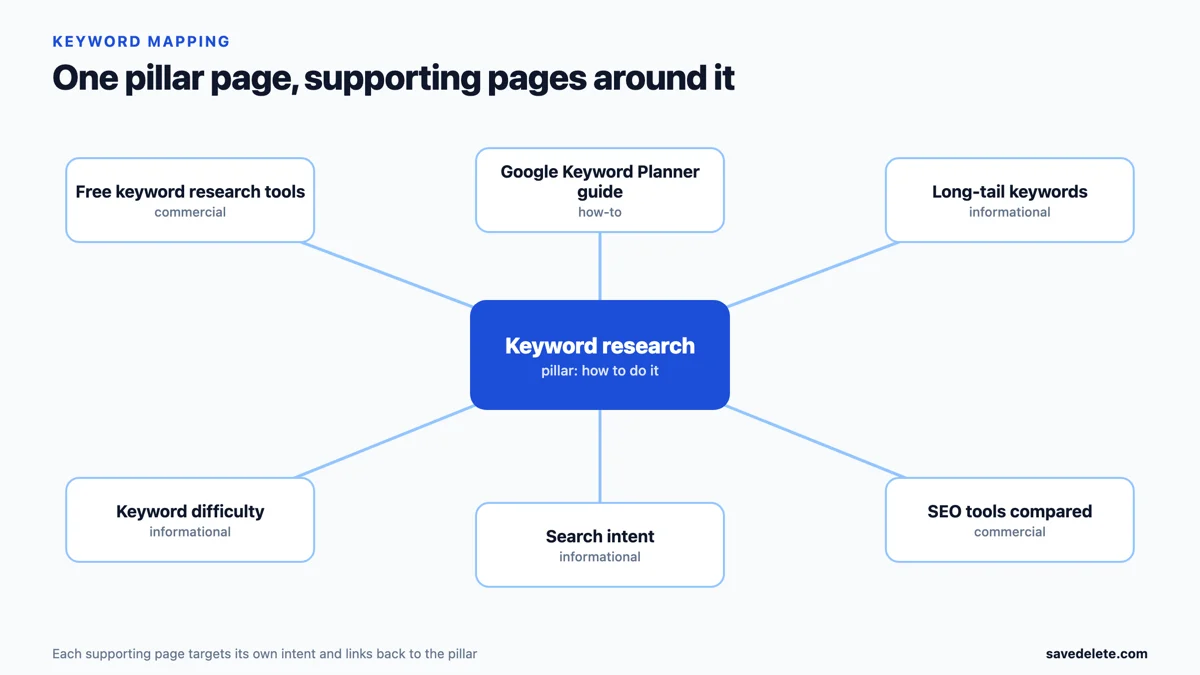
Give every page one main keyword and one intent, plus the close variations that mean the same thing. Group the remaining keywords into clusters: a broad pillar page linked to narrower supporting pages, each targeting its own query. That structure stops two of your pages competing for the same search, and it tells search engines how your content fits together.

Once a page is written, put the main keyword in the title, the first paragraph and a heading, and cover the questions from Step 2. Our on-page optimisation guide covers the details, and our free on-page SEO checker flags what a page is missing.
A Real Example: Researching Our 12ft Ladder Article
This week we were asked to write about “12 foot ladder alternative”, the replacements for the paywall tool 12ft.io, which went offline in July 2025. Here is how the seven steps played out.
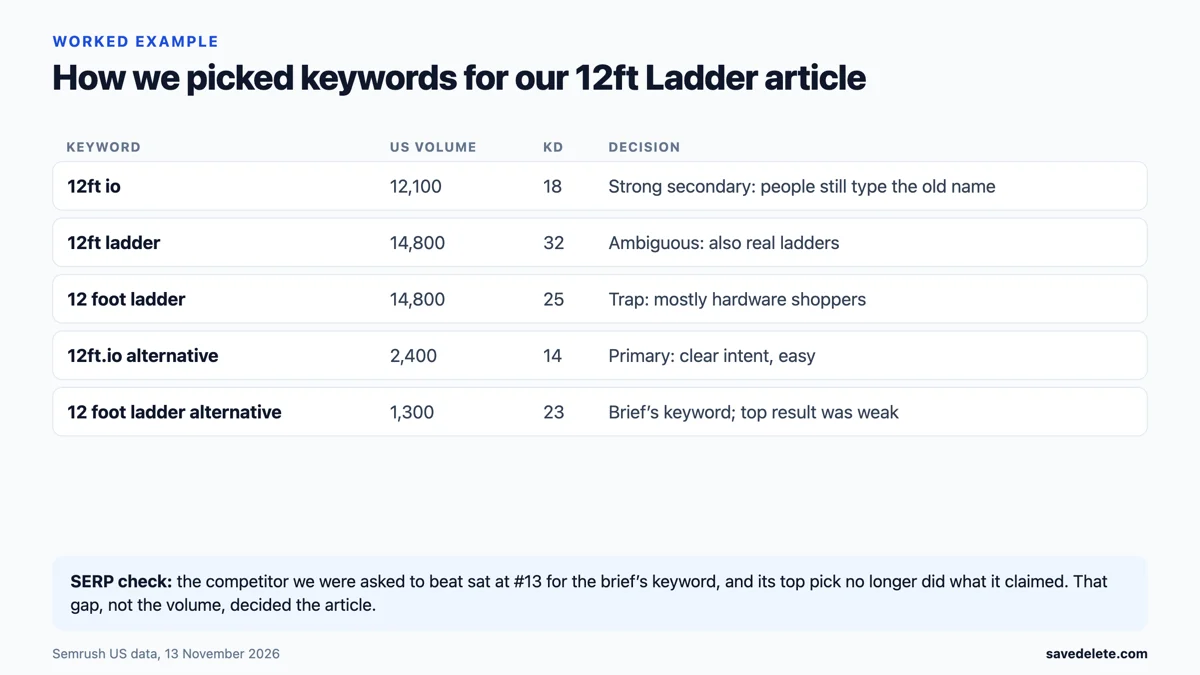
- Expanding the seed turned up the old brand name “12ft io” (12,100 searches, difficulty 18), which was larger than the brief’s keyword (1,300, difficulty 23).
- Reading intent caught a trap. “12 foot ladder” has 14,800 searches, but many of those people want an actual ladder. Targeting it would have attracted the wrong visitors, so we left it out of the title.
- Sizing up rivals was decisive. The page we were asked to beat ranked only 13th for the brief’s keyword, and its top recommendation, SMRY, had since stopped offering what the page described.
- Prioritising made “12ft.io alternative” (2,400 searches, difficulty 14) the primary target, with the old name and the brief’s phrase as secondary keywords.
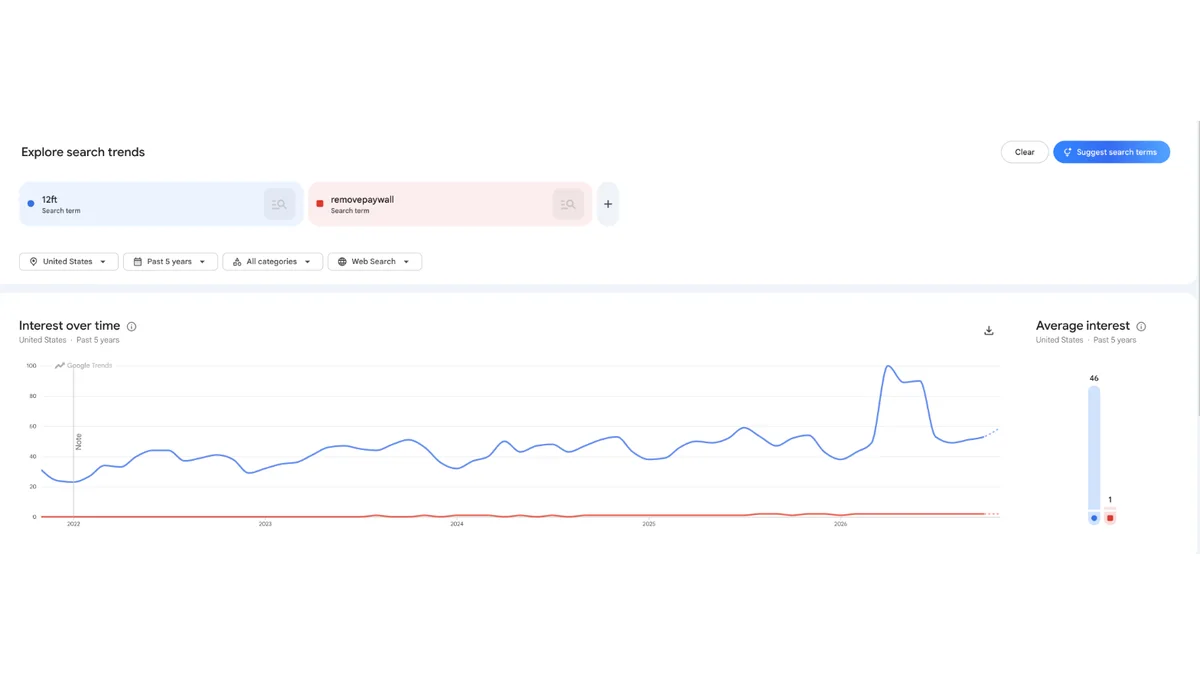
Google Trends added a final check. US interest in “12ft” didn’t collapse after the site went offline, partly because people kept looking for the tool and partly because of the word’s other meanings. That was one more reason to state the topic precisely in the title. The finished piece is our guide to 12ft Ladder alternatives. The same week, research for our RARBG explainer found 8,100 monthly searches for the typo “ragb”, a reminder that misspellings are keywords too.
Keyword Research for YouTube, Amazon and Local Search
The autocomplete box in Step 2 suggested “keyword research for youtube” and “for amazon” first, and for good reason: the method changes slightly on each platform, because each one has its own search engine.
YouTube
YouTube is the second place many people search, and its suggestions differ from Google’s. Type a seed into YouTube’s own search bar and note the autocomplete phrases, then look at the titles, view counts and upload dates of the top videos. Also check Google: when a keyword shows a video carousel on Google’s results page, a video can win traffic from both places. Use the main keyword in the title, the first lines of the description and the spoken script, since YouTube can read captions.
Amazon and other marketplaces
Shoppers on Amazon search with buying intent, so phrases are short and product-led: brand, model, size, colour, “for” a use. Amazon’s autocomplete is the best free source, and the filters on a results page reveal which attributes people care about. Put the most important terms early in the product title, because the title carries the most weight and is cut off on mobile.
Local businesses
Local searches add a place or a “near me”: “emergency plumber in Austin”, “dentist near me open Saturday”. Many local searches never include a city at all, because Google infers it from location, so the Google Business Profile and its categories matter as much as the website. Research neighbourhood names, service variations and the questions customers ask on the phone.
How to Tell Whether Your Keyword Research Worked
Keyword research is a prediction, so check it. Give a new page six to twelve weeks, then look in Google Search Console at the page’s queries, impressions, average position and clicks.
- Impressions for your target keyword, rising position: the choice was right; improve the page and add internal links to it.
- Impressions for different queries than you targeted: Google has decided what the page is about. Either refocus the page or adopt the better keyword.
- Position between 8 and 20 with few clicks: the page is close. Better titles, fresher facts and a few more links often move it onto page one.
- No impressions at all: check that the page is indexed before blaming the keyword.
This is also how you find your next targets: the queries a page ranks for by accident are often the cheapest keywords to win on purpose.
Free vs Paid Keyword Research Tools
You can do every step for free. Paid tools mainly save time and add difficulty scores, competitor data and bigger keyword databases.
| Tool | Cost | Best for | Limit |
|---|---|---|---|
| Google autocomplete and People Also Ask | Free | Real phrasing and questions | No volumes; varies by location |
| Google Keyword Planner | Free with a Google Ads account | Volume ranges straight from Google | Built for advertisers; ranges, not exact counts |
| Google Search Console | Free | Queries you already show up for | Only your own site |
| Google Trends | Free | Seasonality and rising topics | Relative interest only |
| AnswerThePublic | Limited free searches | Question-style keyword ideas | Few free searches a day |
| Ahrefs Keyword Generator | Free version | Quick ideas with difficulty | Shows a limited number of results |
| Semrush, Ahrefs, other suites | Paid, with free tiers or trials | Difficulty, competitor gaps, SERP history | Cost; scores differ between tools |
If you use AI tools to draft content once the research is done, keep the keyword decisions human; our look at a free AI writing assistant for SEO content explains where that line sits.
Common Keyword Research Mistakes
- Chasing volume. A 1.5-million-search head term you can’t rank for is worth less than a 300-search phrase you can.
- Skipping the results page. The numbers never show intent or how weak the current top ten really is.
- Ignoring ambiguity. “12 foot ladder” means a paywall tool to some searchers and a hardware purchase to many others.
- Comparing difficulty across tools. A 40 in one tool is not a 40 in another.
- Targeting one keyword with several pages. Your own pages end up competing; map one main keyword per page.
- Treating research as one-off. Re-check volumes, rankings and Search Console queries every few months.
Frequently Asked Questions
What is keyword research in SEO?
Keyword research is finding the search terms your audience uses, measuring their volume and competition, and deciding which terms each page on your site should target so it can rank and attract the right visitors.
How do I do keyword research for free?
Use Google autocomplete, People Also Ask and related searches for ideas, Google Keyword Planner for volume ranges, Google Trends for seasonality and Google Search Console for queries your site already appears for. Free versions of keyword tools add difficulty scores.
What is a good keyword difficulty score?
For a new or small site, aim for keywords at the low end of your tool’s scale, roughly below 30 in Semrush, and build up from there. Scores differ between tools, so compare keywords within one tool only.
How many keywords should one page target?
One main keyword and one search intent per page, plus close variations and related questions. If two keywords need different types of page, they belong on different pages.
What are long-tail keywords?
Long-tail keywords are longer, more specific searches with lower volume, such as “keyword research for youtube”. They are usually easier to rank for and make up the large majority of all searches.
What is search intent?
Search intent is the goal behind a query: to learn, to compare options, to buy or to reach a specific site. Google ranks the type of page that matches it, so check the current results before choosing a keyword.
Is Google Keyword Planner enough for keyword research?
It is a good free start for volume ranges and ideas, but it shows ranges rather than exact numbers and no SEO difficulty. Pair it with a look at the results page and a free difficulty checker.
How often should I do keyword research?
Do it before creating any new page, and review your main keywords every few months. Volumes, competitors and search results change, and Search Console will show new queries your pages start to appear for.