Seedance 2.5 Video Extension: Fit a Short Clip into a Finished Edit
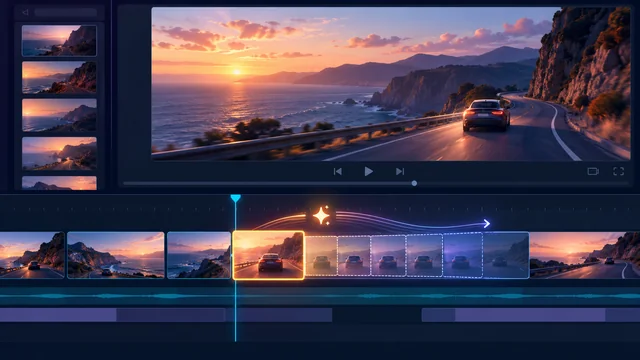
The voiceover continues for two seconds after the useful picture ends. Stretching the clip makes the movement look strange, and repeating it creates an obvious jump. Before extending anything, identify what the edit actually needs during that gap.
Within a Seedance 2.5 video workflow, extension may help continue a suitable source where the service you use supports it. It is one option alongside another take, regeneration, external matching, or a deliberate cut. The right remedy depends on the action and the viewer's need.
Define the missing visual job
Watch the sequence with its sound and mark the exact gap. Is the audience waiting for a spoken explanation, a title, or an action to finish? Decide what must remain visible while that happens.
For a hypothetical scene showing a curtain settling beside a window, the gap might need a quiet hold after the main movement. That is different from needing the curtain to continue opening. One preserves a resting state; the other asks for new action.
Write the desired continuation plainly. For the quiet hold, an illustrative brief could be: “The curtain finishes settling and hangs almost still, with only slight movement at its lower edge. Preserve the existing camera position, window shape, fabric pattern, and sunlight direction; introduce no new objects or actions.” A continuation in which the curtain keeps opening would serve a different visual job. Adapt the brief to the current service's supported extension controls, and review the result rather than assuming every detail will remain fixed.
Sometimes the voiceover itself contains unnecessary wording. A concise script revision may solve the problem more cleanly than adding picture. Confirm the meaning before cutting speech, especially when the missing seconds contain a necessary qualification.
Check whether extension is available and appropriate
Review the current tool's modes, input requirements, and limits. Do not assume that every interface offering Seedance 2.5 exposes the same extension controls or accepts every source clip.
A Seedance 2.5 video workflow can include extension where the current service supports it. Treat the requested continuation as a candidate rather than a guarantee of uninterrupted motion or exact additional timing.
Use an authorized source and preserve the original. Choose a clip whose final state is understandable: a clear subject, stable framing, and an action that can plausibly continue or settle. A source ending during a complicated interaction may create more unresolved details.
If the footage demonstrates real product performance or documents an event, generated continuation cannot be treated as further recorded evidence. Use an honest illustrative role or obtain additional real footage.
Review the original and extended segment together
Watch the full joined result at normal speed. Then inspect the transition and the entire added segment more closely. A clean first extended frame does not prove that later frames remain coherent.
Check subject position, object shape, background geometry, motion direction, and camera behavior. Look for a hand gaining an extra finger, a curtain changing pattern, or the window frame shifting while the camera supposedly holds still.
Listen with the intended audio too. The extended image must support the time needed by the edit. It should not introduce a distracting action while the viewer is trying to read a title or understand a line.
AI video extension is useful only when the extra material remains acceptable for its intended role. Keep the strongest usable portion; you do not need to retain the entire generated continuation.
Distinguish color mismatch from changes in the scene
A color difference might involve exposure, white balance, saturation, or contrast. If the curtain and window remain coherent but the added segment looks slightly cooler or darker, careful external color matching may help. External AI video editing tools can sometimes bring neighboring segments closer with these adjustments; replay the sequence to check the correction.
A lighting change is more complex. A shadow moving to another wall or a highlight appearing from a new direction changes the scene's illumination. In the curtain example, sunlight switching to the opposite side of the window calls for another take or candidate, rather than a simple white-balance adjustment. Color correction does not restore the original light source.
Geometry and content changes are different again. A bent window, a new object on the sill, or altered fabric structure cannot be fixed merely by warming the image. If the curtain pattern changes or the window frame bends during the added segment, reject that portion and compare another candidate or a deliberate cut. Identify the problem accurately before spending time on matching.
Compare the join and later frames with the accepted original. Subtle differences may become more noticeable once the sequence is played repeatedly, especially in a quiet hold with little other movement.
Choose the least disruptive remedy
Use external matching when the action and geometry remain sound and the difference is mainly tonal. Adjust locally, then replay the full sequence; a correction that helps one frame may make another worse.
Choose another take when suitable material already exists. A real alternate angle can fill the gap while giving viewers useful information. Regenerate when the continuation repeatedly introduces content or motion that the scene cannot support.
A deliberate cut is often a practical option. Cut to a relevant detail, a clearly illustrative insert, or an approved title card if that serves the sequence. Make the transition intentional instead of trying to hide every change behind a dissolve.
A freeze or speed adjustment can suit some shots, but inspect the effect carefully. Frozen particles, unnaturally slowed gestures, and interrupted camera movement can expose the workaround.
Verify the finished edit rather than the extension alone
Place the chosen remedy in the external timeline and review the complete passage. Confirm that the gap is filled, the necessary speech or text has enough time, and the sequence still feels purposeful.
Export the file and replay it on the intended screen. Check the join, sound, frame boundaries, and any newly visible artifacts. Keep the original source and the accepted replacement labeled separately.
The practical test for extend video AI is whether the finished edit becomes clearer without introducing misleading or distracting material. Extra seconds are valuable only when they do the job the sequence needs.