Folx Review 2026: The Best Download Manager for Mac?
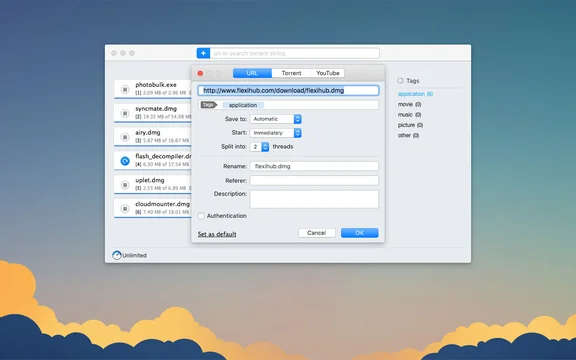
Mac's built-in downloading is basic, and that's where Folx shines. It's a dedicated download manager (and torrent client) built specifically for macOS. Here's our updated 2026 Folx review.
What Is Folx?
Folx is a native macOS download manager that accelerates downloads by splitting them into threads, lets you pause and resume, organizes files automatically, and includes a built-in torrent client.
Key Features
- Faster downloads via multi-threaded splitting.
- Pause, resume, and schedule downloads, even overnight.
- Built-in torrent client for managing torrents in one app.
- Smart organization with tags and auto-sorting.
- Browser integration to capture downloads automatically.
Is Folx Worth It in 2026?
For Mac users who download frequently - large files, media, or torrents - Folx is a genuinely useful upgrade over the browser's basic downloader, with a free version and a Pro tier for advanced features. Casual downloaders may not need it. For more Mac tools, see our guides to the best Mac apps and must-have Mac apps.
Frequently Asked Questions
Is Folx good in 2026?
Yes. Folx remains one of the best download managers for macOS, with multi-threaded acceleration, scheduling, smart organization, and a built-in torrent client.
Is Folx free?
Folx has a free version with core download-management features, plus a Pro tier that adds faster splitting, scheduling, and advanced organization.
Does Folx support torrents?
Yes. Folx includes a built-in torrent client, so you can manage regular downloads and torrents together in one native Mac app.