X-VPN Protocol Review 2026: How Clear Is Its Protocol Selection?
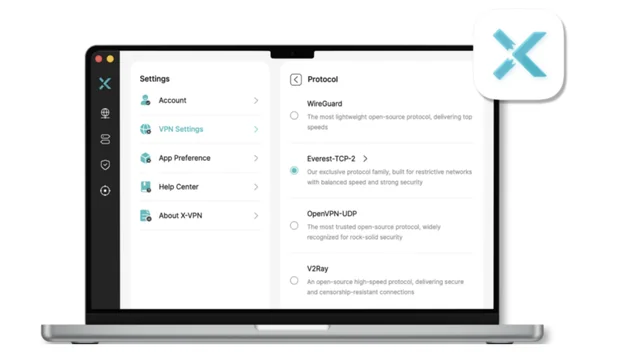
VPN protocols affect how a service balances speed, stability, security, and reliability across different network conditions.
Users who want more control should be able to see which connection methods are available and choose between them without having to interpret vague labels.
For this review, we focused specifically on X-VPN’s protocol setup.
We checked whether its desktop and mobile apps identify protocols by name, how easy the settings are to find, and whether both free and premium users can make a manual selection.
X-VPN currently combines established open-source options, including WireGuard and OpenVPN, with Everest, its in-house protocol.
The important question is not simply how many protocols it offers, but whether users can understand what they are selecting and choose an option that fits their needs.
How We Tested X-VPN’s Protocol Options
We tested X-VPN across its Windows, macOS, iOS, and Android apps. Where applicable, we checked the protocol menu in both the free and premium versions to determine whether protocol visibility and manual selection were limited by subscription status.
On each platform, we looked at four areas:
-
where the protocol settings were located;
-
whether the available protocols were displayed by name;
-
whether users could manually select an option;
-
whether Everest included an Auto mode for users who preferred not to choose a connection mode manually.
|
Platform |
Plan tested |
Protocol setting location |
Protocols displayed |
Manual selection |
Auto mode |
Notes |
|
Windows |
Free and Premium |
Settings → VPN Settings → Protocol |
Everest, WireGuard, OpenVPN-UDP |
Yes |
Yes, within Everest |
Everest TLS-3 (Premium only) |
|
macOS |
Free and Premium |
Settings → VPN Settings → Protocol |
Everest, WireGuard, OpenVPN-UDP, V2Ray |
Yes |
Yes, within Everest |
Everest TLS-3 (Premium only) |
|
iOS |
Free and Premium |
Me → VPN Settings → Protocol |
Everest, WireGuard, OpenVPN-UDP |
Yes |
Yes, within Everest |
Everest TLS-3 (Premium only) |
|
Android |
Free and Premium |
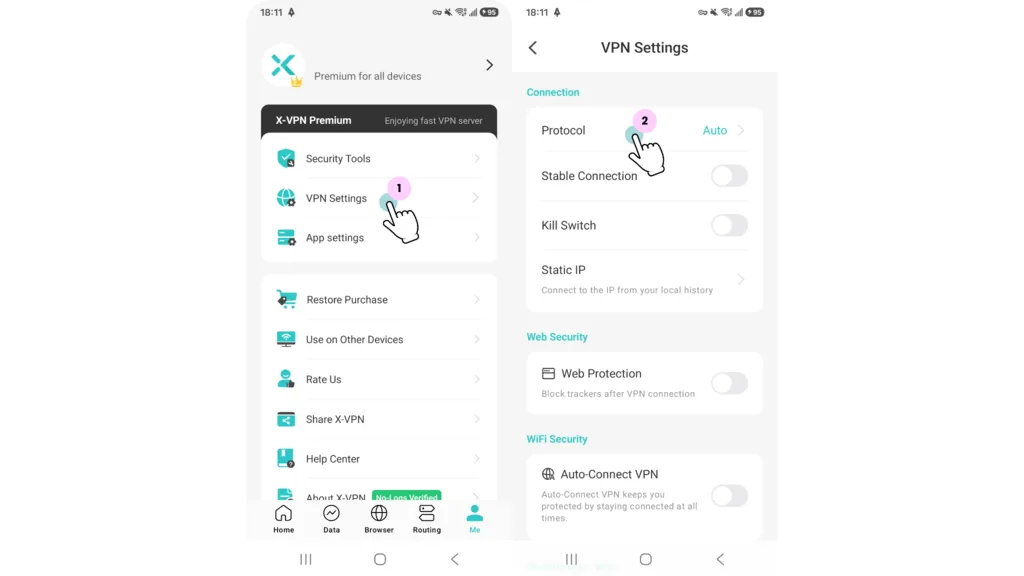
Me → VPN Settings → Protocol |
Everest, WireGuard, OpenVPN-UDP, V2Ray |
Yes |
Yes, within Everest |
Everest TLS-3 (Premium only) |
We assessed whether each client clearly identified the options it did provide and allowed users to make an informed choice.
Protocol Names Are Clearly Displayed
Across the Windows, macOS, iOS, and Android apps we tested, X-VPN displayed its available protocols by name on both the free and premium plans. The protocol menu identifies options such as WireGuard, OpenVPN, and Everest directly. Users can therefore see which connection method they are selecting rather than choosing from unexplained labels.
Windows
Free
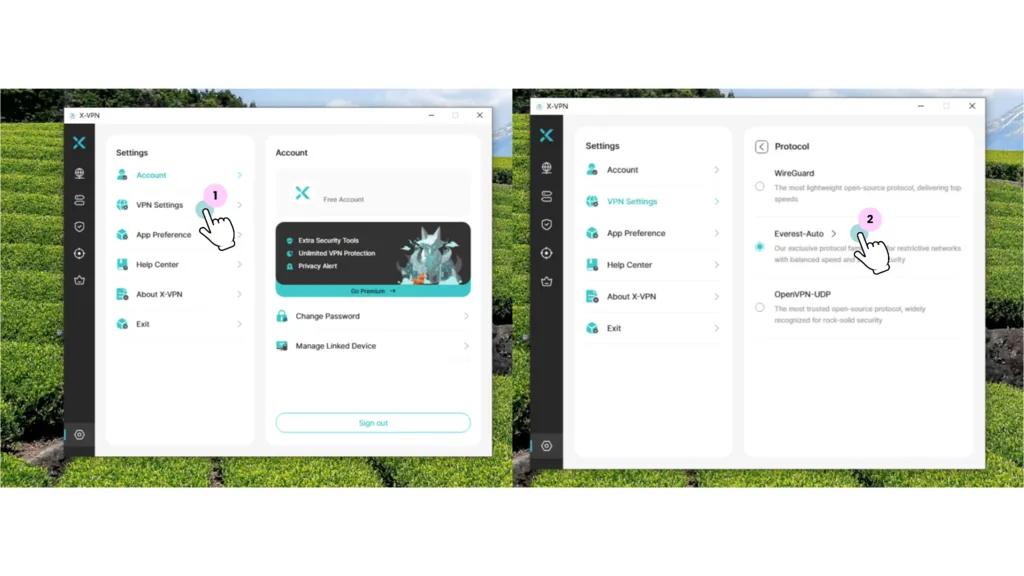
Protocol selection in the free X-VPN app for Windows
On Windows, free users can access the protocol menu through Settings → VPN Settings → Protocol. The main screen displays WireGuard, Everest, and OpenVPN-UDP by name, with a short description explaining the intended role of each option.
Opening Everest provides the same detailed selection available on macOS, including Auto, UDP, TLS, TCP, HTTP, and QUIC. Users can leave Everest on Auto or manually select a mode based on their network conditions.
Most Everest modes are included with the free version. TLS-3 is still shown in the menu but requires Premium, so the restriction is visible before the user tries to select it.
Premium
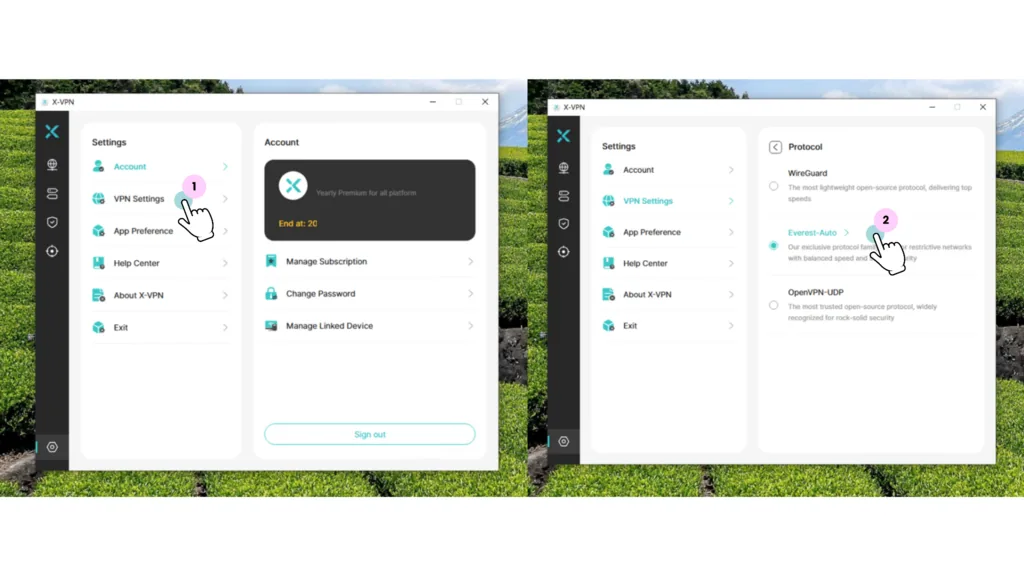
Protocol selection in the X-VPN Premium app for Windows
The Windows Premium app follows the same navigation path and presents the same three main options: WireGuard, Everest, and OpenVPN-UDP. Protocol names and descriptions remain visible, and users can manually choose between the open-source options and X-VPN’s own protocol.
Premium also unlocks TLS-3 within the Everest menu. Apart from that addition, the protocol layout and selection process are consistent with the free Windows app.
macOS
Free
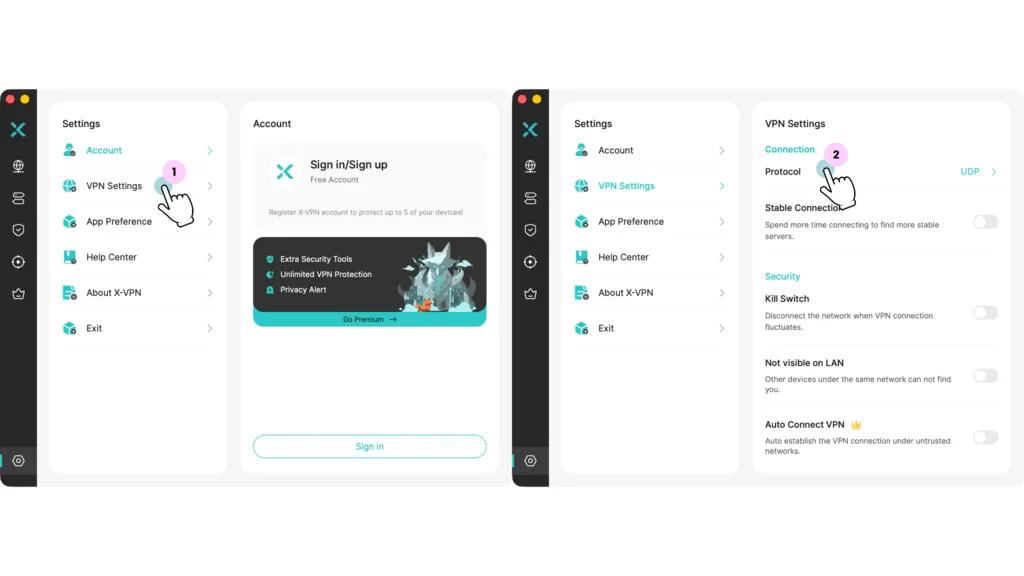
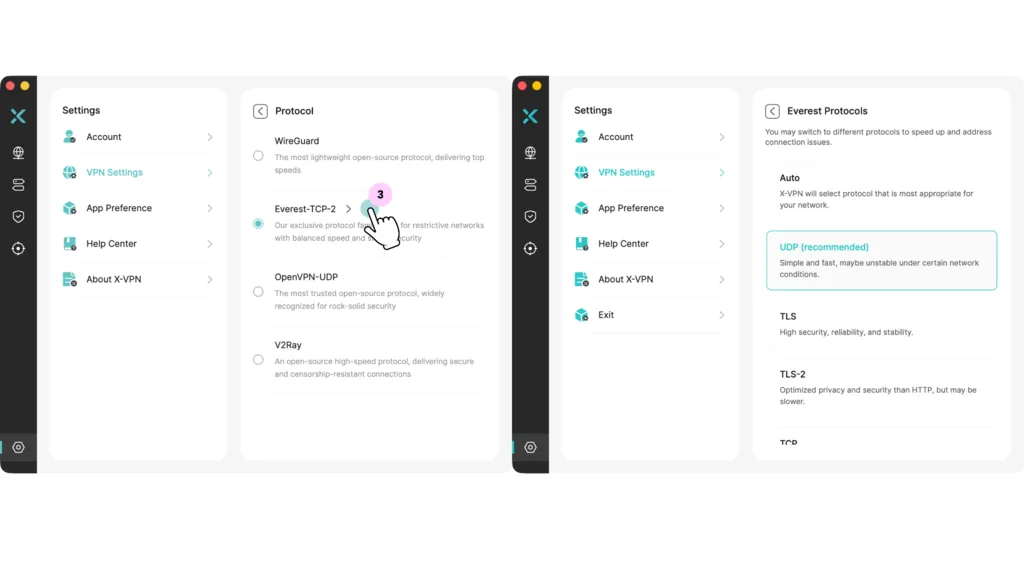
Protocol selection in the free X-VPN app for macOS
On macOS, free users can find the protocol menu under Settings → VPN Settings → Protocol. The main selection screen clearly lists WireGuard, Everest, V2Ray, and OpenVPN-UDP, with a short description beneath each option explaining its intended use.
Selecting Everest opens a more detailed menu with Auto, UDP, TLS, TCP, HTTP, and QUIC. Most of these modes are available on the free plan, while TLS-3 remains visible but requires Premium.
The free app therefore provides both familiar open-source choices and X-VPN’s own Everest option without hiding them behind generic labels. Users can leave Everest on Auto or manually choose a specific mode based on speed, stability, privacy, or network conditions.
Premium
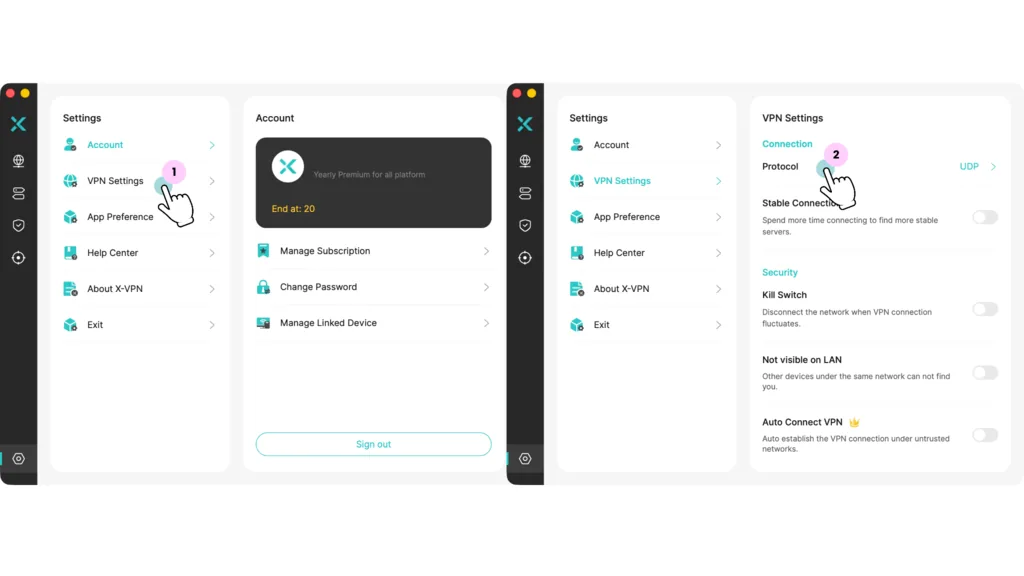
Protocol selection in the X-VPN Premium app for macOS
The Premium macOS app follows the same path and uses the same clearly labeled layout. Users can choose between WireGuard, Everest, V2Ray, and OpenVPN-UDP, then open Everest to access its more detailed connection modes.
The key difference is that TLS-3 is unlocked for Premium users. Apart from this additional Everest mode, the protocol names, descriptions, and manual selection process remain consistent with the free version.
iOS
Free
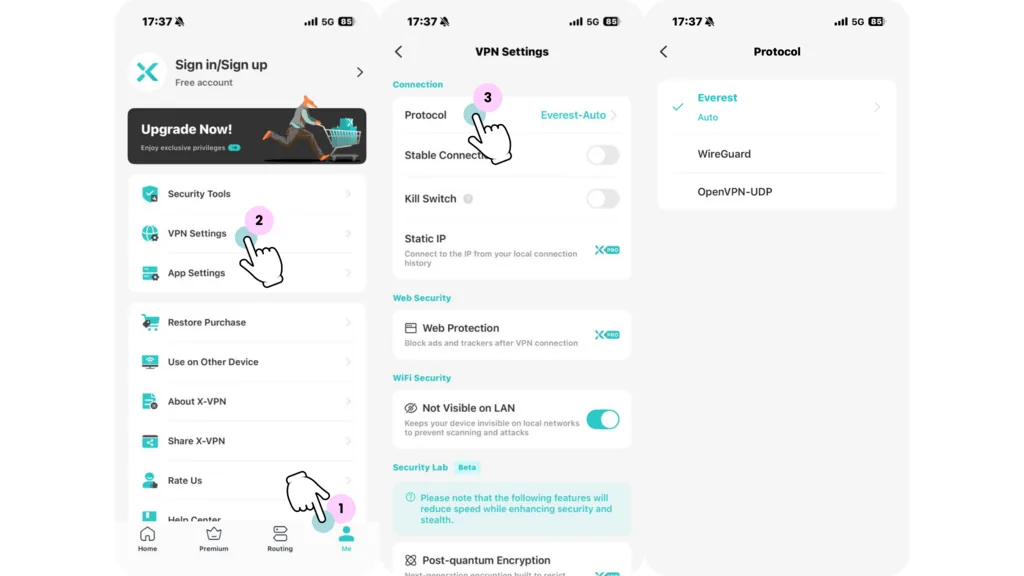
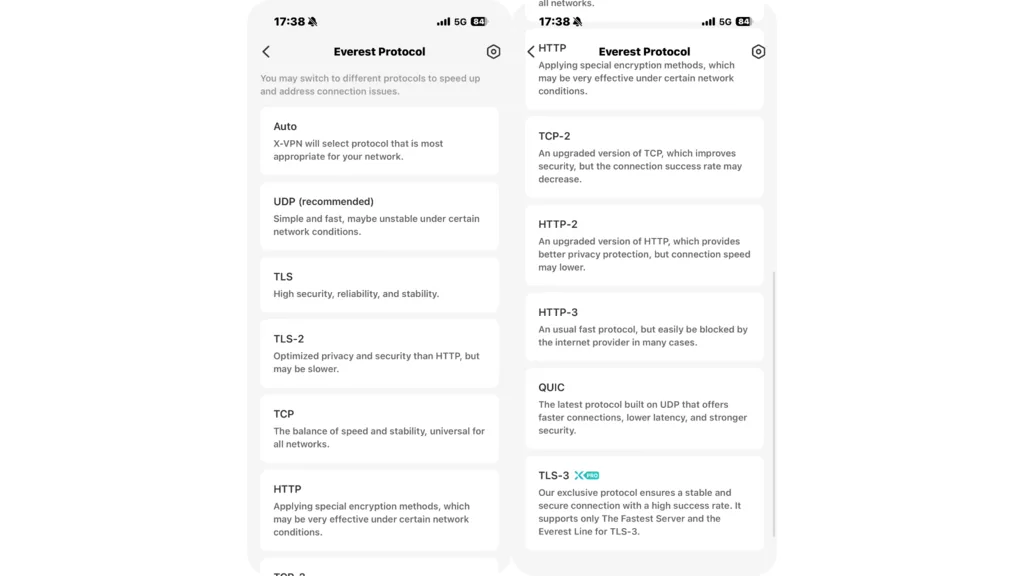
iOS free protocol menu
The free iOS app uses the same protocol menu as the Premium version, located under Me → VPN Settings → Protocol. It clearly lists Everest, WireGuard, and OpenVPN-UDP, and users can select any of these main protocol options manually.
Everest also opens a more detailed menu with Auto, UDP, TLS, TCP, HTTP, and QUIC. Each option includes a short explanation of its intended balance of speed, stability, privacy, or compatibility, which makes the menu easier to understand without requiring users to know the technical differences in advance.
Most Everest modes are available on the free plan. The exception is TLS-3, which remains visible but is marked as a Premium feature. This makes the limitation clear rather than removing the option from view entirely.
Premium
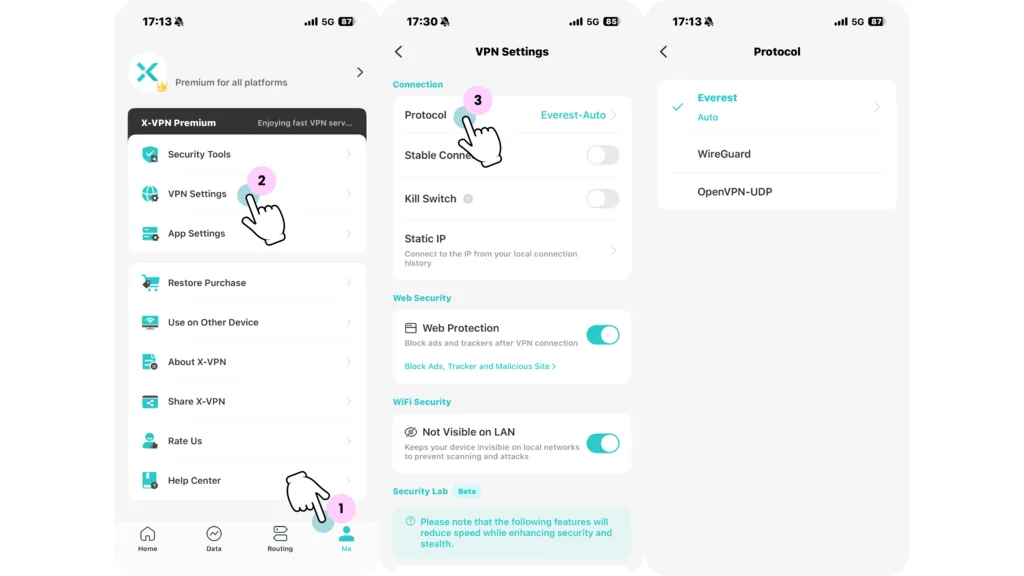
X-VPN Premium clearly lists Everest, WireGuard, and OpenVPN-UDP in its iOS protocol menu
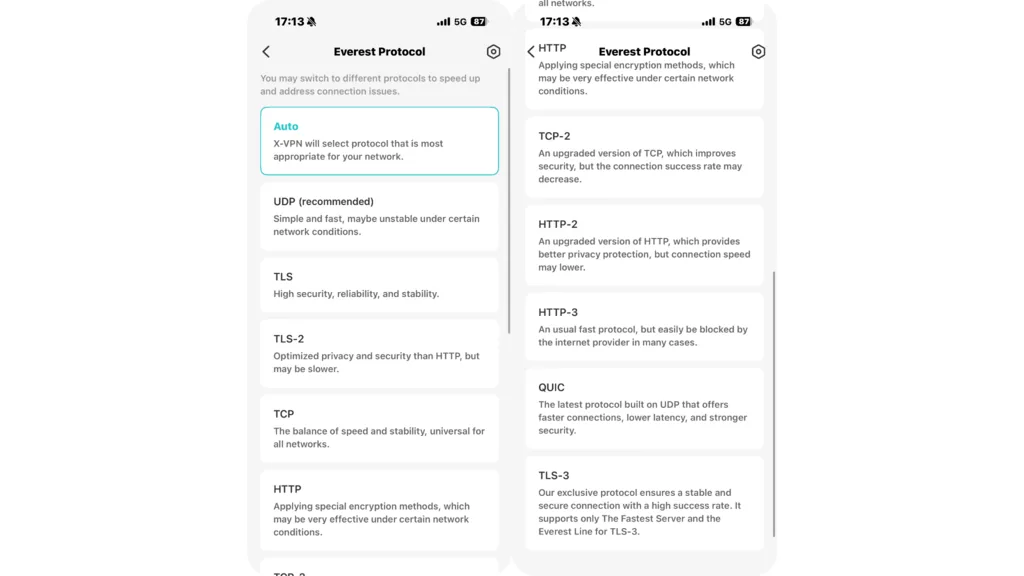
Everest includes an Auto setting and several manually selectable transport modes, each accompanied by a brief description
On iOS, Premium users can find the protocol menu under Me → VPN Settings → Protocol. The main selection screen clearly identifies three protocol options: Everest, WireGuard, and OpenVPN-UDP, allowing users to choose between X-VPN’s in-house protocol and two established open-source alternatives.
Selecting Everest opens a second menu with more granular connection modes. These include Auto, UDP, TLS, TCP, HTTP, and QUIC. Rather than presenting these as unexplained labels, the app adds a short description of how each option is intended to behave. For example, UDP is recommended for speed, TLS emphasizes security and stability, and TCP is positioned as a balance between speed and reliability.
The layout gives less technical users the option to leave Everest on Auto, while users with specific network requirements can choose a transport mode manually. Those who prefer a familiar open-source protocol can select WireGuard or OpenVPN-UDP directly from the main protocol menu.
Android
Free
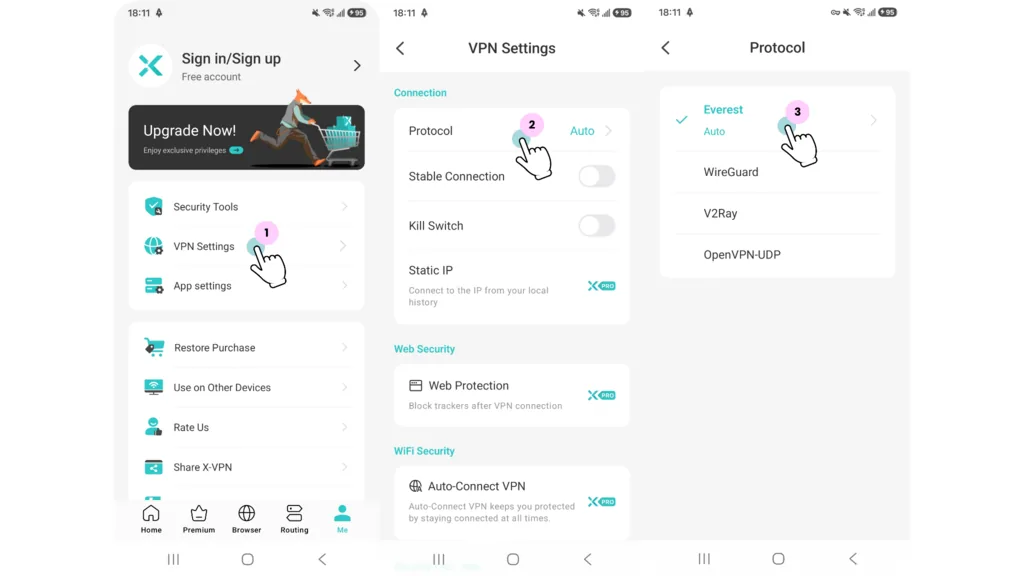
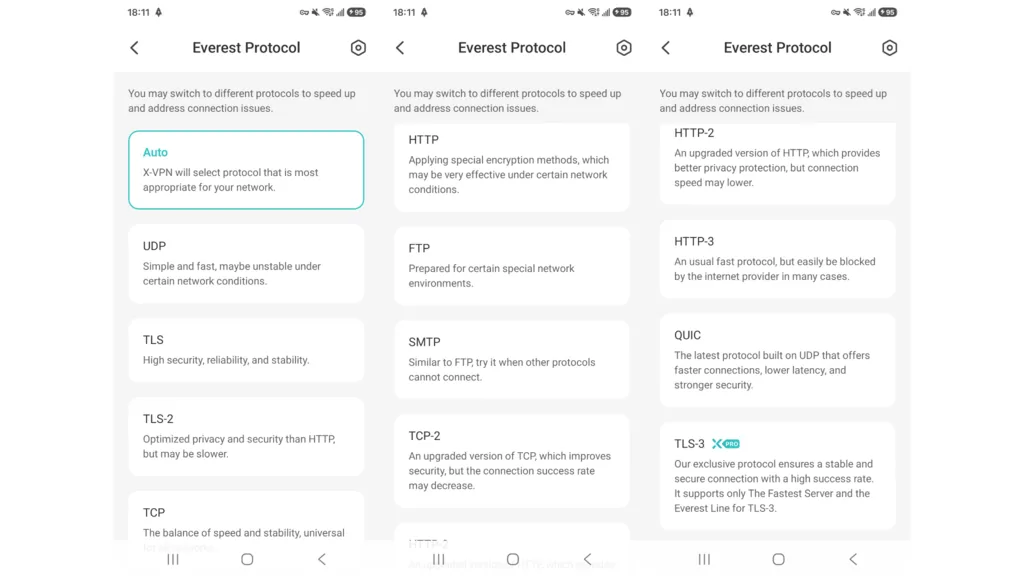
Protocol selection in the free X-VPN app for Android
On Android, free users can access protocol selection through Me → VPN Settings → Protocol. The main menu clearly lists Everest, WireGuard, V2Ray, and OpenVPN-UDP.
Opening Everest reveals a more detailed set of connection modes: Auto, UDP, TLS, TCP, HTTP, FTP, SMTP, and QUIC. Each mode includes a short description of its intended performance or use under different network conditions.
Most Everest modes can be selected on the free plan. TLS-3 remains visible but is marked as a Premium-only option, so users can clearly see both the protocol name and the subscription restriction.
Premium
Protocol selection in the X-VPN Premium app for Android
The Android Premium app uses the same navigation path and presents the same four main choices: Everest, WireGuard, V2Ray, and OpenVPN-UDP. Users can choose any of them manually or leave Everest set to Auto.
Premium unlocks TLS-3 within the Everest menu. Otherwise, the protocol names, descriptions, and selection process remain consistent with the free Android app.
What Each X-VPN Protocol Is Designed For
X-VPN’s protocol menu combines familiar open-source options with its own Everest protocol. The best choice depends on whether the priority is speed, compatibility, or reliability under more restrictive network conditions.
WireGuard
WireGuard is the most straightforward choice for everyday use. It is open source, lightweight, and generally designed to deliver fast connections with relatively low overhead. It is a sensible default for browsing, streaming, and mobile use.
OpenVPN
OpenVPN is a mature, widely used open-source protocol with a long security track record. X-VPN offers it as OpenVPN-UDP, which typically favors speed while retaining the compatibility and established design associated with OpenVPN.
Everest
Everest is X-VPN’s in-house protocol, positioned for networks where standard VPN connections may be unstable or easier to detect. It includes several selectable modes, such as UDP, TCP, TLS, HTTP, and QUIC, allowing users to adjust the connection for different network conditions.
V2Ray
V2Ray appears as a separate option on supported platforms, including macOS and Android. It is designed for connections that need both speed and greater resilience under restricted network conditions. Its availability varies by operating system, so it does not appear in every X-VPN app.
Transparency Limitations
X-VPN’s protocol selection is clearly labeled, but the available lineup is not identical across every platform. V2Ray appears as a separate option on macOS and Android, while the Windows and iOS apps offer WireGuard, OpenVPN-UDP, and Everest. Some of the descriptions are also fairly brief, so less experienced users may still prefer Auto mode.
X-VPN’s completed no-logs audit should also be viewed separately from its protocol technology. The audit assesses the company’s data-handling practices and no-logs controls; it is not a cryptographic audit of WireGuard, OpenVPN, Everest, or V2Ray. If X-VPN commissions a dedicated audit of its protocol implementations in the future, it should publish the findings separately so users can clearly understand what was examined and what the independent review concluded.
Verdict
X-VPN performs well in user-facing protocol transparency. Across the Windows, macOS, iOS, and Android apps we tested, available protocols were identified by name rather than hidden behind vague labels. Both free and Premium users could manually choose between open-source options such as WireGuard and OpenVPN and X-VPN’s in-house Everest protocol.
The main limitation is that the available lineup varies by platform, with V2Ray currently appearing on macOS and Android but not Windows or iOS. Even so, X-VPN makes it clear what users are selecting and does not restrict basic protocol choice to paying customers.
FAQ
Which protocols does X-VPN support?
X-VPN supports WireGuard, OpenVPN-UDP, Everest, and V2Ray on supported platforms. Everest also includes several connection modes, such as UDP, TCP, TLS, HTTP, and QUIC.
Can free X-VPN users choose a protocol?
Yes. Free users can manually choose between the protocols available on their platform. Most choices are shared with Premium, although TLS-3 within Everest requires a paid subscription.
Should I use WireGuard, OpenVPN, or Everest?
WireGuard is generally the simplest choice for speed and everyday use. OpenVPN is a mature option with broad compatibility and a long security track record. Everest is designed for restrictive or unstable network conditions. Users who are unsure can leave Everest on Auto and let the app select a suitable mode.