Best Fan Control Software for Windows 11 in 2026: 9 Free and Paid Tools

Fan control software lets you set how fast your CPU, case and graphics card fans spin at each temperature, so your PC stays quiet when it's idle and cool when it's working hard. We checked every tool below on its maker's official site on November 19, 2026, including the current version and price.
Quick answer: for most desktop PCs, the free Fan Control is the best fan control software for Windows 11. Use MSI Afterburner for graphics card fans, Argus Monitor ($16.45 a year) if you want a paid all-in-one tool, and your motherboard's BIOS if you just want to set a curve once and forget it.
Our Picks at a Glance
| Software | Best for | Price | What it controls | Latest version |
|---|---|---|---|---|
| Fan Control | Best overall | Free (donations) | CPU, GPU and case fans, AIOs | V286 (Nov 17, 2026) |
| Argus Monitor | Best paid tool | $16.45 per year, 30-day free trial | CPU, GPU and AIO fans, some RGB | 7.4.03 |
| MSI Afterburner | Graphics card fans | Free | GPU fans (any brand) | 4.6.6 (Sep 2026) |
| NZXT CAM | NZXT hardware | Free, no account | NZXT fans, RGB and Kraken coolers | – |
| Corsair iCUE | Corsair hardware | Corsair's own app | Compatible Corsair devices | – |
| ASUS Armoury Crate | ASUS boards and laptops | ASUS's own app | FanXpert on ASUS motherboards | – |
| HWiNFO | Monitoring | Free for personal use; Pro from $29 | Monitoring | – |
| Libre Hardware Monitor | Open-source monitoring | Free (open source) | Monitoring | v0.9.6 (Feb 2026) |
| NoteBook FanControl | Laptops on Linux | Free (open source) | Laptop fans with a matching config | nbfc-linux 0.5.4 |
The 9 Best Fan Control Tools in 2026
1. Fan Control — Best Overall
Fan Control, made by Rémi Mercier (Rem0o on GitHub), is the tool most people should start with. It handles CPU, GPU and case fans, plus hardware such as AIO coolers, from one window, so you don't need a different app for each part. It has seven fan curve types, and its standout feature is mixing curves: for example, case fans can follow whichever is hotter, the CPU or the GPU. Tinkerers also get fan calibration, RPM avoid zones, hysteresis, and step-up and step-down settings, and plugins add more hardware.
- Price: free to download. You can support the developer through a PayPal donation.
- Open source? No. The project's README says "Sources for this software are closed"; GitHub hosts the releases, not the code.
- Works on: Windows 10 and Windows 11. The latest version is V286, released on November 17, 2026, and it can now start on boot as a service, before anyone signs in.
- Install: download it from its GitHub releases page or run
winget install Rem0o.FanControl. - Laptops: mostly no. Its FAQ says laptops don't expose their fans the way desktop motherboards do, unless a plugin adds support for a specific model.
Pros: free, very flexible, one app for all fans. Cons: closed source, no RGB control, little use on laptops.
2. Argus Monitor — Best Paid Fan Control Software
Argus Monitor is a polished all-in-one tool from Argotronic. It controls fans on motherboard headers, AIO coolers and external fan controllers, and can base a curve on any temperature source, including CPU, GPU, HDD/SSD, motherboard or AIO sensors. It can also control the RGB lighting of certain devices.
- Price: a fully working 30-day trial, then US $16.45 for a 1-year license or $35.95 for 3 years. A license covers two installations.
- No subscription: when your license period ends, you keep using every version released before it expired. You only pay again if you want newer versions.
- Works on: Windows 11 and Windows 10 22H2. The current version is 7.4.03.
Pros: one app for fans, temperatures and some RGB; no subscription. Cons: paid, and Windows only.
3. MSI Afterburner — Best for Graphics Card Fans
MSI Afterburner is the standard tool for graphics card fans. MSI says it's completely free and works with graphics cards from all brands, not just MSI's. Alongside custom GPU fan control, it handles overclocking and undervolting, live monitoring, and OC Scanner, which finds a stable overclock automatically.
- Price: free.
- Version: 4.6.6 (final) and 4.6.7 (beta), both released in September 2026.
- Download safely: MSI warns about phishing sites posing as Afterburner. The real downloads are only on msi.com and Guru3D.
Afterburner controls only the graphics card, so pair it with Fan Control or your BIOS for CPU and case fans.
4. NZXT CAM — Best for NZXT Hardware
NZXT CAM is free, with no account, no sign-in and no subscription. It monitors CPU, GPU, memory and storage on any Windows 10 or 11 PC. Fan control, RGB lighting and Kraken LCD settings unlock when you connect compatible NZXT hardware, so it's the right choice if your case fans or cooler are NZXT.
5. Corsair iCUE — Best for Corsair Hardware
Corsair iCUE runs Corsair's fans, AIO coolers and controllers. It lets you monitor system temperatures and set custom fan curves across all your compatible Corsair devices, along with lighting, mouse settings and macros. If most of your cooling is Corsair, use iCUE for it rather than mixing in another app for the same fans.
6. ASUS Armoury Crate — Best for ASUS Motherboards and Laptops
On ASUS motherboards, Armoury Crate handles fan control in Windows through its FanXpert feature, and it also has fan control for ASUS laptops and desktops. If you'd rather not run another app in the background, the same boards have Q-Fan Control in the BIOS (see below).
7. HWiNFO — Best for Monitoring
HWiNFO is the most detailed way to see what your fans and sensors are doing: temperatures, fan speeds (RPM), voltages and more. Use it to check that a fan curve is working, or to find which sensor is running hot. We list it for monitoring, so pair it with one of the fan control tools above.
- Price: free for personal and non-commercial use. Commercial use needs a Pro license, which starts at $29 for the first year (renewals from $14.50) or $199 for a lifetime license.
- Free-version limit: the free version switches off Shared Memory Support after 12 hours, which matters if another app reads HWiNFO's sensor data.
8. Libre Hardware Monitor — Best Open-Source Monitor
Libre Hardware Monitor is free and open-source software (MPL 2.0) that monitors temperature sensors, fan speeds, voltages, load and clock speeds. The current release is v0.9.6, from February 2026. Version 0.9.5 replaced the old WinRing0 driver with PawnIO, which matters for the Windows Defender warnings described below. Fan Control uses Libre Hardware Monitor as its main sensor source, so the two work well together.
9. NoteBook FanControl (NBFC) — Best for Laptops on Linux
NoteBook FanControl uses community-made config files to control laptop fans that normal desktop tools can't reach. The original Windows project hasn't had a release since version 1.6.3 in April 2019, so it may not support newer laptops. The actively maintained version is nbfc-linux, a C port for Linux whose latest release is 0.5.4. On a Windows laptop, start with your laptop maker's own app, such as Armoury Crate on ASUS laptops.
What Happened to SpeedFan?
SpeedFan was the classic free fan control tool for years, but its official site still offers version 4.52 and lists support up to Windows 10 and Windows Server 2012. It predates today's motherboards, so it may not detect the fans on a new PC. Fan Control is the modern replacement for desktop PCs.
How Much Does Fan Control Software Cost?
Most fan control software is free. The paid tools and their prices on November 19, 2026:
- Fan Control: free; you can donate to the developer through PayPal.
- Argus Monitor: $16.45 for 1 year or $35.95 for 3 years after a 30-day free trial, with no subscription.
- HWiNFO Pro: from $29 for the first year or $199 for a lifetime license. You only need it for commercial use or its extra features; the regular version is free for personal use.
- Free tools: MSI Afterburner, NZXT CAM, Libre Hardware Monitor and NBFC.
- Your BIOS: free, and it's already on your PC.
How to Control CPU Fan Speed
You can control your CPU fan in two places: your motherboard's BIOS (UEFI), or a Windows app like Fan Control.
In the BIOS: on an ASUS motherboard, for example, press Delete or F2 when the ASUS logo appears to open the UEFI BIOS. There, Q-Fan Control lets you set each fan header (CPU fan, chassis fans, pump) separately. The Standard, Silent, Turbo and Full Speed presets can't be edited, but Manual mode lets you drag the points of the fan curve yourself. Other makers use different names and keys for the same settings, so check your motherboard manual.
In Windows: install Fan Control, let it detect your fans, then give the CPU fan a curve based on the CPU temperature. Fan Control's FAQ suggests turning off any "smart" BIOS fan control and setting a fixed default speed, such as 50%, so the BIOS and the app don't fight over the fan.
PWM or DC? Set the header to match your fan: PWM for 4-pin fans and DC for 3-pin fans, as ASUS's BIOS guide explains.
Is Fan Control Software Safe?
Yes, if you download it from the official site and keep it updated. Two things to know:
- The WinRing0 driver warning. Many older hardware tools used a driver called WinRing0, which Windows Defender now flags. Fan Control's README says the WinRing0 driver in V237 and earlier is flagged as Trojan:Win32/Vigorf.A, which stops its sensors from being detected. V238 and later ship with the PawnIO driver instead, and Libre Hardware Monitor made the same switch in version 0.9.5. If your fan software suddenly can't see any sensors, update it.
- Fake download sites. MSI warns that phishing sites pose as MSI Afterburner to steal data. Download Afterburner only from msi.com or Guru3D, and other tools only from the links in this guide.
Can You Test a Laptop Fan Online?
No. A website can't read or control your fans, so an "online fan test" can't check your laptop's fan. Instead:
- Run your maker's built-in diagnostics. On a Dell, for example, Dell's fan troubleshooting guide says to restart, press F12 at the Dell logo, choose Diagnostics, then select Advanced Test, choose the fan entries and run a Thorough test. If it fails, write down the error and validation codes.
- Watch the fan speed in Windows. HWiNFO or Libre Hardware Monitor shows fan RPM. Start a demanding task and check that the RPM rises as the temperature climbs.
Understanding Fan Curves
A fan curve sets how fast a fan spins at each temperature. These three profiles are good starting points; adjust them to your case, cooler and how much noise you can live with.
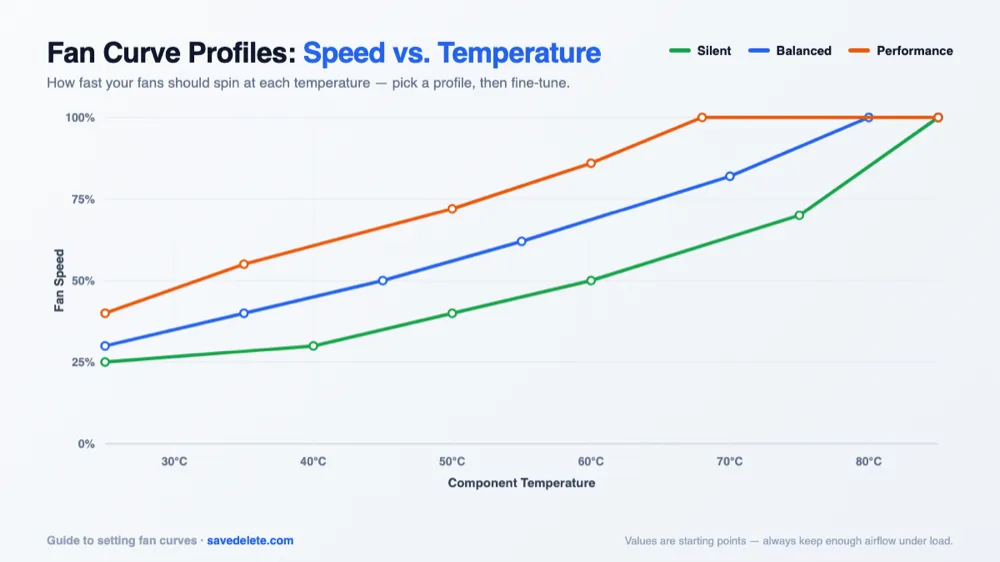
- Silent: about 25-30% below 40°C, rising to 50% at 60°C and 70% at 75°C, then full speed by 85°C. Best for office work and media.
- Balanced: about 30-40% below 35°C, about 50-60% between 45°C and 55°C, then full speed by 80°C. A good default for most PCs.
- Performance: 40% or more even at idle, rising quickly to full speed by about 70°C. Best for long gaming or rendering sessions.
Base CPU and case fan curves on the CPU temperature, and graphics card fans on the GPU temperature. In Fan Control, you can mix the two so case fans react to whichever is hotter.
Frequently Asked Questions
What is the best fan control app?
For desktop PCs, Fan Control is the best fan control app: it's free, works on Windows 10 and 11, and controls CPU, GPU and case fans from one place. Use MSI Afterburner for graphics card fans and your maker's app (NZXT CAM, Corsair iCUE or ASUS Armoury Crate) for its own hardware.
How much is fan control?
Fan Control is free; you can donate to its developer if you like it. Argus Monitor, the best paid alternative, costs $16.45 for a year or $35.95 for three years after a 30-day trial.
Is Fan Control open source?
No. Fan Control is free, but its README says the sources are closed. Libre Hardware Monitor, which Fan Control uses for sensor readings, is open source under the MPL 2.0 license.
Does Fan Control work on laptops?
Mostly no. Fan Control's FAQ says laptops don't interface their fans the way desktop motherboards do, so the app usually won't find any fans unless a plugin supports your model. Use your laptop maker's app instead, or NBFC on Linux.
Why does Windows Defender flag my fan control software?
Older versions of many hardware tools use the WinRing0 driver, which Windows Defender flags. Fan Control V237 and earlier are affected; V238 and later use the PawnIO driver instead. Update to the latest version rather than turning off Defender.
Should I use PWM or DC mode for my fans?
Use PWM for 4-pin fans and DC for 3-pin fans. You can set this per fan header in your BIOS, for example in Q-Fan Control on ASUS motherboards.
Can I control my PC fans from my phone?
Not directly. The apps in this guide are Windows programs that run on the PC itself. To change a fan profile from your phone, connect to the PC with a remote desktop app and adjust it there. For a ceiling or pedestal fan, use the fan maker's own app or a smart plug.
Building or upgrading a PC? See our guides to the best laptops of 2026 and the best budget gaming laptops, where cooling makes a big difference.