18 Best Free Apps To Watch Movies and TV Shows on iPad
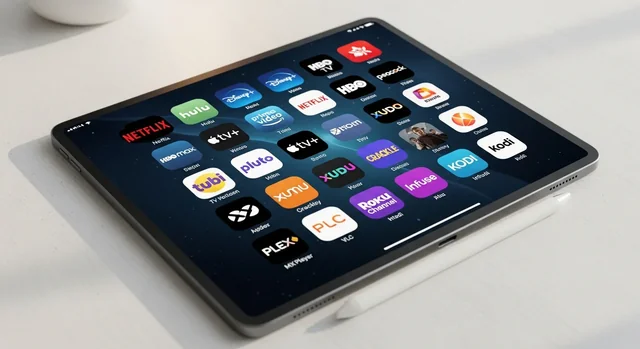
The entertainment landscape has transformed dramatically in recent years, with free streaming services offering an incredible array of movies and TV shows right on your iPad. Gone are the days when you needed expensive cable subscriptions or had to purchase every movie you wanted to watch. Today's free streaming apps provide access to thousands of titles, from classic films to recent releases, all legally and without breaking the bank.
Your iPad remains one of the best devices for streaming content, thanks to its crisp display, excellent battery life, and portable design. Whether you're commuting, traveling, or simply relaxing at home, these free streaming apps can keep you entertained for hours. The key is knowing which apps offer the best content libraries, streaming quality, and user experience.
In this comprehensive guide, we'll explore the top free movie and TV streaming apps available for iPad in 2025, covering everything from ad-supported platforms to library-based services that require no payment whatsoever.
You might also be interested in Netflix Casting Change: Why the Streaming Giant Is Pulling Back on Phone-to-TV Casting.
Top Free Movie and TV Streaming Apps for iPad in 2025
1. Tubi TV - The Content King
Content Library: 52,000+ movies and TV shows
Cost: Completely free with ads
Streaming Quality: Up to 1080p HD
Tubi TV stands out as the heavyweight champion of free streaming services, boasting an impressive library of over 52,000 titles. Owned by Fox Corporation, Tubi offers a diverse selection ranging from Hollywood blockbusters to indie films, classic TV series to recent releases. The platform features content from major studios including Paramount, Lionsgate, and MGM.
What makes Tubi exceptional is its well-organized categories and surprisingly good recommendation algorithm. You'll find dedicated sections for different genres, including a robust collection of horror films, family-friendly content, and international cinema. The ad experience is reasonable, with commercial breaks similar to traditional TV viewing.
Key Features:
- Massive content library with regular additions
- No sign-up required (though recommended for personalization)
- Available in multiple countries
- Excellent search and discovery features
- Offline viewing not available
2. Pluto TV - Live TV Meets On-Demand
Content Library: 250+ live channels plus on-demand content
Cost: Free with ads
Streaming Quality: Up to 1080p HD
Pluto TV, owned by Paramount, offers a unique hybrid experience combining live TV channels with on-demand streaming. The service features over 250 live channels covering news, sports, entertainment, and niche interests. You'll find dedicated channels for specific shows like "The Price is Right," "Survivor," and classic sitcoms.
The live TV aspect makes Pluto TV feel familiar to traditional television viewers, while the on-demand section provides flexibility. The platform excels in providing background entertainment and discovering new content through its curated channels.
Key Features:
- Live TV channels with scheduled programming
- 24/7 dedicated channels for popular shows
- News and sports coverage
- No account required
- Program guide similar to cable TV
3. The Roku Channel - Premium Content for Free
Content Library: 40,000+ movies and TV episodes
Cost: Free tier with ads, premium options available
Streaming Quality: Up to 4K for select content
The Roku Channel has evolved into a serious competitor in the free streaming space, offering both free ad-supported content and premium subscription options. The free tier includes a substantial library of movies and TV shows, including some premium content that rotates regularly.
What sets The Roku Channel apart is its clean interface and high-quality streaming options. The platform also offers live news channels and has been investing heavily in original content. You don't need a Roku device to access the service on your iPad.
Key Features:
- High-quality streaming up to 4K
- Mix of free and premium content
- Live news channels
- Original programming
- Clean, user-friendly interface
4. Amazon Freevee (formerly IMDb TV) - Amazon's Free Service
Content Library: Thousands of movies and TV shows
Cost: Free with ads
Streaming Quality: Up to 1080p HD
Amazon Freevee leverages Amazon's vast content relationships to offer a solid selection of free movies and TV shows. The service includes both licensed content and Amazon Originals that are available without a Prime subscription. You'll find popular TV series, recent movies, and exclusive Freevee originals.
The integration with Amazon's ecosystem means excellent streaming quality and reliable service. The ad experience is well-implemented, and the content selection is curated thoughtfully.
Key Features:
- Amazon's streaming infrastructure
- Exclusive Freevee original content
- Integration with Amazon accounts
- Reliable streaming quality
- Regular content updates
5. Peacock (Free Tier) - NBCUniversal's Platform
Content Library: 13,000+ hours of free content
Cost: Free tier with ads, premium tiers available
See also: Free Music Streaming Apps: Your Complete Guide to Unlimited Music Without Breaking the Bank.
Streaming Quality: Up to 1080p HD
Peacock's free tier offers substantial value with over 13,000 hours of content from NBCUniversal's vast library. You'll find classic TV shows like "The Office," "Parks and Recreation," current NBC shows, news programming, and a selection of movies.
The free tier includes next-day access to current NBC shows, live news coverage, and sports highlights. While some content requires the premium subscription, the free offering is generous and well-curated.
Key Features:
- Next-day access to NBC shows
- Extensive classic TV library
- Live news and sports content
- Premium upgrade options
- High-quality streaming
6. Crackle - Sony's Free Platform
Content Library: Hundreds of movies and TV shows
Cost: Free with ads
Streaming Quality: Up to 1080p HD
Sony's Crackle has been a pioneer in free streaming, offering a curated selection of movies and TV shows from Sony's library and other content partners. While smaller than some competitors, Crackle focuses on quality over quantity, with a good mix of popular films and hidden gems.
The platform is known for its original programming and exclusive content that you won't find elsewhere. The ad load is reasonable, and the streaming quality is consistently good.
Key Features:
- Sony Pictures content
- Original programming
- Curated selection
- No sign-up required
- Available internationally
7. Plex - Your Personal Media Hub
Content Library: Personal media plus free streaming content
Cost: Free with ads for streaming content
Streaming Quality: Depends on source material
Plex serves dual purposes: it's both a personal media server for your own content and a free streaming platform. The free streaming section includes movies, TV shows, documentaries, and web series, all supported by ads.
For more details, check out our guide on Best Free iPhone Apps to Watch TV Shows and Movies in 2025: Complete Guide.
What makes Plex unique is its ability to organize and stream your personal media collection alongside free content, creating a comprehensive entertainment hub on your iPad.
Key Features:
- Personal media server capabilities
- Free streaming content
- Excellent organization tools
- Cross-platform availability
- Premium features available
8. Kanopy - Library-Based Streaming
Content Library: Thousands of films and documentaries
Cost: Free with library card
Streaming Quality: Up to 1080p HD
Kanopy partners with public libraries and universities to provide free access to high-quality films, documentaries, and educational content. You'll need a library card from a participating institution, but once connected, you get access to critically acclaimed films, indie cinema, and educational content without any ads.
The platform is perfect for film enthusiasts looking for artistic and educational content rather than mainstream entertainment.
Key Features:
- No advertisements
- High-quality, curated content
- Educational and artistic focus
- Requires library card
- Limited monthly views per library
9. Hoopla - Digital Library Content
Content Library: Movies, TV shows, and more media types
Cost: Free with library card
Streaming Quality: Up to 1080p HD
Similar to Kanopy, Hoopla works with library systems to provide free digital content. Beyond movies and TV shows, Hoopla offers audiobooks, ebooks, comics, and music, making it a comprehensive digital library platform.
The content selection varies by library system, and you typically get a limited number of monthly borrows, but there are no ads and the quality is excellent.
Key Features:
See also: Mobile Geo-Targeting: Attract More Booth Visitors at Trade Shows.
- Multiple media types
- No ads
- Library partnership required
- Monthly borrowing limits
- Instant access (no waiting lists)
10. Popcornflix - Classic Free Streaming
Content Library: Over 1,500 movies and web series
Cost: Free with ads
Streaming Quality: Up to 1080p HD
Popcornflix has been providing free movies for over a decade, focusing on a curated selection of films across various genres. While the library is smaller than some competitors, it's well-organized and includes both popular titles and indie films.
The platform is straightforward and user-friendly, with reasonable ad placement and good streaming quality for a free service.
Key Features:
- Long-established platform
- Well-organized categories
- No sign-up required
- Regular content rotation
- Clean interface
Bonus Tool: JustWatch - Your Content Discovery Companion
While not a streaming service itself, JustWatch is an essential app for anyone using multiple streaming platforms. This free app helps you find where specific movies and TV shows are available to stream, rent, or purchase across all major platforms.
Key Features:
- Search across all streaming platforms
- Price comparison for rentals and purchases
- Watchlist functionality
- New release notifications
- Filtering by free content
Comparison Table: Free Streaming Apps for iPad
| Service | Content Volume | Ad Experience | Streaming Quality | Sign-up Required | Best For |
|---|---|---|---|---|---|
| Tubi TV | 52,000+ titles | Moderate ads | Up to 1080p | Optional | Largest free library |
| Pluto TV | 250+ channels | TV-style ads | Up to 1080p | No | Live TV experience |
| The Roku Channel | 40,000+ titles | Minimal ads | Up to 4K | Optional | Premium feel |
| Amazon Freevee | Thousands | Well-placed ads | Up to 1080p | Optional | Amazon ecosystem |
| Peacock Free | 13,000+ hours | Moderate ads | Up to 1080p | Yes | NBC content |
| Kanopy | Thousands | No ads | Up to 1080p | Library card | Art house films |
| Hoopla | Varies | No ads | Up to 1080p | Library card | Educational content |
Understanding Ad-Supported vs. Ad-Free Options
Ad-Supported Services
Most free streaming services support themselves through advertising revenue. Here's what to expect:
- Ad Frequency: Typically 2-4 commercial breaks per hour
- Ad Length: Usually 15-30 seconds per ad, with 1-3 ads per break
- Content Impact: Ads are generally well-placed at natural breaks
- Skip Options: Most ads cannot be skipped
Ad-Free Options
Library-based services like Kanopy and Hoopla offer completely ad-free experiences:
- Requirements: Valid library card from participating institution
- Limitations: Monthly borrowing limits (typically 5-10 titles)
- Content Focus: More educational and artistic content
- Quality: Often higher-quality, curated selections
Streaming Quality and Technical Considerations
Internet Speed Requirements
- 480p (SD): 1.5 Mbps minimum
- 720p (HD): 3 Mbps minimum
- 1080p (Full HD): 5 Mbps minimum
- 4K (Ultra HD): 25 Mbps minimum
Data Usage Considerations
When streaming on cellular data, be aware of usage:
- SD Quality: Approximately 1 GB per hour
- HD Quality: Approximately 3 GB per hour
- 4K Quality: Approximately 7 GB per hour
Tips for Maximizing Your Free Streaming Experience
Content Discovery Strategies
- Use JustWatch to find content across multiple platforms
- Create watchlists on each platform to track interesting content
- Follow platform social media for new addition announcements
- Explore different genres to discover hidden gems
Managing Multiple Apps
- Organize apps in a dedicated folder on your iPad
- Use universal search to find content quickly
- Consider which apps work best for different content types
- Keep apps updated for the best performance
Optimizing Streaming Quality
- Connect to Wi-Fi whenever possible to avoid data charges
- Close other apps to free up bandwidth and processing power
- Restart apps if you experience streaming issues
- Check your internet speed if quality is consistently poor
Legal Considerations and Safety
All the apps mentioned in this guide are completely legal and safe to use. They operate with proper licensing agreements and content partnerships. Here are some important points to remember:
- Legitimate Services: Stick to well-known, established platforms
- App Store Downloads: Only download apps from the official App Store
- Personal Information: Be cautious about what information you share when creating accounts
- Too Good to Be True: Avoid apps promising free access to premium content like Netflix originals
Future of Free Streaming
The free streaming landscape continues to evolve rapidly. Major trends to watch include:
- Increased Investment: More companies are investing in free, ad-supported streaming
- Original Content: Free platforms are producing more exclusive content
- Better Ad Experiences: Improvements in ad targeting and user experience
- International Expansion: More services becoming available globally
Frequently Asked Questions
1. Are these free streaming apps really free?
Yes, all the apps listed are genuinely free to use. Most are supported by advertising revenue, while library-based services like Kanopy and Hoopla are funded by participating institutions. You won't be charged for basic access to content.
2. Do I need to create accounts for these apps?
Account requirements vary by service. Some apps like Tubi TV and Pluto TV work without accounts but offer personalization features if you sign up. Others like Peacock require account creation. Library-based services require valid library cards from participating institutions.
3. Can I download content for offline viewing?
Most free streaming services do not offer offline downloading due to licensing restrictions and the need to serve ads. This feature is typically reserved for premium, paid services. Your content will need an internet connection to stream.
4. How often is new content added to these platforms?
Content addition schedules vary by platform. Tubi TV and The Roku Channel add new titles regularly, often weekly. Pluto TV frequently updates its channel lineup. Library-based services depend on their institution's licensing agreements for new additions.
5. Are these apps available internationally?
Availability varies by region due to licensing restrictions. Tubi TV, Pluto TV, and Crackle are available in multiple countries but with different content libraries. Always check the App Store in your region to see which apps are available and what content they offer.
6. How do I find specific movies or shows across multiple apps?
Use JustWatch, a free app that searches across all streaming platforms to show you where specific content is available. You can filter results to show only free options, making it easy to find what you want to watch without checking each app individually.
7. What's the video quality like on free streaming services?
Most modern free streaming services offer HD (1080p) quality, with some like The Roku Channel even supporting 4K for select content. Quality depends on your internet connection speed and the source material. Generally, the streaming quality is comparable to paid services.
8. Can I use these apps with my existing streaming setup?
Yes, these apps work independently and can complement your existing streaming subscriptions. Many people use free services to discover new content or watch specific shows not available on their paid subscriptions. You can have multiple apps installed and switch between them as needed.
9. Are there parental controls available?
Most major free streaming platforms offer some form of parental controls or content filtering. You can usually set up kids' profiles or enable content restrictions through the app settings. Additionally, iPad's built-in parental controls can provide an extra layer of protection.
10. What should I do if an app isn't working properly?
Try these troubleshooting steps: force-close and restart the app, check your internet connection, restart your iPad, ensure the app is updated to the latest version, and clear the app's cache if possible. If problems persist, contact the app's customer support or try reinstalling the app.
Conclusion
The world of free streaming has never been more robust, offering iPad users access to tens of thousands of movies and TV shows without spending a penny. From Tubi TV's massive 52,000+ title library to the ad-free experience of library-based services like Kanopy, there's something for every type of viewer.
For the best overall experience, we recommend starting with Tubi TV for its extensive content library, adding Pluto TV for live channel browsing, and exploring The Roku Channel for higher-quality streaming. If you have a library card, definitely check out Kanopy and Hoopla for premium, ad-free content.
Remember to use JustWatch to efficiently find content across all platforms, and don't hesitate to install multiple apps – they're all free, and different services excel in different areas. With these apps on your iPad, you'll have access to more entertainment than you could watch in a lifetime, all without breaking your budget.
You might also be interested in 8 Best And Free Video Streaming Apps For Android Phones.
The key to maximizing your free streaming experience is understanding what each platform offers and matching that to your viewing preferences. Whether you're looking for the latest blockbusters, classic films, educational documentaries, or just something to watch in the background, these free streaming apps have you covered.