VideoAsk by Typeform Review 2026: Features, Pricing, Pros, Cons and Alternatives

VideoAsk is an asynchronous video interaction platform from Typeform that turns one-way web forms into face-to-face conversations. Instead of typing into text fields, you record short video, audio, or text questions, and respondents reply the same way at their own pace. It is widely used for recruiting screens, lead capture, customer testimonials, support FAQ bots, and async interviews. In 2026 the core idea is unchanged, but the product now leans harder on automation: an AI Chatbot on the top tier, automatic speech-to-text transcription and captions, conditional logic branching, Calendly and HubSpot scheduling, Stripe payments, and roughly 1,500 Zapier integrations plus a public API and webhooks. The pricing model remains its defining trait and its biggest friction point: you pay for video and audio processing minutes, not flat usage, so costs scale with how much content you and your respondents generate. This review verifies VideoAsk's current features, pricing tiers, genuine use cases, limitations, and the strongest alternatives.
VideoAsk Features in 2026
Async video, audio, and text conversations
Core product
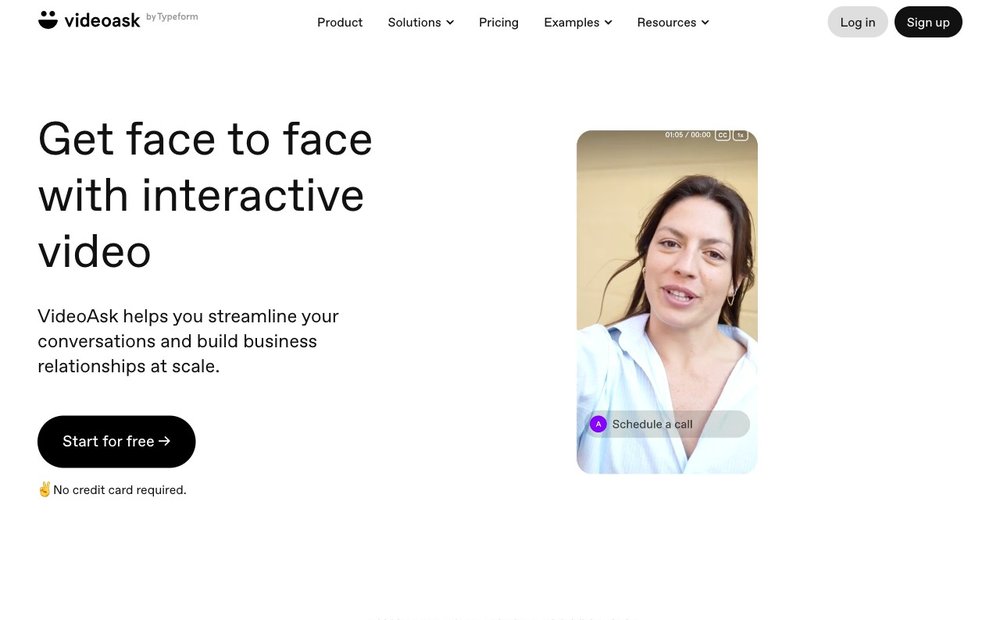
VideoAsk's foundation is a multi-step interactive video funnel. You record questions as video, audio, or text, and respondents reply in whichever format they prefer, including typed answers, multiple choice, NPS scores, file uploads, and even live calls when you are online. Each videoask is a shareable link or embeddable widget that plays in the browser with no app or download for the respondent. The result feels personal and human compared with a static form, which is why it lands well for warm, relationship-driven interactions rather than high-volume anonymous surveys.
AI Chatbot, transcription, and summaries
AI features (Chatbot on Brand)
VideoAsk's AI layer centers on an AI Chatbot that can hold a conversational, automated exchange with respondents, available on the Brand plan. Across plans, every video and audio answer is automatically transcribed to text with captions, making responses searchable and accessible, and the platform can generate text summaries of longer answers to cut review time. These are useful for FAQ deflection and screening at scale, though reviewers note the AI tooling is lighter than dedicated conversational-AI or video-editing platforms, with no sentiment analysis or advanced clip editing.
Conditional logic and branching funnels
All paid tiers
Conditional logic (logic jumps) lets you build branching paths so respondents see different follow-up questions based on how they answer. Logic can branch off multiple-choice, NPS, AI Chatbot, or Live Call steps, which makes VideoAsk capable of qualification flows, routing, and lightweight chatbot-style decision trees. The Start tier caps you at three steps per videoask, while Grow and Brand unlock unlimited steps, so any non-trivial branching flow effectively requires a paid plan. It is a genuine strength for sales qualification and recruiting pre-screens.
Scheduling, payments, and lead capture
Stripe + Calendly/HubSpot
Several answer types turn VideoAsk into a conversion tool, not just a survey. A calendar step lets respondents book meetings inside the videoask via Calendly, HubSpot Meetings, Acuity, or OnceHub, with contact details auto-filled. A payment step uses Stripe to collect money or paywall content before respondents continue. Contact forms capture names and emails as leads, and respondent tracking and custom hidden variables let you attribute and enrich responses. Together these make VideoAsk viable for booking calls, taking deposits, and feeding qualified leads into a CRM.
Integrations, API, webhooks, and embeds
thousands of apps via Zapier
VideoAsk connects to thousands of apps through Zapier (which advertises 8,000+ integrations), plus native ties to tools like HubSpot and Slack, so new responses can trigger downstream automations automatically. The Grow and Brand plans add direct API access and webhooks for custom pipelines. You can share a videoask as a hosted link, a full-screen page, a chat-style bubble widget, or an inline embed on your site or landing page. Reviewers occasionally report friction with specific CRM syncs, but the breadth of no-code connectivity is a clear advantage.
Pricing tiers and the minutes model
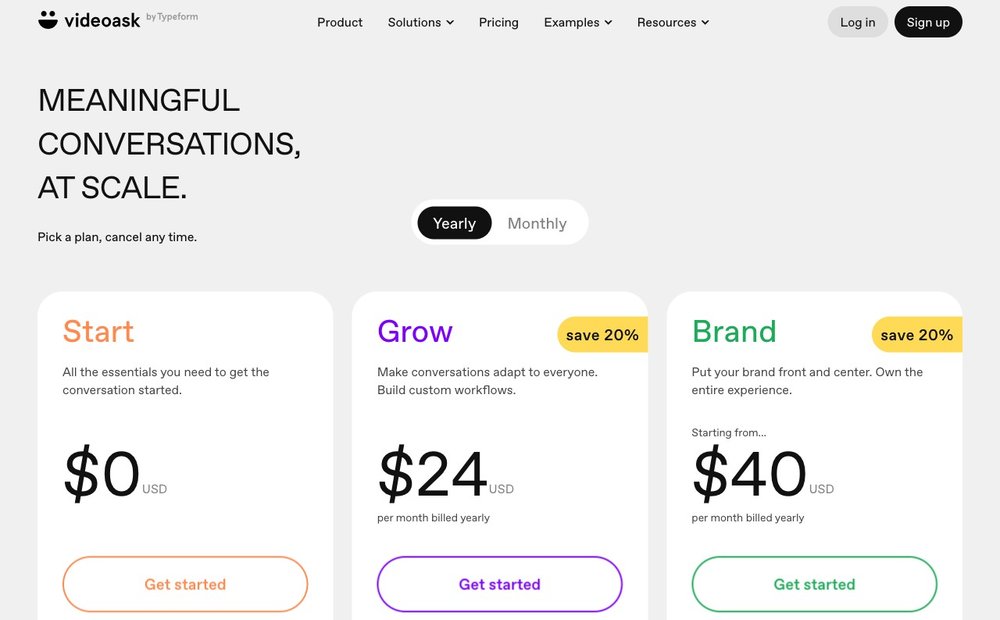
Free $0 / Grow $24 / Brand from $40
VideoAsk has a free Start tier ($0, 20 processing minutes per month, up to 3 steps and 3 users) plus Grow ($24/mo billed yearly, ~1,200 minutes/year, up to 5 users, unlimited steps, APIs and webhooks, Live Calls, NPS) and Brand (from $40/mo billed yearly, ~2,400 minutes/year, up to 10 users, domain white labeling, priority support, AI Chatbot), with custom Enterprise above. The catch: you buy processing minutes counted every time you or a respondent records, and you can add more minutes as overage. Heavy or viral usage can produce unpredictable bills.
Best-fit use cases
Recruiting, sales, testimonials
VideoAsk shines where a human touch lifts conversion: async one-way recruiting screens that let candidates record answers on their own time, sales and lead-qualification funnels that book a call at the end, gathering authentic video testimonials and customer feedback, and FAQ or support bots that answer common questions with a friendly recorded host. It is less suited to high-volume anonymous data collection or heavy customer-support deflection, where the per-minute cost and lighter analytics make flat-rate, unlimited tools more economical. Match it to warm, relationship-led touchpoints rather than mass throughput.
Pros and Cons
Pros
- Turns static forms into engaging async video, audio and text conversations
- Strong for recruiting screens, lead qualification, testimonials and FAQ bots
- No-code, with conditional logic, scheduling, Stripe payments and thousands of Zapier integrations
- A genuinely usable free tier (20 minutes a month) to test the format
Cons
- Pricing is based on processing minutes, so costs can spike during high-volume campaigns
- The AI Chatbot and domain white-labeling are gated to the higher Brand tier
- Flat-rate alternatives can be cheaper for heavy, predictable usage
- Some users report friction with specific CRM syncs
The Best VideoAsk Alternatives in 2026
Loom
Free (25 videos) / Business from $15/creator/mo
Now part of Atlassian, Loom is the leading async video messaging and screen-recording tool. Unlike VideoAsk, it is built around one-to-many recorded updates and screen captures rather than interactive two-way funnels, and respondents typically reply via comments rather than recording their own branching answers. Loom offers AI-generated titles, summaries, and chapters, plus deep Slack and Google Workspace integration. Its free plan allows 25 videos with a five-minute cap; paid Business plans start around $15 per creator per month billed annually. Choose Loom for team communication, not lead-capture funnels.
Bonjoro
Free 50 videos / paid from ~$15-$29/mo
Bonjoro is the closest direct competitor for personal, one-to-one video outreach and is frequently pitched as a VideoAsk alternative. It specializes in personalized video messages triggered by CRM and e-commerce events, such as welcoming new customers or thanking buyers, with a mobile-first recording workflow. Its free tier is more generous, allowing around 50 video messages, and paid plans use flat monthly pricing rather than processing minutes, which appeals to teams burned by VideoAsk's usage billing. Bonjoro is weaker on interactive multi-step funnels but stronger for outbound relationship-building at scale.
Vidyard
Free (25 videos) / Pro from ~$19-$59/mo
Vidyard is a video platform aimed at sales and marketing teams, combining screen and webcam recording, hosting, AI-assisted personalized outreach, and detailed viewer analytics. It overlaps with VideoAsk on sales use cases but emphasizes outbound prospecting videos and engagement tracking rather than respondent-driven interactive funnels. Vidyard offers a free tier capped at a small number of videos, with paid Pro, Team, and Enterprise plans. It is the stronger pick when you need granular video analytics, large-scale personalized sales sends, and CRM integration, and a weaker fit for collecting recorded answers.
Tolstoy (Shopify ecosystem)
Pro from ~$19/mo; Shopify-focused
Tolstoy is an interactive and shoppable video platform popular in the Shopify and e-commerce ecosystem. Like VideoAsk it supports branching video paths where viewer choices route them to tailored content, but its focus is on-site product discovery, UGC, and video commerce rather than recruiting or feedback collection. It embeds directly into storefronts and product pages and prices by included monthly views, with a Pro tier from about $19/month. Choose Tolstoy if your goal is converting shoppers with interactive on-page video; choose VideoAsk for conversational lead and response capture.
Final Verdict on VideoAsk
VideoAsk is the most polished way to add conversational, async video to lead capture, recruiting and support, and its free tier makes it easy to try. The catch is the minutes-based pricing, which rewards light, high-value interactions but can get expensive at scale. If your use case is occasional and conversion-focused, VideoAsk is an easy recommendation; if you need high-volume recording at a predictable cost, compare it against flat-rate tools like Loom, Bonjoro and Vidyard first. Teams using it to screen candidates may also like our guide to recruiting software.
Sources and Further Reading
- VideoAsk official site
- VideoAsk pricing page
- VideoAsk answer types and features
- VideoAsk conditional logic help doc
- Typeform (parent company)
- VideoAsk reviews on G2
- VideoAsk on Capterra
Frequently Asked Questions
Is VideoAsk still owned by Typeform in 2026?
Yes. VideoAsk operates as VideoAsk by Typeform and was built internally rather than acquired. Note that Typeform itself was reported in late 2025 to be subject to an acquisition by Italian software group Bending Spoons; even if that completes, VideoAsk continues to run and brand under the Typeform name, with no change to the product's day-to-day features for users.
Does VideoAsk have a free plan, and what are the limits?
Yes. The free Start tier costs $0 and includes roughly 20 minutes of video or audio processing per month, up to 3 steps per videoask, and up to 3 team members. It carries VideoAsk branding and still includes core features like conditional logic, Stripe payments, Zapier, scheduling, and transcription. It is enough to test the product, but the step cap and tiny minute allowance push most real workflows to a paid plan.
How does VideoAsk's minutes-based pricing actually work?
VideoAsk charges by processing minutes, counted every time you or a respondent records video or audio; playback and replays are free. Grow includes about 1,200 minutes per year and Brand about 2,400, and you can buy add-on minutes when you exceed your allowance. Because cost scales with response volume, a viral campaign or busy hiring round can run up an unexpected bill, which is the most common complaint reviewers raise.
Does VideoAsk include AI features?
Yes. Every video and audio answer is automatically transcribed with captions, and VideoAsk can generate text summaries of longer responses. The headline AI feature is the AI Chatbot, available on the Brand plan, which can run automated conversational exchanges with respondents. The AI toolkit is functional for FAQ and screening, but lighter than dedicated conversational-AI platforms, with no sentiment analysis or smart video editing.
What are the best VideoAsk alternatives?
For one-to-one personalized outreach with flat pricing, Bonjoro is the closest swap. Loom suits async team and screen-recording messages, while Vidyard targets sales teams needing analytics and personalized sends at scale. Tolstoy fits shoppable, interactive video for Shopify storefronts. Teams most often leave VideoAsk over its per-minute billing, so the main draw of these alternatives is predictable flat-rate pricing.
Plan names, included minutes and prices change and vary between monthly and yearly billing. Verify current pricing on videoask.com before subscribing.