MAGIX Movie Edit Pro Review 2026: Features, Pros & Cons
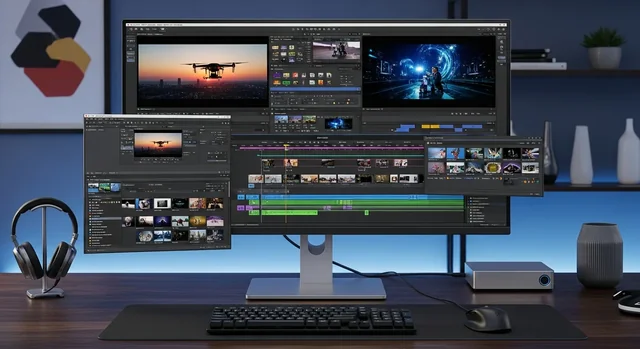
MAGIX Movie Edit Pro has established itself as Europe's best-selling video editing software, and the 2026 edition continues to push boundaries with cutting-edge AI features and professional-grade tools. This comprehensive review examines why Movie Edit Pro remains a top choice for creators seeking powerful editing capabilities without the complexity of high-end professional suites.
The latest version introduces revolutionary AI-powered features including automatic subtitle generation, AI voiceovers, and intelligent effects that adapt to your content. Combined with the enhanced INFUSION Engine 3 for ultra-smooth playback and robust 4K editing capabilities, Movie Edit Pro 2026 delivers professional results at a consumer-friendly price point.
What Makes MAGIX Movie Edit Pro Stand Out in 2026
MAGIX Movie Edit Pro differentiates itself through its unique object-based editing approach and perpetual licensing model. Unlike subscription-based competitors, you purchase the software once and own it forever, making it an attractive option for budget-conscious creators and professionals alike.
You might also be interested in Tools To Upload Multiple Videos On YouTube: The Ultimate Guide (2026).
Revolutionary AI-Powered Features
The 2026 edition introduces several groundbreaking AI capabilities that streamline the editing process:
- AI-Generated Subtitles: Automatically transcribes speech and generates accurate subtitles in multiple languages with customizable styling options
- AI Voiceovers: Creates natural-sounding voiceovers from text using advanced neural networks, perfect for tutorials and presentations
- Intelligent Effects: AI analyzes your footage and suggests appropriate color corrections, transitions, and effects based on content type
- Smart Scene Detection: Automatically identifies scene changes and suggests optimal cut points
INFUSION Engine 3: Unmatched Performance
The third-generation INFUSION Engine delivers exceptional playback performance, even with 4K footage. This proprietary technology ensures smooth timeline scrubbing, real-time effects preview, and faster rendering times. The engine intelligently manages system resources, allowing seamless editing on both high-end workstations and modest consumer laptops.
Core Editing Features and Capabilities
Dual Editing Modes: Storyboard and Timeline
Movie Edit Pro 2026 offers two distinct editing approaches to accommodate different workflow preferences:
Storyboard Mode: Perfect for beginners, this visual approach allows you to arrange clips like a comic strip. Simply drag and drop media, and the software automatically handles transitions and timing. Advanced users can still access detailed controls without switching modes.
Timeline Mode: Provides granular control with unlimited tracks, precise keyframing, and professional-grade audio mixing. The object-based editing system allows any media type on any track, offering unprecedented flexibility in project organization.
Multi-Camera Editing Excellence
The enhanced multi-cam editor supports up to 16 camera angles simultaneously, with automatic synchronization based on audio waveforms or timecode. Features include:
- Real-time switching between camera angles
- Audio sync analysis with visual waveform matching
- Color matching across different cameras
- Proxy workflow support for smooth multi-cam playback
Professional Color Correction Tools
The 2026 edition includes comprehensive color grading capabilities rivaling professional software:
- Three-way color corrector with shadows, midtones, and highlights
- Vector scopes and waveform monitors
- LUT support for cinematic color grading
- Automatic white balance and exposure correction
- Secondary color correction for selective adjustments
Format Support and Export Options
4K Editing and Export Capabilities
Movie Edit Pro 2026 provides full 4K workflow support with optimized performance for ultra-high-definition content. The software handles various 4K formats including:
Related: Free AI Video Editors Without Watermark: 10 Best Tools in 2026.
- 4K UHD (3840 × 2160) at up to 60fps
- Cinema 4K (4096 × 2160)
- HDR10 and Dolby Vision support
- HEVC/H.265 encoding for efficient file sizes
Multi-Format Timeline Support
One of Movie Edit Pro's standout features is its ability to mix different formats, frame rates, and resolutions on the same timeline. The software automatically handles conversion in the background, allowing you to focus on creativity rather than technical constraints.
Title Animations and Graphics
The 2026 edition includes an extensive library of professionally designed title templates and animations. The enhanced title editor features:
- Over 1,500 customizable title templates
- 3D text animations with realistic lighting
- Motion graphics templates for lower thirds and callouts
- Advanced keyframing for custom animations
- Integration with Adobe After Effects templates
Pricing and Versions Comparison 2026
| Edition | Price (USD) | Key Features | Best For |
|---|---|---|---|
| Movie Edit Pro | $69.99 | Basic editing, AI subtitles, 4K export | Beginners and hobbyists |
| Movie Edit Pro Plus | $99.99 | Advanced effects, multi-cam, color correction | Serious enthusiasts |
| Movie Edit Pro Premium | $129.99 | All features, bonus content, premium plugins | Semi-professionals |
| Movie Edit Pro Suite | $199.99 | Complete package with additional software | Content creators and professionals |
Pros and Cons Analysis
Advantages
- Perpetual License: No ongoing subscription fees
- AI Integration: Cutting-edge artificial intelligence features
- Performance: INFUSION Engine 3 delivers smooth editing experience
- Flexibility: Object-based editing and multi-format timeline
- Value: Professional features at consumer pricing
- Learning Curve: Accessible to beginners yet powerful for professionals
Limitations
- Platform: Windows-only (no Mac version available)
- Market Presence: Less popular in North America compared to Europe
- Plugin Ecosystem: Smaller third-party plugin library than Adobe Premiere
- Collaboration: Limited team collaboration features
Comparison with Competitors
| Feature | MAGIX Movie Edit Pro | Adobe Premiere Pro | DaVinci Resolve | Filmora |
|---|---|---|---|---|
| Pricing Model | One-time purchase | Subscription | Free/One-time | Subscription/One-time |
| AI Features | Excellent | Good | Limited | Good |
| 4K Performance | Excellent | Excellent | Excellent | Good |
| Learning Curve | Moderate | Steep | Very Steep | Easy |
| Color Grading | Good | Good | Excellent | Basic |
System Requirements and Performance
Minimum System Requirements
- Operating System: Windows 10/11 (64-bit)
- Processor: Intel Core i5 or AMD equivalent
- RAM: 8 GB (16 GB recommended for 4K)
- Graphics: DirectX 11 compatible
- Storage: 4 GB free space for installation
Recommended for Optimal Performance
- Processor: Intel Core i7/i9 or AMD Ryzen 7/9
- RAM: 32 GB for professional 4K workflows
- Graphics: Dedicated GPU with 4GB+ VRAM
- Storage: SSD for media cache and projects
Who Should Choose MAGIX Movie Edit Pro in 2026
Movie Edit Pro 2026 is ideal for several user categories:
Content Creators: YouTubers, social media influencers, and online educators will appreciate the AI subtitle generation and efficient workflow. The perpetual license model makes it cost-effective for creators building their channels.
Small Business Owners: Companies needing professional marketing videos without ongoing software costs will find excellent value. The title templates and effects library provide professional polish without requiring design expertise.
Related: AI Likeness Protection or Data Risk? Why YouTube’s New Deepfake Tool Has Creators Worried.
Hobbyist Filmmakers: Enthusiasts seeking professional features at reasonable prices will love the multi-cam editing and color correction tools. The storyboard mode helps beginners transition to timeline editing naturally.
Educational Users: Schools and training organizations benefit from the one-time purchase model and comprehensive feature set suitable for teaching video production fundamentals.
Getting Started: Tips for New Users
To maximize your Movie Edit Pro experience, consider these recommendations:
- Start with Storyboard Mode: Begin projects in storyboard mode to quickly arrange your story, then switch to timeline for detailed editing
- Utilize AI Features: Let the AI subtitle generator handle transcription while you focus on creative decisions
- Organize Media: Use the built-in media manager to keep projects organized and easily accessible
- Experiment with Templates: Explore the extensive title and effect templates to understand possibilities before creating custom elements
- Enable Proxy Editing: For 4K projects, enable proxy editing to maintain smooth playback on modest hardware
Frequently Asked Questions
Is MAGIX Movie Edit Pro available for Mac?
No, MAGIX Movie Edit Pro is exclusively available for Windows. Mac users should consider alternatives like Final Cut Pro or cross-platform options like DaVinci Resolve.
Can I upgrade from an older version of Movie Edit Pro?
Yes, MAGIX offers upgrade pricing for existing users. Check the official website for current upgrade discounts, which typically range from 30-50% off the full price.
Related: Best AI Tools for YouTube Thumbnails (2026).
How does the AI subtitle generation work?
The AI analyzes audio tracks in your timeline and automatically generates subtitles using speech recognition. You can edit the text, adjust timing, and customize appearance. The feature supports multiple languages and accents.
What's the difference between Movie Edit Pro and Movie Edit Pro Plus?
The Plus version includes additional effects, advanced color correction tools, and premium title templates. It also includes multicam editing for up to 4 cameras (compared to 2 in the standard version).
Can I use Movie Edit Pro for commercial projects?
Yes, the standard license allows commercial use. However, some bundled music and template content may have usage restrictions, so check individual asset licenses for commercial projects.
How does proxy editing work in Movie Edit Pro?
The software automatically creates lower-resolution proxy files for smooth editing while preserving original quality for export. You can customize proxy settings based on your system capabilities and storage space.
Is there a mobile version of Movie Edit Pro?
Yes, MAGIX Movie Edit Touch is available for mobile devices, offering basic editing capabilities including trimming, transitions, and HD export. However, it's a separate app with limited functionality compared to the desktop version.
What video formats does Movie Edit Pro support?
The software supports virtually all common formats including MP4, AVI, MOV, MKV, AVCHD, and professional formats like ProRes and DNxHD. It also handles various audio formats and image sequences.
Can I collaborate with others using Movie Edit Pro?
While Movie Edit Pro doesn't have built-in cloud collaboration like some competitors, you can share project files and media folders through network drives or cloud storage services.
How often does MAGIX release updates?
MAGIX typically releases major versions annually with new features, plus regular updates throughout the year for bug fixes and minor improvements. Updates are free for the current version year.
Learn more in our article about How Compressing Images Improves Website Speed & SEO: Tools, Tips, and Best Practices.
MAGIX Movie Edit Pro 2026 represents excellent value for creators seeking professional editing capabilities without subscription costs. The combination of innovative AI features, robust performance, and comprehensive toolset makes it a compelling choice for anyone serious about video production. While it may not have the market presence of Adobe Premiere Pro, its unique features and pricing model offer distinct advantages for many users.
Related Guides
For more editing options, see our guides to the best video editing software and video editing laptops.
Frequently Asked Questions
Is MAGIX Movie Edit Pro good in 2026?
MAGIX Movie Edit Pro is a capable consumer-to-prosumer video editor with strong effects, good performance, and an approachable interface, making it a solid mid-range choice.
Is MAGIX Movie Edit Pro for beginners?
Yes. It balances ease of use with advanced features, so beginners can start quickly while still having room to grow into more complex edits.
Does MAGIX Movie Edit Pro support 4K?
Yes. It supports 4K editing and export, hardware acceleration, and a range of modern formats, though performance depends on your PC's hardware.