How to Move from Blogger to WordPress in 3 Steps
By Jaspal Singh
Migrate your Blog from Blogger to WordPress in three simple steps and gain full control with a self hosted blog. You can also retain your blogger blog's comments, traffic and search ranking.
Let me summarize the tutorial for you.
 After installing above plugin, activate and run the importer. You might have to Authorize access to your Google/Blogger account.
"Allow access" and you get a list of blogger blogs from your Google Account. Press Import in front of the blog you need to move.
Select your .XML file and let the import process begin.
That's it you have migrated your blog successfully.
After installing above plugin, activate and run the importer. You might have to Authorize access to your Google/Blogger account.
"Allow access" and you get a list of blogger blogs from your Google Account. Press Import in front of the blog you need to move.
Select your .XML file and let the import process begin.
That's it you have migrated your blog successfully.
- Get your Self hosted WordPress up and ready, choose one of the best hosting sites.
- Export your Blogger's Blog.
- Import Blogger Blog to WordPress
Step 1. Setting up a new WordPress (Self-hosted) Blog.
There are many blog hosting sites, but the easiest and most affordable one is Bluehost hosting, as it has free domain name and unlimited hosting space. And moreover it's recommended by WordPress official team. After you have taken hosting, you need to install WordPress on your new Bluehost account.Step 2. Once your new WordPress is ready, you can now go to your blogger settings to export your blog.
Go to Settings > Others > Export Blog You will be asked to download blog, which will be in .XML format Save that .XML file, and get ready to import it in our next step.Step 3. Import .XML File
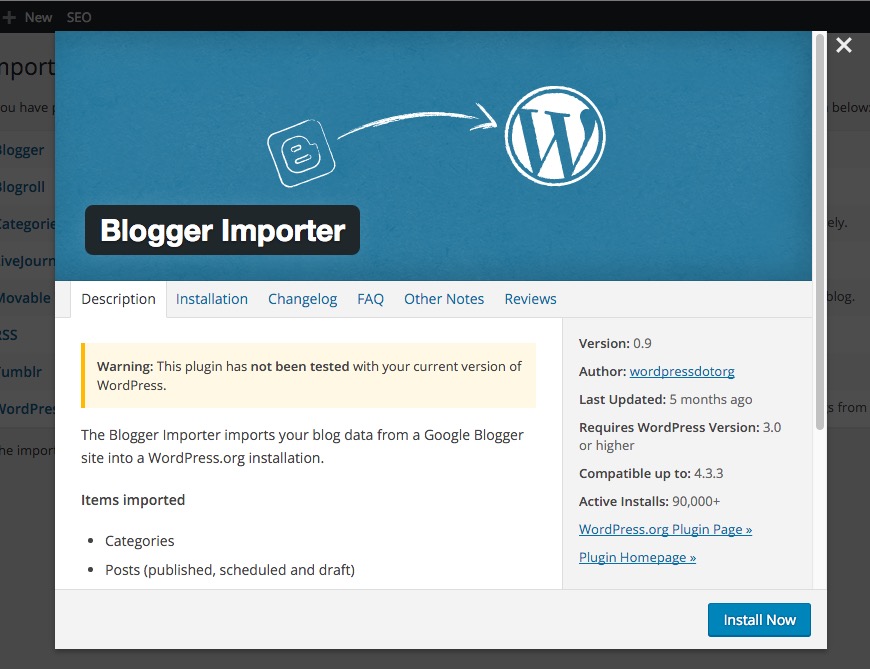
This is your last, final step which only require a simple import of the file we saved in the Step 2. In your new WordPress Installation, Go to Tools > Import Click "Blogger" and when a prompt appears like below, press "Install Now".
After installing above plugin, activate and run the importer. You might have to Authorize access to your Google/Blogger account.
"Allow access" and you get a list of blogger blogs from your Google Account. Press Import in front of the blog you need to move.
Select your .XML file and let the import process begin.
That's it you have migrated your blog successfully.