The Best Apple Pencil Alternatives in 2026: Cheaper Styluses for iPad, Android & Windows Tablets
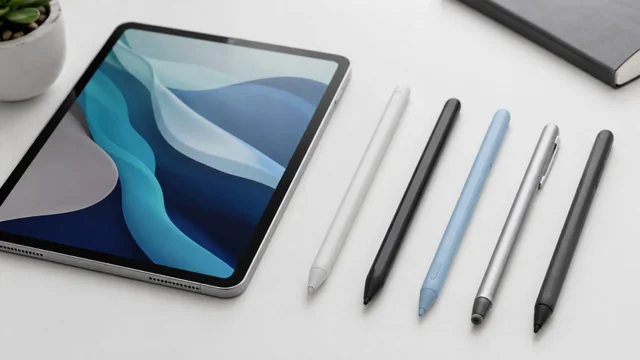
You don't need to spend $129 on an Apple Pencil Pro to get tilt, palm rejection and lag-free writing on an iPad. In 2026 a crowded field of third-party styluses, plus Apple's own cheaper USB-C Pencil, deliver most of the everyday experience for a fraction of the price. Below are the best Apple Pencil alternatives for iPad, plus the USI 2.0 pens that bring the same idea to Android tablets and Chromebooks.
Key takeaways:
- You can get tilt, palm rejection and lag-free writing on an iPad for $25-80, versus $129 for an Apple Pencil Pro.
- Pressure sensitivity is the one feature third-party iPad styluses can't replicate — only the Adonit Note+ comes close, and only in supported apps.
- The Logitech Crayon ($69.99) and Apple's own USB-C Pencil ($79) are the safest, most compatible 'no surprises' options.
- For magnetic snap-on wireless charging on a budget, look at the Adonit Neo Pro or ESR Digital Pencil Pro ($30-60).
- Android and Chromebook users need a USI 2.0 stylus (Penoval, Lenovo) or a Samsung S Pen — iPad pens won't work on them.
The best Apple Pencil alternatives at a glance
- Logitech Crayon (USB-C) — All iPads 2018 and later · ~$70 mid-range · tilt + palm rejection, no Bluetooth pairing
- Apple Pencil (USB-C) — iPad 10th gen, iPad Air M2/M3, iPad Pro M4/M5, iPad mini 6/7 · $79 · tilt + magnetic attach, USB-C charging, no pressure
- Zagg Pro Stylus 2 — iPad 2018 and later · ~$80 premium · dual-tip, tilt + palm rejection, Qi wireless charging
- Adonit Note+ 2 — iPad 2018 and later (app-dependent) · ~$50-60 · 2,048 pressure levels + tilt, programmable shortcut buttons
- Adonit Neo Pro — iPad Pro 2018+, iPad Air 4/5/M2/M3, iPad mini 6 · ~$45-60 · magnetic snap-charging + tilt + palm rejection
- Metapen A8 — iPad 2018-2026 (Pro/Air/mini incl. M4) · ~$27-36 budget · tilt + palm rejection, magnetic attach, 4-min fast charge
- Metapen A14 — iPad 2018-2026 · ~$25-36 budget · tilt + palm rejection, ~365-day standby, USB-C
- ESR Digital Pencil Pro — iPad 2018+ (check magnetic-charge exceptions) · ~$30-35 budget · magnetic wireless charging + tilt + palm rejection
- JamJake / Penoval iPad stylus — iPad 2018 and later · ~$15-25 ultra-budget · palm rejection, tap-to-write, no Bluetooth
- Penoval USI 2.0 (Chromebook & Android) — USI 2.0 Chromebooks, Google Pixel Tablet, Amazon Fire Max 11, Lenovo/ASUS/HP USI tablets · ~$40 · 4,096 pressure levels + tilt
The Picks, Reviewed
1. Logitech Crayon (USB-C)
All iPads 2018 and later · ~$70 mid-range · tilt + palm rejection, no Bluetooth pairing
The Logitech Crayon is the only third-party stylus that uses Apple's officially licensed Pencil technology, so it pairs instantly with no Bluetooth setup and works with virtually every iPad from 2018 onward. It supports tilt shading and palm rejection but, like Apple's cheaper pencils, does not offer pressure sensitivity. It's the safest pick for students and note-takers who want zero fuss and broad compatibility. In 2026 it sits at $69.99, undercutting the Apple Pencil USB-C while adding a flat anti-roll design and a USB-C charge port.
2. Apple Pencil (USB-C)
iPad 10th gen, iPad Air M2/M3, iPad Pro M4/M5, iPad mini 6/7 · $79 · tilt + magnetic attach, USB-C charging, no pressure
Apple's own budget pencil is technically an 'alternative' to the pricier Pencil Pro, and it's a strong one. It delivers pixel-perfect precision, low latency and tilt sensitivity, attaches magnetically for storage and pairs/charges over a USB-C cable. The catch is no pressure sensitivity and no wireless charging or double-tap. At $79 it's the genuine-Apple option for anyone who wants guaranteed compatibility and tilt but doesn't paint professionally.
3. Zagg Pro Stylus 2
iPad 2018 and later · ~$80 premium · dual-tip, tilt + palm rejection, Qi wireless charging
The Zagg Pro Stylus 2 is the most versatile third-party hardware on the list, built around a genuinely useful dual-tip design: a fine active tip for precise drawing and writing, plus a rounded capacitive back-end for scrolling and navigation. It supports tilt and palm rejection (but not pressure), and its standout 2026 feature is Qi wireless charging, so you're not locked to a proprietary dock. At around $80 it's pitched directly against Apple's USB-C Pencil and widely rated as the better value of the two.
4. Adonit Note+ 2
iPad 2018 and later (app-dependent) · ~$50-60 · 2,048 pressure levels + tilt, programmable shortcut buttons
The Adonit Note+ 2 is the rare third-party stylus that actually does pressure sensitivity, offering 2,048 levels plus tilt detection and customizable shortcut buttons. The catch is that pressure only works in apps that specifically support Adonit's tech rather than system-wide. That makes it the pick for artists and serious note-takers who use compatible drawing apps. In 2026 it remains one of the cheapest ways to get any pressure response on an iPad, sitting around $50-60.
5. Adonit Neo Pro
iPad Pro 2018+, iPad Air 4/5/M2/M3, iPad mini 6 · ~$45-60 · magnetic snap-charging + tilt + palm rejection
The Adonit Neo Pro is the closest a budget stylus gets to mimicking the Apple Pencil 2's signature trick: it magnetically clips to the side of supported iPads and charges wirelessly off the device, no cable needed. It adds tilt sensitivity and palm rejection but no pressure. It's ideal for writers who want the clean magnetic-charge workflow without paying Apple prices. The standout 2026 fact is that it delivers that magnetic-charge experience for roughly $45-60, often $80+ less than Apple's premium pencil.
6. Metapen A8
iPad 2018-2026 (Pro/Air/mini incl. M4) · ~$27-36 budget · tilt + palm rejection, magnetic attach, 4-min fast charge
The Metapen A8 is the perennial budget bestseller: an aluminum-barrel stylus with tilt, palm rejection and magnetic attachment (for storage, not charging) at well under $40. It charges fully in about 30 minutes over USB-C and lasts up to 10 hours, and a 4-minute top-up gives roughly 2 hours of use. There's no pressure sensitivity, but for school, notes and casual sketching it's hard to beat. Its 2026 compatibility spans iPads from 2018 all the way to the M4 iPad Pro, typically selling for $27-36.
7. Metapen A14
iPad 2018-2026 · ~$25-36 budget · tilt + palm rejection, ~365-day standby, USB-C
The Metapen A14 is the newer, slightly refined sibling to the A8, with the same tilt and palm-rejection feature set but improved battery management — around 8 hours of active use, a 5-minute auto-shutdown, and roughly 365 days of standby. Like all iPad-side third-party pens it skips pressure sensitivity. It's aimed at students and note-takers who want a near-disposable-priced backup or daily driver. In 2026 it routinely dips to around $25 on sale, making it one of the cheapest credible Apple Pencil alternatives.
8. ESR Digital Pencil Pro
iPad 2018+ (check magnetic-charge exceptions) · ~$30-35 budget · magnetic wireless charging + tilt + palm rejection
The ESR Digital Pencil Pro punches far above its price by offering magnetic wireless charging — clip it to a compatible iPad's flat edge to top up — plus tilt sensitivity, palm rejection and shortcut gestures, all for around $30-35. There's no pressure sensitivity, and note that the newest 2024 iPad Air/Pro models can't magnetically charge it (USB-C still works). It's the budget pick for anyone who wants the wireless-charge convenience without spending Adonit or Apple money. ESR also sells a cheaper non-charging Digital Pencil near $27.
9. JamJake / Penoval iPad stylus
iPad 2018 and later · ~$15-25 ultra-budget · palm rejection, tap-to-write, no Bluetooth
JamJake and Penoval are the value-bin staples: simple capacitive-active pens that turn on with a button tap, require no Bluetooth pairing, and add palm rejection so you can rest your hand on the screen. They generally lack tilt and always lack pressure, so they're best for handwriting, annotation and everyday tasks rather than art. Their appeal is price — often $15-25 — and wide iPad compatibility. In 2026 they remain the go-to recommendation for a cheap, no-frills first stylus or a spare.
10. Penoval USI 2.0 (Chromebook & Android)
USI 2.0 Chromebooks, Google Pixel Tablet, Amazon Fire Max 11, Lenovo/ASUS/HP USI tablets · ~$40 · 4,096 pressure levels + tilt
Not an iPad pen at all — the Penoval USI 2.0 brings Apple-Pencil-style features to the other ecosystem. Built on the Universal Stylus Initiative 2.0 standard, it delivers genuine 4,096-level pressure sensitivity plus tilt, working across USI-compatible Chromebooks, the Google Pixel Tablet, Amazon Fire Max 11 and many Lenovo/ASUS/HP tablets. It's the answer for Android and Chrome OS users who can't use an Apple stylus. The key 2026 caveat: USI 2.0 only works on devices that specifically support the protocol, so check your tablet's compatibility first. Lenovo's USI Pen 2 is a strong alternative in the same class.
How to choose the right Apple Pencil alternative
Match the stylus to your platform first. Almost every pen in this guide is iPad-only, because Apple controls the screen tech these pens talk to. If you own an Android tablet or Chromebook, an iPad stylus simply won't work — you need a USI 2.0 pen (like the Penoval USI 2.0 or Lenovo USI Pen 2) for compatible Chromebooks, the Google Pixel Tablet or Fire Max 11, or Samsung's proprietary S Pen for Galaxy Tabs. Windows tablets use their own active-pen standards (MPP or Wacom AES) tied to the specific device.
Understand what 'tilt' and 'pressure' really mean here. Most good third-party iPad styluses support tilt (angle the pen to shade wider strokes) and palm rejection (rest your hand on the glass). What almost none of them support is true pressure sensitivity — Apple does not license that part of its technology. The notable exception is the Adonit Note+ line, which delivers pressure, but only inside apps that explicitly support Adonit's SDK. If you do digital painting and need system-wide pressure, the real Apple Pencil Pro is still the only complete answer.
Decide how you want to charge. Charging style is the biggest practical difference between budget and premium picks. Cheaper pens (Metapen, JamJake, Penoval, the standard ESR) charge over USB-C and attach magnetically only for storage. Step up and you get true magnetic snap-on wireless charging like the Apple Pencil 2 — the Adonit Neo Pro and ESR Digital Pencil Pro both do this for $30-60, while the Zagg Pro Stylus 2 uses universal Qi charging. Apple's own USB-C Pencil notably skips wireless charging despite the magnetic attach.
Check the iPad-generation fine print, then decide if Apple still wins. Almost all of these pens cover iPads from 2018 onward, but magnetic-charging models have exceptions — for example, several won't wireless-charge on the 2024 iPad Air and Pro. Verify your exact iPad model before buying. For most students, note-takers and casual sketchers, a $25-80 alternative covers everything they'll actually use. The genuine Apple Pencil Pro is worth its premium only if you need pressure sensitivity, hover, squeeze, barrel-roll and double-tap for serious art and pro workflows.
Sources & Further Reading
- Apple Pencil (USB-C) tech specs
- Logitech Crayon official product page
- Google's list of USI-compatible Chromebooks
- Macworld: best iPad stylus and Apple Pencil alternatives
Frequently Asked Questions
Do Apple Pencil alternatives support pressure sensitivity?
Almost none do on iPad. Apple does not license its pressure-sensing technology to third parties, so even good styluses like the Logitech Crayon, Zagg Pro Stylus 2 and Metapen pens offer only tilt and palm rejection, not pressure. The main exception is the Adonit Note+ line, which adds 2,048 pressure levels — but only in apps that specifically support Adonit. For true system-wide pressure you still need a genuine Apple Pencil Pro.
What's the cheapest Apple Pencil alternative worth buying?
The Metapen A8 and A14 are the strongest budget picks, frequently selling for $25-36 with tilt, palm rejection, magnetic attachment and fast USB-C charging. For even less, JamJake and Penoval pens go as low as $15-25, though they typically drop tilt. All of these handle handwriting and annotation well; they just can't replace a pro stylus for pressure-based art.
Which Apple Pencil alternatives charge wirelessly like the Apple Pencil 2?
A few do. The Adonit Neo Pro and ESR Digital Pencil Pro both clip magnetically to the side of supported iPads and charge there, no cable needed, for roughly $30-60. The Zagg Pro Stylus 2 uses universal Qi wireless charging instead. Note that Apple's own cheaper USB-C Pencil does not charge wirelessly despite attaching magnetically — it needs a cable.
Can I use an iPad stylus on an Android tablet or Chromebook?
No. iPad styluses only work with iPads because they rely on Apple's screen technology. For Android tablets and Chromebooks you need a USI 2.0 pen such as the Penoval USI 2.0 or Lenovo USI Pen 2 — and only on devices that support the USI standard, like the Google Pixel Tablet, Amazon Fire Max 11 and many Lenovo/ASUS/HP models. Samsung Galaxy tablets use their own S Pen instead.
Is the Logitech Crayon better than the Apple Pencil USB-C?
They're very close. Both offer tilt and palm rejection without pressure sensitivity, and both work with iPads from 2018 onward. The Crayon costs about $69.99, pairs instantly with no Bluetooth, and has an anti-roll flat body, while Apple's $79 USB-C Pencil adds magnetic attachment for storage. The Crayon is the better pick for classrooms and shared iPads; Apple's pencil is the safest for guaranteed long-term compatibility.
Information is based on public sources and vendor pages current as of June 2026. Prices, plans and features change frequently — verify on the official site before purchasing. SaveDelete may earn a small commission on purchases made through some links on this page, at no extra cost to you.