10 Best Task Management Apps for Android and iOS in 2026
A good task management app gets everything out of your head and onto your phone, reminds you at the right time, and syncs to your computer so nothing slips. This guide was first written in 2015, and a lot has changed since: several apps on the original list, including Wunderlist, have shut down. We rebuilt it from scratch and checked every app below on its official site and on Google Play and the App Store on November 19, 2026, including what the free version actually includes.
Quick answer: Todoist is the best task management app for most people, with a useful free plan and Pro from $5 a month. TickTick is the best value if you also want a calendar and habit tracker, Microsoft To Do and Google Tasks are the best completely free options, and Asana is the pick for teams.
Best Task Management Apps at a Glance
| App | Best for | Free version | Paid plan |
|---|---|---|---|
| Todoist | Most people | 5 personal projects | Pro $5/month billed yearly |
| TickTick | Daily planning and habits | 9 lists, 99 tasks per list | Premium $49.99/year |
| Microsoft To Do | Outlook and Microsoft 365 users | Free | None |
| Google Tasks | Gmail and Google Calendar users | Free | None |
| Any.do | Personal and family planning | Tasks, reminders, calendar | Premium $4.99/month billed yearly |
| Asana | Teams | 2 users, unlimited tasks | Starter $10.99/user/month billed yearly |
| Superlist | Shared lists and notes | 5 lists, 5 people per shared list | Basic $5/person/month billed yearly |
| Remember The Milk | Reminders everywhere | Free | Pro subscription in the app |
| Tasks.org | Open source on Android | Free, no ads | Optional in-app purchases |
| Things 3 | iPhone and iPad users | None | $9.99 on the App Store |
The 10 Best Task Management Apps for Android and iOS in 2026
1. Todoist — Best Task Management App Overall
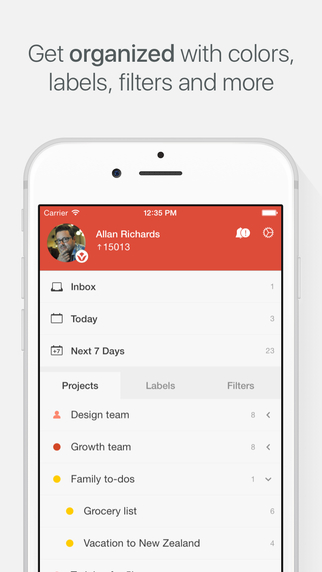
Todoist is a clean, fast task manager for both personal and work tasks, used by more than 50 million people and teams. You can capture tasks with Quick Add, sort them into projects, set reminders and switch between list and board layouts. It has 4.6 stars from 308,000 reviews on Google Play and 4.8 stars from 130,883 ratings on the App Store.
Pricing: the free Beginner plan includes 5 personal projects, task reminders, list and board layouts and 3 filter views. Pro costs $5 a month billed yearly ($60) or $7 billed monthly, and adds 300 projects, calendar and table layouts, task duration and full reporting history. Business is $8 per user a month billed yearly.
2. TickTick — Best for Daily Planning and Habits
TickTick combines a to-do list with calendar views, a habit tracker, white noise for focus and an Eisenhower Matrix. Tasks sync across Android, iOS, Wear OS, the web, Mac and PC. It has 4.6 stars from 167,000 reviews on Google Play and 4.9 stars from 47,063 ratings on the App Store.
Pricing: the free plan includes 9 lists with 99 tasks per list, list and Kanban views, reminders, cross-platform sync and up to 5 habits. Premium costs $49.99 a year and raises the limits to 299 lists and 999 tasks per list, with multiple calendar views, task duration and AI features.
3. Microsoft To Do — Best Free App for Microsoft 365 Users
Microsoft To Do is a free task manager for shopping lists, task lists, notes and reminders. Its My Day view and Suggestions help you plan each day, you can flag emails in Outlook to turn them into tasks, and tasks assigned to you in Microsoft Planner show up too. It has 4.6 stars from 485,000 reviews on Google Play and 4.7 stars from 270,473 ratings on the App Store.
4. Google Tasks — Best Free App for Gmail Users
Google Tasks is Google’s own free task app, part of Google Workspace. You can create task lists, star your most important tasks, break tasks into subtasks, set dates with notifications and create tasks straight from Gmail with a link back to the email. Your tasks sync across devices. It has 4.6 stars from 619,000 reviews on Google Play and 4.8 stars from 108,172 ratings on the App Store. (The old version of this guide linked a third-party app by mistake.)
5. Any.do — Best for Personal and Family Planning
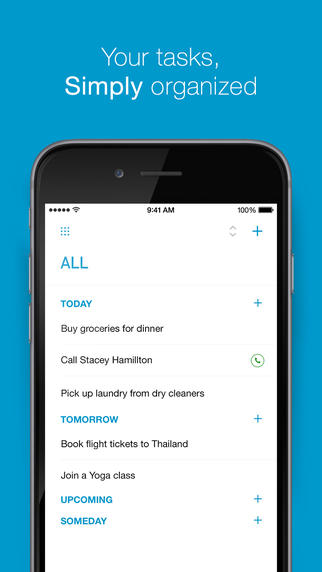
Any.do combines tasks and lists with reminders, a calendar and a daily planner, synced across devices. It has 4.4 stars from 506,000 reviews on Google Play.
Pricing: the Personal plan is free forever. Premium costs $4.99 a month billed yearly or $7.99 monthly and adds recurring tasks, WhatsApp reminders, AI features, color tags and location reminders. The Family plan is $8.33 a month billed yearly for 4 members, with a shared family space and grocery list, and Teams is $4.99 per member a month billed yearly.
6. Asana — Best for Teams
Asana is built for managing shared work: tasks live inside projects, and you can switch between list, board and calendar views. The free Personal plan is for one or two people and includes unlimited tasks and projects and 100+ free integrations, such as Slack, Google Drive and Zoom. Starter costs $10.99 per user a month billed yearly and adds timeline and Gantt views with no seat limit. It has 3.8 stars from 45,600 reviews on Google Play and 4.7 stars from 15,682 ratings on the App Store.
7. Superlist — Best for Shared Lists and Notes
Superlist comes from the team that created Wunderlist and mixes tasks, notes and shared lists, with AI meeting notes on its top plan. It runs on macOS, iOS, Android and the web.
Pricing: the free plan includes up to 5 private and shared lists, up to 5 people in shared lists and unlimited tasks and notes. Basic costs $5 per person a month billed yearly ($59) and adds unlimited lists and Voice AI; Super costs $17 per person a month billed yearly ($199) and adds unlimited AI meeting notes.
8. Remember The Milk — Best for Reminders Everywhere
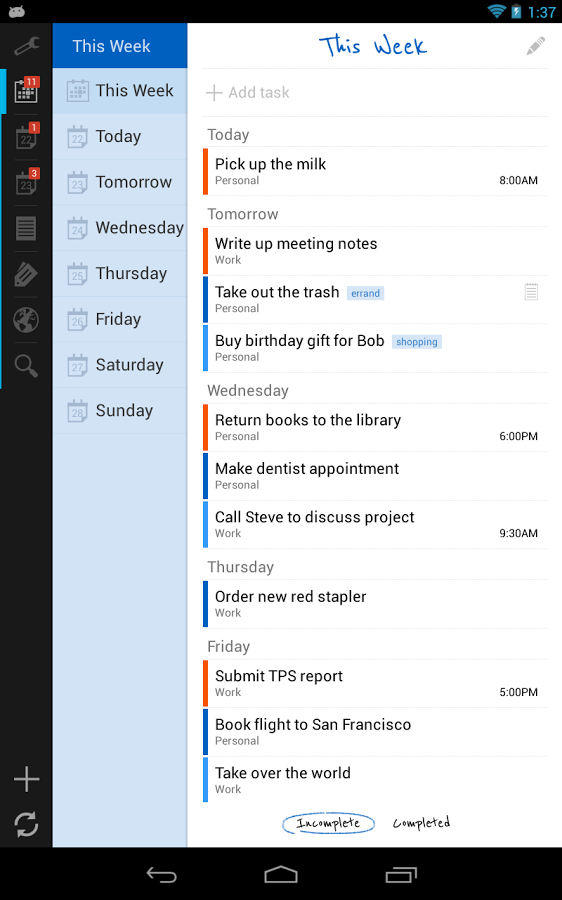
Remember The Milk is a smart to-do app that can remind you by email, text, IM and mobile notifications, lets you share lists and give tasks to others, and organizes tasks with priorities, due dates, repeats, lists and tags. It integrates with Gmail, Google Calendar and Evernote. The app is free to use; a Pro subscription adds subtasks, unlimited sharing, tag colors and advanced sorting. It has 4.7 stars from 51,400 reviews on Google Play.
9. Tasks.org — Best Open-Source App for Android
Tasks.org is an open-source, privacy-focused to-do app for Android with unlimited nested subtasks, flexible recurring tasks and drag-and-drop sorting. It can sync with Google Tasks, Microsoft To Do, CalDAV and its own Tasks.org Cloud, or work completely offline, and it has no ads or location tracking. It has 4.6 stars from 13,700 reviews on Google Play.
10. Things 3 — Best for iPhone and iPad Users
Things 3 is an award-winning planner for iPhone and iPad: you organize to-dos into projects and areas of your life, and the Today and Upcoming lists show your to-dos alongside your calendar events. It costs $9.99 on the App Store, where it has 4.8 stars from 28,106 ratings.
What happened to the apps on the old list
Microsoft ended support for Wunderlist in May 2020, and Producteev and Conqu are no longer on Google Play. Evernote and OneNote are note-taking apps rather than task managers; Evernote’s free plan now holds 50 notes in one notebook and syncs to one device.
How to Track Daily Tasks
- Capture everything in one app. Pick one app from this list and add every task as soon as you think of it.
- Give tasks a date. Due dates and reminders turn a long list into a daily plan.
- Plan each morning. Microsoft To Do’s My Day view, Todoist’s projects or TickTick’s calendar views help you choose what to do today.
- Track habits separately. TickTick’s habit tracker (5 habits free) keeps routines such as exercise or reading apart from one-off tasks.
- Share what you can. Shared lists in Any.do, Superlist or Remember The Milk keep household and team tasks in one place.
Is Todoist Actually Free?
Yes, with limits. Todoist’s Beginner plan costs $0 and includes 5 personal projects, task reminders, list and board layouts, 3 filter views and one week of reporting history. That’s enough for a personal to-do list, but if you need more projects, a calendar layout or task durations, Pro costs $5 a month billed yearly ($60) or $7 billed monthly.
For more ways to organize your work, see our guides to the best AI productivity apps and Kanban software.
Frequently Asked Questions
What is the best task management app?
Todoist is the best for most people: it’s simple to set up and has a useful free plan. TickTick is the best value if you want a calendar and habit tracker too, and Asana is better for teams that share projects.
Is Todoist actually free?
Yes. Todoist’s Beginner plan is free and includes 5 personal projects, reminders and list and board layouts. Pro costs $5 a month billed yearly and adds 300 projects, calendar and table layouts and task duration.
What is the best completely free task management app?
Microsoft To Do and Google Tasks are both free with no paid plan. Pick Microsoft To Do if you use Outlook or Microsoft 365, and Google Tasks if you live in Gmail and Google Calendar. On Android, Tasks.org is a free, open-source alternative with no ads.
What is the best daily activity app?
TickTick, because it combines tasks, calendar views and a habit tracker in one app, so you can plan your day and track routines together. Microsoft To Do’s My Day view is a simpler free alternative.
Is there a better app than a basic task manager?
If a simple to-do list isn’t enough, step up to an app built for bigger plans: Todoist and TickTick add projects, filters and calendar views for individuals, while Asana adds shared projects, timelines and Gantt views for teams.
Which task management app is best for teams?
Asana. Its free Personal plan covers one or two people, and Starter at $10.99 per user a month billed yearly adds timeline and Gantt views with no seat limit. Todoist Business ($8 per user a month billed yearly) is a lighter option for small teams.
What happened to Wunderlist?
Microsoft ended support for Wunderlist in May 2020. Its creators later built Superlist, which is on this list.