Windows 11 on 8GB of RAM: What Microsoft's New Update Changes
Microsoft's November 3 Windows 11 update makes PCs with 8GB of RAM keep more of your open work in memory, mostly through retuned memory compression and leaner Microsoft apps. The company claims up to 20% faster everyday responses and 40% faster multitasking in its own tests. To get it you need version 26H2, build 26300.9818 or later.
What Happened
On November 3, 2026, Pavan Davuluri, Microsoft's executive vice president for Windows and Devices, published a post on the Windows Experience Blog titled "Raising the bar for 8 GB Windows 11 PCs." It is a progress report on memory work Microsoft said it would prioritise back in July, when it named memory optimisation as one of the focus areas of its Windows quality push.
The headline numbers are Microsoft's own. On 8GB machines, Davuluri wrote, Windows is "up to 20% more responsive" and multitasking is "up to 40% faster in our lab test." The footnotes matter here. The responsiveness figure comes from telemetry on six everyday actions (opening Start, Search, right-click menus, Settings, Snipping Tool and File Explorer), comparing build 26300.9550 with the January 2026 build 26200.7628. The 40% multitasking figure comes from one scripted scenario on a single laptop, an HP OmniBook 3 with a Snapdragon X Plus chip and 8GB of RAM. Engineers opened 20 Edge tabs, a 4K video, large Word, PowerPoint and Excel files, Outlook and File Explorer one after another, and timed the whole sequence. Microsoft itself says the result "is not a benchmark."
The specific changes Microsoft listed are:
- Retuned memory compression that lets Windows keep up to 2GB more of your active data in RAM instead of moving it to the drive.
- Up to 900MB less committed-memory growth during multitasking across Windows, Edge and Microsoft 365, measured in September 2026. Word, PowerPoint, Excel and Outlook account for 360MB of that.
- Widgets load on demand on PCs with 8GB or less, saving roughly 200MB while the panel is closed.
- Edge sleeping tabs kick in after 15 minutes by default, down from two hours.
- Edge opens up to 33% faster from a link or Start because Windows connects to the copy already running in the background (this needs Edge 150 or later).
- Teams Efficiency Mode switches on by default on 8GB PCs, which Microsoft says makes Teams launch up to 20% faster.
Coverage from The Register tied the timing to the memory price surge, and to Microsoft's own results. In its fiscal first-quarter 2027 earnings release, for the quarter ended September 30, 2026, Microsoft reported that Windows OEM and Devices revenue fell 22%.
Why It Matters
For several years, 8GB was the spec reviewers told buyers to avoid. That advice has run into the memory market. AI data centres are absorbing so much DRAM supply that PC makers are paying far more for memory, and we covered how that squeeze could last until the end of the decade in our explainer on the SK Hynix memory shortage forecast. The practical effect is that 8GB laptops are returning to store shelves. Microsoft's own post ends by promoting 8GB Windows 11 PCs starting at $429 for the holidays.
That makes this update matter in three ways.
If you already own an 8GB PC, this is free performance. Fewer reloads of tabs and apps you switched away from is the most noticeable result of the compression change, and that is exactly the slowdown 8GB owners complain about most.
If you are shopping, the case for 8GB is a little stronger than it was a year ago, but only for light workloads. Microsoft says plainly that 3D modelling, advanced video editing and large-scale data processing "benefit from 16GB of memory or more."
For Microsoft, it is a reversal in tone. Copilot+ PCs require at least 16GB, and Windows has spent years adding features that run in the background whether you use them or not. Loading Widgets only when you open them is a quiet admission that always-on extras cost real memory on cheaper machines, and it follows the company's earlier promise to respond to Windows 11 complaints and cut bloat.
How It Works
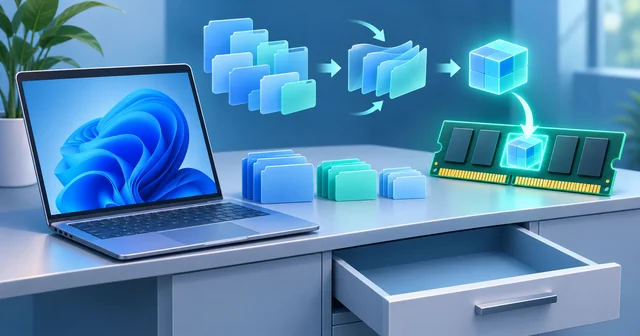
Microsoft's post uses a desk-and-drawer analogy. RAM is your desk, within instant reach; the drive is a drawer. When the desk fills up, Windows moves things you have not touched recently into the drawer (the page file on your SSD) and fetches them back when you return. Even a fast SSD is far slower than RAM for this, which is why an app you left an hour ago can take a second to wake up.
Compression: fitting more on the desk
Windows has compressed memory since Windows 10. Instead of writing an inactive page straight to disk, the memory manager can squeeze it into a compressed store that stays in RAM. Decompressing costs a little processor time, but it is much faster than a trip to the drive. Microsoft's memory management documentation describes the general virtual memory system this sits inside: every process sees its own address space, and Windows decides which pages actually live in physical RAM.
What changed in this update is the tuning, not the mechanism. Davuluri says Microsoft adjusted "how much to compress, when to use the drawer, and when to fetch something back" specifically for 8GB PCs. The result, by Microsoft's measurement on build 26300.9550, is up to 2GB more active data kept in RAM. The trade-off is a little more CPU work spent compressing and decompressing, which is one reason Microsoft also points to newer, faster processors as part of the picture.
Committed memory: using less in the first place
The 900MB figure measures something different. "Committed memory" is the amount Windows has promised to processes, backed by either RAM or the page file. When committed memory climbs past physical RAM, the system starts paging. Reducing how fast it grows during a work session means Windows reaches that point later, or not at all.
Most of the savings are in Microsoft's own software. Office apps now organise and allocate memory with less bookkeeping overhead. The Teams team, in a separate Microsoft Tech Community post, says Efficiency Mode switches on by default on devices with 8GB or less and lowers camera resolution during calls so the processor has headroom for audio. Microsoft also says platform changes let third-party apps benefit, citing a double-digit memory improvement in WhatsApp's Windows app.
Prioritising what you are doing
The responsiveness gains come from scheduling, not just memory. When you open Start or right-click, Windows now briefly favours that request and backs off background work such as search indexing, including in the first minutes after an update reboot.
What is coming next
Microsoft listed further work for the next few months: smarter compression, Search and Widgets sharing a single web engine (as will OneDrive and Photos), WinUI 3 apps such as File Explorer, Notepad and Paint that open faster and use less memory, and work with PC and chip makers to reduce how much RAM is reserved for hardware such as integrated graphics.
What's Still Unknown
How much you will notice. Every figure is Microsoft's, measured on its own builds and, for the 40% claim, one Snapdragon laptop. Independent testing on common Intel and AMD 8GB machines has not been published yet.
Whether other apps follow. Windows can only manage what apps ask for. PCWorld points out that Chrome's developers have said they will not trade site isolation or security for lower memory use. A PC running Chrome, Slack and a few Electron apps may see much less benefit than Microsoft's Edge-and-Office test.
The cost of compression on older chips. Compressing more memory uses more CPU. On a 2026 laptop that is cheap; on a 2019 dual-core machine running Windows 11 it could cut into the gains.
Rollout timing. Microsoft's footnotes repeat that "rollout timing and availability may vary by device and region," and several improvements arrive through Edge, Microsoft 365, Teams and Microsoft Store updates rather than through Windows Update.
The vendor-funded comparison. Microsoft-commissioned testing by Principled Technologies found a 2026 8GB Dell XPS 13 matching a 2021 16GB model on several workloads. That says more about processor progress than about 8GB being enough.
Frequently Asked Questions
Which Windows 11 build includes the 8GB memory improvements?
Microsoft says you need Windows 11 version 26H2, build 26300.9818 or later, for the full set announced on November 3, 2026. Some gains, including the faster Edge launch, also require Edge 150 or later. Several Office, Teams and Edge improvements arrive through app updates or the Microsoft Store rather than through Windows Update itself.
How do I get the update now?
Open Settings, then Windows Update, switch on "Get the latest updates as soon as they're available," and select Check for updates. Then update Microsoft Edge, Microsoft 365 apps and Teams, since part of the memory savings ship inside those apps. Microsoft warns that availability can vary by device and region, so it may not appear on every PC immediately.
Does this help PCs with 16GB of RAM?
Some of it does. The Office memory savings, faster Edge launch and interaction prioritisation apply broadly. But the compression tuning, on-demand Widgets and default Teams Efficiency Mode are aimed at machines with 8GB or less. A 16GB PC rarely runs out of physical memory in everyday use, so it has less paging to avoid and less to gain.
Is 8GB of RAM enough for Windows 11 in 2026?
For web browsing, email, documents, video calls and streaming, 8GB is workable, and this update makes it more comfortable. For gaming, video editing, 3D work, large spreadsheets, local AI models or heavy multitasking with Chrome and Electron apps, 16GB remains the safer choice. Microsoft itself recommends 16GB or more for demanding workloads, and memory is soldered on many laptops.
What is memory compression in Windows?
Memory compression lets Windows squeeze data from apps you are not actively using into a compact form that stays in RAM, instead of writing it to the page file on your drive. Bringing it back costs a little processor time, but it is far faster than reading from storage. Windows has done this since Windows 10; this update retunes it for 8GB machines.
Why do my browser tabs reload on a low-RAM laptop?
When RAM fills up, the browser or Windows discards or pages out tabs you have not used recently to free memory. Returning to one means reloading it. Microsoft says its compression changes keep up to 2GB more active data in memory, so tabs and apps are less likely to reload. Edge also now puts inactive tabs to sleep after 15 minutes.
Can I change Edge's 15-minute sleeping tabs setting?
Yes. Edge's sleeping tabs feature has a setting under System and performance that controls how long a tab must be inactive before it sleeps, and you can exclude specific sites. The new 15-minute default only replaces the old two-hour default. If a site you rely on loses state when it sleeps, add it to the exclusion list instead of turning the feature off.
Should I buy an 8GB laptop this holiday season?
Only if your use is light and the price gap to 16GB is large. Check whether the RAM is soldered, because if it is you can never upgrade it. A newer processor helps, as Microsoft's own testing shows, but no software update adds capacity. For a machine you plan to keep four or more years, 16GB is still the better buy.
Related Reading
The reason 8GB machines are back is the DRAM squeeze, which we explain in what SK Hynix's memory shortage forecast means for your PC. For background on Microsoft's broader promise to make Windows lighter, see how Microsoft responded to Windows 11 complaints about Copilot bloat. If you are weighing the newest Arm-based Windows hardware, our look at what Nvidia's RTX Spark laptops change for Windows PCs covers how chip design affects memory and performance, and our long-running best laptops buying guide compares current models across budgets and RAM configurations.