Understanding Leadpages in 2026: Features, Pricing & Alternatives
Leadpages is a landing-page and website builder aimed squarely at lead generation and conversion. First launched in 2012, it has grown into an AI-assisted platform that builds branded pages in seconds, runs A/B tests on autopilot, and captures leads through forms and pop-ups. This guide explains what Leadpages does in 2026, what it costs, where it shines, and which alternatives may fit you better.
Key takeaways:
- Leadpages is a landing-page and website builder focused on lead generation, conversion, and A/B testing.
- Its 2026 AI Engine generates full branded pages, copy, and images from a plain-language prompt.
- Main conversion plans run roughly $49 (Grow), $99 (Optimize), and $399 (Scale) per month, with a cheaper HTML Pub line and a short free trial.
- It suits small businesses, marketers, and course creators who want conversion tools without juggling multiple subscriptions.
- Alternatives like Unbounce, Instapage, Kit, Carrd, Systeme.io, Webflow, and HubSpot fit better for design control, email focus, budget, or CRM integration.
What Leadpages Is
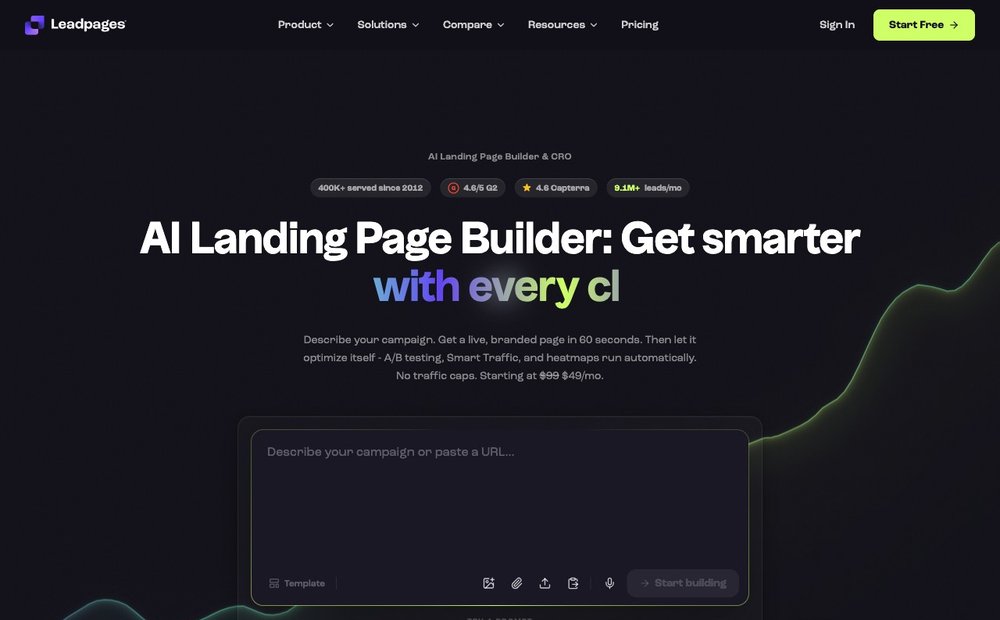
Leadpages is a hosted landing-page and lightweight website builder built around a single goal: turning visitors into leads and customers. Rather than positioning itself as a general-purpose web design tool, it focuses on conversion-oriented pages such as opt-in forms, webinar registrations, sales pages, and small-business sites.
The platform pairs a drag-and-drop editor with a large library of conversion-tested templates, then layers on tools for capturing and routing leads. In 2026 Leadpages describes itself as an "AI landing page builder with built-in A/B testing and CRO," reflecting how much of the workflow now runs through its AI Engine. It serves a reported 400,000-plus customers and aims to consolidate what used to require several separate tools, a page builder, a split-testing tool, heatmap software, and lead-enrichment services, into one subscription.
Key Features in 2026
Leadpages combines a visual editor with a growing set of AI and conversion features. The headline capabilities include:
- AI Engine page generation — describe a page in plain language and the AI produces headlines, copy, images, forms, and a conversion path in under a minute.
- AI copywriting and image generation — generate and rewrite section copy (adjusting tone and length) and create on-brand visuals from a text prompt, without separate design tools.
- Auto Brand Kit — point the AI at a URL and it extracts logo, colors, fonts, and tone so generated pages stay on brand.
- Drag-and-drop builder and templates — a grid-based editor plus a library of conversion-focused templates for sales, lead gen, webinars, and portfolios.
- A/B testing and Smart Traffic — manual split testing on entry tiers, with AI-driven traffic routing to the best-performing variant on higher plans.
- Leadboxes, pop-ups, and alert bars — on-page opt-in widgets and notification bars to capture emails without sending visitors elsewhere.
- Payments and integrations — embedded Stripe checkout plus 25+ native integrations including HubSpot, Salesforce, Mailchimp, Meta, Google Ads, and Shopify, with Zapier and API access.
Newer additions include heatmaps, dynamic text replacement for ad-to-page matching, visitor intelligence/lead enrichment, and the ability to publish pages directly from AI assistants such as Claude or ChatGPT.
Pricing Plans
Leadpages restructured its pricing in 2026, and the figures below should be treated as approximate, the company runs frequent promotions and changes tiers. The core conversion-focused plans are:
- Grow — around $49/month (often discounted for the first few months), with roughly 500 pages, manual A/B testing, dynamic text replacement, and basic lead enrichment.
- Optimize — around $99/month, adding Smart Traffic, heatmaps, auto-personalization, more integrations, and extended analytics. This is positioned as the most popular tier.
- Scale — around $399/month, aimed at teams and agencies, with the highest page limits, more custom domains, team seats and workspaces, and the full auto-optimization loop.
Leadpages also offers a separate, cheaper "HTML Pub" publishing line (Starter around $10/month) for hosting pages without the full CRO toolkit, plus a free publishing tier. Annual billing typically saves about 20% versus monthly, and there is a short free trial (around 7 days) rather than a permanent free plan. Note that older reviews still cite the previous "Standard / Pro / Advanced" plan names, so always confirm current tiers on the official pricing page.
Pros and Cons
Leadpages has clear strengths, but it is not the right fit for every project. Weigh these honestly:
Pros:
- Fast, beginner-friendly page creation, especially with AI generation handling the blank-page problem.
- Conversion tooling (A/B testing, Smart Traffic, heatmaps, Leadboxes) built in rather than bolted on.
- No traffic caps on its plans, a notable edge over rivals that limit visitors per tier.
- AI copy and image generation included at no extra cost, reducing the need for separate tools.
- Large template library and broad integrations with popular marketing and CRM platforms.
Cons:
- The grid-based editor offers less pixel-perfect freedom than Webflow or Instapage.
- Entry-tier limits (page counts, restricted A/B testing) push serious testers toward pricier plans.
- It is a paid-only platform after a short trial, so there is no free long-term option.
- As a full website builder it is more limited than dedicated CMS or design tools.
- Frequent pricing and plan-name changes can make it hard to compare against past reviews.
Best Use Cases
Leadpages is at its strongest when the primary objective is capturing leads or driving a single conversion action. Common scenarios where it fits well include:
- Lead magnets and opt-in pages — ebooks, checklists, and newsletter sign-ups paired with Leadboxes and pop-ups.
- Webinar and event registration — dedicated pages with forms that sync to your email or CRM tool.
- Course and product launches — sales pages with embedded Stripe checkout and A/B-tested headlines.
- Paid-ad landing pages — dynamic text replacement keeps the page message matched to ad copy for better Quality Score and conversions.
- Small-business websites — simple multi-page sites or microsites for local businesses that need lead capture more than a full CMS.
If you mainly run marketing campaigns and want measurable conversions without stitching together multiple tools, Leadpages is a natural fit.
Top Alternatives
Leadpages sits in a crowded market, and the best choice depends on your priorities, design control, email focus, budget, or all-in-one breadth. Leading alternatives include:
- Unbounce — strong A/B testing and AI Smart Traffic; suits performance marketers focused on paid-ad optimization (though it caps traffic).
- Instapage — enterprise-grade landing pages with heatmaps and collaboration; best for larger teams running many campaigns.
- Kit (formerly ConvertKit) — landing pages built around email; ideal for creators, newsletter writers, and solo entrepreneurs.
- Carrd — ultra-cheap single-page sites; great for portfolios, simple opt-ins, and coming-soon pages.
- Systeme.io — a free-for-life all-in-one with funnels and email; good for budget-conscious solopreneurs.
- Webflow — maximum design freedom and animation control; suited to designers who want pixel-perfect, fully custom sites.
- HubSpot — landing pages tied to a full CRM and marketing suite; best for teams that want unified sales and marketing data.
Is Leadpages Right for You?
Leadpages is a strong choice if you are a small business owner, marketer, or course creator who needs to launch conversion-focused pages quickly without hiring a designer or juggling several subscriptions. The AI Engine flattens the learning curve, the template library covers most lead-generation scenarios, and the built-in A/B testing and lead-capture tools mean you can actually improve results over time rather than just publishing a page and hoping.
An alternative may serve you better in a few cases. If you need total design control and custom animations, Webflow is the better tool. If your business runs entirely on email and you are a creator, Kit is more focused and affordable. If budget is the deciding factor, Carrd or Systeme.io offer free or near-free entry points, and if you want landing pages welded to a full CRM, HubSpot makes more sense.
To get started, sign up for the free trial, use the AI Engine to generate a first page from a plain-language prompt, connect your email or CRM integration, and set up a simple A/B test. That short experiment will tell you quickly whether Leadpages fits your workflow before you commit to a paid plan, and confirm the current pricing tier directly on the Leadpages site, since plans change often.
Sources & Further Reading
- Leadpages official site
- Leadpages AI Engine
- Unbounce
- Instapage
- Kit (formerly ConvertKit)
- Carrd
- Systeme.io
- Webflow
Frequently Asked Questions
What is Leadpages used for?
Leadpages is used to build landing pages, opt-in pages, and lightweight websites focused on lead generation and conversion. Marketers and small businesses use it for lead magnets, webinar sign-ups, sales pages, and paid-ad landing pages. It also includes forms, pop-ups, and A/B testing to capture and optimize leads.
How much does Leadpages cost in 2026?
In 2026 the main Leadpages conversion plans are roughly Grow at $49/month, Optimize at $99/month, and Scale at $399/month, with annual billing typically saving about 20%. There is also a cheaper HTML Pub publishing line starting around $10/month. Prices and plan names change frequently, so confirm current figures on the official pricing page.
Does Leadpages have AI features?
Yes. The Leadpages AI Engine can generate a full landing page, headlines, copy, images, and a form, from a plain-language prompt in under a minute. It also offers AI copy rewriting, AI image generation, an auto brand kit that pulls colors and fonts from your URL, and A/B test suggestions.
Is there a free version of Leadpages?
Leadpages does not offer a permanent free plan for its full conversion toolkit, but it provides a short free trial (around 7 days) so you can test it. There is also a free HTML Pub publishing tier for hosting pages without the full CRO features. For a free all-in-one option, alternatives like Systeme.io or Carrd's free tier may suit better.
What are the best Leadpages alternatives?
Top alternatives include Unbounce and Instapage for advanced A/B testing, Kit (formerly ConvertKit) for email-focused creators, Carrd and Systeme.io for budget-conscious users, Webflow for full design control, and HubSpot for teams that want landing pages tied to a CRM. The right pick depends on your budget, design needs, and whether you want an all-in-one platform.
Is Leadpages good for beginners?
Yes. Leadpages is designed to be beginner-friendly, with a drag-and-drop editor, conversion-tested templates, and an AI Engine that builds a page from a simple description. Beginners can launch a professional lead-capture page without coding or design skills, though pixel-perfect customization is more limited than in tools like Webflow.
Pricing and AI feature details reflect Leadpages' 2026 marketing and change frequently; confirm current plans on the official pricing page. Information is based on public sources and vendor pages current as of June 2026. Details, prices and plans change frequently — verify on the official site before relying on them.