The Ultimate Cyber Gift for Your Best Friend: How to Turn Your Funniest Chat Moments Into an R&B Song
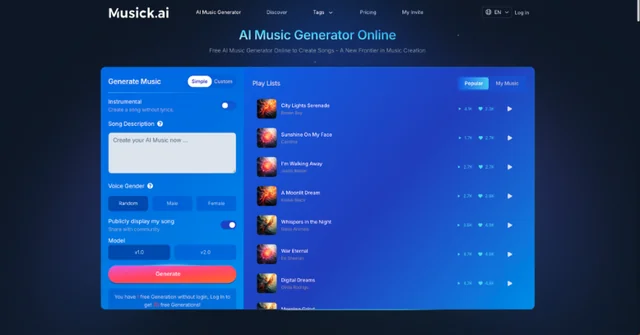
There's a group chat moment so chaotic, so perfectly unhinged, that it deserves more than just a screenshot — it deserves a song. Musick AI, a free AI Music Generator, makes that possible with no music degree, no studio, and no technical know-how required. Just a story worth telling and a few clicks.
I. Why Turn a Chat Into a Song?
Think about the last time a friend sent something so ridiculous in the group chat that the whole thread exploded. That moment lives for a day, then gets buried under memes. Turning it into a song keeps it alive — and makes it the kind of gift nobody forgets.
Birthdays, inside jokes, roast sessions, "remember when" moments — all of it can become a real, playable track. The best part? The person receiving it knows it was made just for them.
II. What Is Musick AI, Exactly?
Musick AI is a free AI music generator that creates full songs — complete with vocals, lyrics, and instrumentation — across a wide range of genres. Users can pick from R&B, Hip-hop, Pop, EDM, Jazz, Reggae, K-pop, and more. The tool is built for everyone, not just musicians.
Beyond song generation, Musick AI includes three additional tools that make it especially useful for creative, personal projects:
-
AI Song Lyrics Generator — generates lyrics based on genre and mood inputs
-
AI Beat Producer — lets users write down melody notes and build a beat
-
AI Rap Generator — designed for creating music sheets and rap-style tracks
For something like a funny birthday song or a "you won't believe what happened" R&B ballad, the AI Song Lyrics Generator is the key starting point.
III. Step-by-Step: From Chat Screenshot to R&B Track
Step 1 — Pick the Moment
Not every message is song material. Look for something with emotion — a dramatic overreaction, an embarrassing confession, a food order that went catastrophically wrong. The more specific and personal it is, the funnier (and better) the song will be.
Step 2 — Open the AI Song Lyrics Generator
Head to Musick AI and open the AI Song Lyrics Generator. Input the genre (R&B works perfectly for dramatic storytelling) and describe the mood. Be specific — instead of typing "funny song," try something like "dramatic R&B ballad about a friend who ate the last dumpling without asking." Specific prompts give the AI enough context to create something genuinely usable.
The generator will produce lyrics with verse and chorus structure, which can be edited or used as-is.
Step 3 — Generate the Full Song
Once the lyrics are ready, go to the main AI Music Maker interface. In the prompt box, describe the style and topic. For an R&B track, something like: "smooth R&B with soulful vocals, emotional build in the chorus, about a betrayal involving food" gives the AI a clear direction. Choose a vocalist gender preference, select R&B as the genre, and hit generate.
Musick AI produces the full song — beat, vocals, and all — in one go.
Step 4 — Download and Gift It
Once the track sounds right, download it and send it over. Drop it into the group chat with zero context and watch the reactions roll in.
IV. Why R&B Works Best for This
R&B is naturally dramatic. The genre thrives on emotional storytelling, and that makes it perfect for exaggerating everyday situations into something that sounds genuinely heartfelt — even when the subject matter is completely absurd. A song about a friend who was two hours late to dinner hits differently when it's delivered over a slow R&B groove with real vocals.
Musick AI supports R&B as one of its core genres, and the vocal selection feature lets users choose the gender of the singer, which adds another layer of personalization to the gift.
V. Other Ways to Use This for Gifts
The birthday R&B roast is just one idea. Here are a few other formats that work well with the AI Song Maker approach:
-
Birthday tribute song — write lyrics about a friend's personality quirks, generate it in Pop or R&B, and send it as a voice note-style gift
-
Anniversary inside joke track — for couples or best friends marking a milestone, turn a shared memory into a song
-
Group chat anthem — capture the vibe of an entire friend group in one track, then share it to the whole thread
-
"Congratulations" song — for a new job, graduation, or any win worth celebrating with something more personal than a card
The AI Song Lyrics Generator handles the words. The Musick AI generator handles the sound. All the human contribution needed is the story.
VI. Tips for Getting Better Results
The quality of the output depends heavily on the quality of the input. A few things that consistently improve results:
-
Use emotions, not just events. Instead of "my friend forgot my birthday," try "deep betrayal, bittersweet forgiveness, slow burn R&B."
-
Reference instruments or energy. Words like "soulful," "slow burn," "big chorus," or "warm bassline" help the AI build a more fitting track.
-
Describe the vibe, not a specific artist. The tool works best with genre descriptors and moods rather than artist names.
-
Try more than once. Each generation is slightly different. Running the same prompt two or three times often produces one version that's noticeably better than the others.
VII. Entertainment That Actually Means Something
Most gifts get used once or forgotten. A song stays. It gets replayed at parties, sent around to mutual friends, and referenced for years. Musick AI was built with entertainment use cases in mind — the tool explicitly highlights sharing songs with friends and expressing feelings as core reasons to use it.
The AI Music Generator isn't replacing musicians. It's giving regular people access to something they couldn't create before — a real, custom song that sounds like it was produced, not typed out in a text box. For the kind of gift that's equal parts funny, thoughtful, and completely unexpected, that's hard to beat.