Roku Streaming Stick 4K Review (2026): Dolby Vision on a Budget
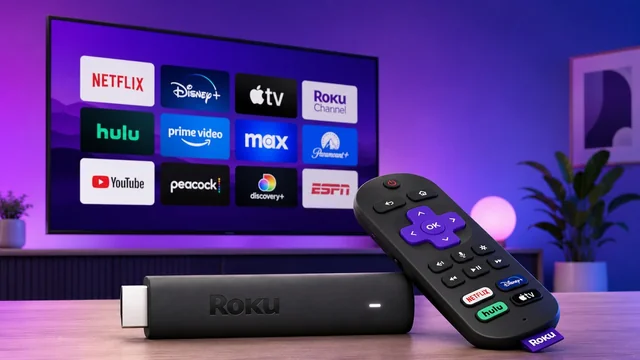
Updated June 2026: refreshed pricing, current availability, and where the Streaming Stick 4K now sits in Roku's 2025 lineup.
Roku replaced its Streaming Stick Plus — long one of the best-value 4K streaming players you could buy — with the Roku Streaming Stick 4K. The name is sharper, but on the outside the hardware looks practically identical, and that's fine: design barely matters for a dongle that disappears behind your TV.
Roku Streaming Stick 4K at a glance
| Spec | Roku Streaming Stick 4K |
|---|---|
| Price | Launched at $49.99; typically ~$45.99 in 2026 |
| Max resolution | 4K (3840 × 2160) at 60fps |
| HDR formats | Dolby Vision, HDR10, HDR10+, HLG |
| Wi-Fi | Dual-band Wi-Fi 5, long-range antenna cable |
| Audio | Dolby Atmos passthrough, AirPlay 2 |
| Remote | Roku Voice Remote (TV power/volume), upgradeable to Voice Remote Pro |
| Processor | Quad-core, ~30% faster boot vs. previous model |
Like its predecessor, the stick plugs straight into an HDMI port on the back of your TV, where it stays hidden from view. The meaningful upgrades are under the hood: it's faster, it has better Wi-Fi reception, and it adds Dolby Vision and HDR10+ support. There's also a Streaming Stick 4K Plus bundle that pairs the same hardware with Roku's Voice Remote Pro.
Beyond snappier boot times and apps that load a hair quicker, the day-to-day experience feels familiar. That's not a criticism — Roku's deliberately simple software is exactly what has kept its active-user base enormous and kept the company neck and neck with Amazon as a leading streaming platform.
Roku still resists overhauling its grid-of-apps home screen, preferring smaller tweaks and sections like "Featured Free" that surface free-to-stream content (and, conveniently, Roku's own ad-supported Roku Channel). Its universal search remains a genuine strength, prioritizing free content and your existing subscriptions over paid options.
Design and remote
The Roku Streaming Stick 4K closely resembles the Stick Plus. Where that device was mostly glossy, this one is matte black plastic apart from the "Roku" lettering. They're essentially the same size — the newer stick is only marginally thinner — and it still uses a Micro USB port for power. Importantly, the included USB power cable doubles as a long-range Wi-Fi antenna, so you'll want to use that cable rather than a random spare.
In the box is Roku's standard voice remote, with shortcut buttons for popular streaming apps plus power and volume controls for your TV. There's no headphone jack on this base remote — for that, plus a rechargeable battery, hands-free voice, and a built-in remote finder, you'd step up to the Voice Remote Pro. Still, the included remote covers the essentials.
Setup
Setup involves plenty of hand-holding, most of it through a web browser rather than the device itself. After activating the stick via an emailed link, you're asked which top streaming apps to install, and Roku suggests more based on your interests. You'll also see a screen highlighting 20-plus free streaming options.
Several of those nudges point toward subscriptions billed through The Roku Channel, which can feel a touch spammy — but you're quickly dropped into the same familiar app-grid home screen. When it's time to log into apps, you can use voice dictation to enter your email and password.
Performance and Wi-Fi
Roku says the Streaming Stick 4K boots up about 30 percent faster than the previous model from a powered-off state, thanks to a more powerful quad-core processor. The company doesn't make big claims about everyday navigation, but combined with the improved long-range Wi-Fi receiver — which can pull down streams up to twice as fast as before — apps run smoothly and streams start without delay.
One caveat that still stands in 2026: the Streaming Stick 4K is on Wi-Fi 5, whereas Amazon's similarly priced Fire TV Stick 4K Max moved to Wi-Fi 6. For most home networks that won't matter, but it's worth noting.
HDR: the real reason to upgrade
Dolby Vision is the headline reason to step up from an older Roku. There's now a deep catalog of Dolby Vision content across services like Netflix and Disney+, and the Streaming Stick 4K plays it all back without trouble. HDR10+ matters more if you own a Samsung TV and remains more limited in content. We didn't run into the occasional overheating the older Stick Plus could show. Roku's players also support Apple's AirPlay 2, making it easy to push content from an iPhone, iPad, or Mac.
Where it sits in Roku's 2025 lineup
Since this review first published, Roku refreshed its sticks in 2025 with even slimmer designs and retired the old Roku Express and Express 4K+. Here's how the current lineup compares:
| Model | Price | Max resolution | HDR | Best for |
|---|---|---|---|---|
| Roku Streaming Stick (HD) | $29.99 | 1080p | — | Secondary / older TVs |
| Roku Streaming Stick Plus (4K) | $39.99 | 4K | HDR10, HDR10+, HLG | Most people; powers from TV USB |
| Roku Streaming Stick 4K | ~$45.99 | 4K | + Dolby Vision | Dolby Vision & long-range Wi-Fi |
The practical takeaway: if you don't care about Dolby Vision, the cheaper Streaming Stick Plus covers most people. The Streaming Stick 4K is the pick when you want Dolby Vision and the extended Wi-Fi range.
How it compares to other platforms
By now you probably know which streaming ecosystem you prefer:
- Roku is the easiest to use, though it lacks substantial smart-home controls.
- Fire TV packs a lot of value (and Alexa) at similarly low prices.
- Google TV has the best content recommendations.
- Apple TV has the most reliable performance.
- Devices like the Nvidia Shield add gaming and room to tinker.
Verdict
Our rating: 4.5 / 5. The Roku Streaming Stick 4K is a safe, sensible evolution of one of Roku's bestselling products, delivering the upgrade that mattered most — Dolby Vision — alongside faster boot times and better Wi-Fi. The draws are the same as any Roku: a straightforward interface, a complete app selection with no real content gaps, and an appealingly low price. The trade-off is Roku's well-known data collection, which helps keep these devices cheap. If your current Roku feels sluggish or can't get the most from a 4K HDR TV, it remains an easy, affordable upgrade.
Frequently Asked Questions
Does the Roku Streaming Stick 4K support Dolby Vision?
Yes. The Roku Streaming Stick 4K supports Dolby Vision, along with HDR10, HDR10+, and HLG. It's the only stick in Roku's current lineup that adds Dolby Vision, which is the main reason to choose it over the cheaper Streaming Stick Plus.
How much does the Roku Streaming Stick 4K cost in 2026?
It launched at $49.99 and now typically sells for around $45.99. The newer Roku Streaming Stick Plus (4K) is $39.99 and the HD Roku Streaming Stick is $29.99.
What's the difference between the Roku Streaming Stick 4K and the Streaming Stick Plus?
Both stream in 4K with HDR10, HDR10+, and HLG. The Streaming Stick 4K adds Dolby Vision and ships with a long-range Wi-Fi antenna cable, while the cheaper Streaming Stick Plus draws so little power it can run straight from your TV's USB port. If you don't need Dolby Vision, the Plus is the better value.
Does the Roku Streaming Stick 4K have Wi-Fi 6?
No. It uses dual-band Wi-Fi 5 with a long-range receiver. Amazon's similarly priced Fire TV Stick 4K Max uses Wi-Fi 6, but for most home networks the difference won't be noticeable.
Is the Roku Streaming Stick 4K worth buying in 2026?
Yes, if you want Dolby Vision on a budget or your current Roku feels sluggish. It's still widely available and remains an easy, affordable upgrade. If you don't need Dolby Vision, consider saving a few dollars with the Roku Streaming Stick Plus.