Remove.bg vs Canva vs SaveDelete: Background Removers Compared (2026)
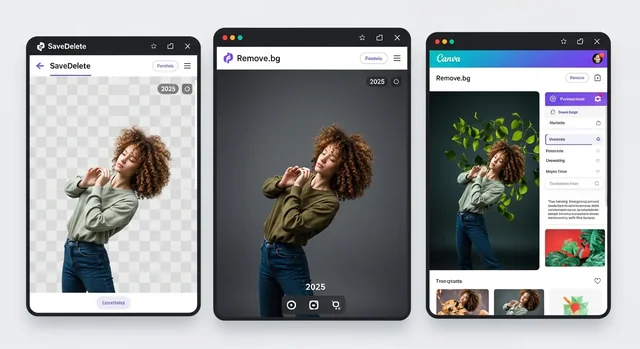
Remove.bg made one-click background removal mainstream, Canva folded the same idea into a full design editor, and we built a free tool of our own. This comparison looks at what each actually gives you in September 2026 — and it starts with news that changes the answer for many people: remove.bg's standalone website is closing.
A note on bias: SaveDelete makes one of the three tools compared here. We have tried to be straight about where the other two are the better choice, and every fact below was checked against each company's own pages in September 2026.
Remove.bg Is Closing on 1 December 2026
Remove.bg, owned by Canva since 2021, says its website will no longer be available from 1 December 2026. Background removal moves into Canva itself, and the self-service developer API moves to Leonardo.Ai, another Canva company. Its desktop app and its Photoshop and Figma plugins end on the same date, as do subscriptions: annual plans get a pro-rata refund, and unused pay-as-you-go credits expire. If you rely on remove.bg for regular work, plan the move now rather than in the last week of November.
Quick Comparison
| SaveDelete | Remove.bg | Canva | |
|---|---|---|---|
| Status | Available | Website closes 1 Dec 2026 | Available |
| Free result | Full resolution | Preview only, up to 0.25MP (e.g. 625×400), non-commercial | One free try; otherwise a paid plan |
| Price for full quality | Free, no signup, no watermark | From $9/month for 40 images, or $3 for 3 pay-as-you-go | Canva Pro, about $18/month or $180/year |
| Upload limit | 10MB; JPG, PNG, WebP | 22MB | Under 9MB; results over 10MP scaled down |
| Output | Transparent PNG at original size | Up to 50MP on paid credits | Inside your Canva design |
| Where it runs | Our server, open-source U²-Net model | Remove.bg's servers (Europe and Canva facilities) | Canva's servers |
| Replace the background | No — transparent only | Yes | Yes, with the whole editor |
| Images at once | One at a time | Batch via desktop app (until 1 Dec) | Per image in the editor |
| Developer API | No | Yes until 1 Dec (50 free calls/month), then Leonardo.Ai | No |
SaveDelete Background Remover
Our free background remover does one job: upload a JPG, PNG or WebP of up to 10MB and download a transparent PNG at the same size as the original. There is no account, no watermark, no credit system and no reduced-resolution "preview" — the file you download is the full result.
It runs on our own server using U²-Net, a widely used open-source segmentation model, through the rembg library. Your image is not sent to any third-party service. The original is processed in memory and never saved, and the transparent PNG is kept on our server for about an hour so that you can download it, then deleted automatically.
Where it falls short: U²-Net is a general-purpose model, and it is at its best with a clear subject against a contrasting background. Fine hair, fur, smoke and glass are where commercial tools trained for exactly those cases do noticeably better. There is no edge-refinement control, it cannot fill in a new background colour or scene, and it handles one image at a time. There is no API.
Best for: product shots, profile photos and simple cut-outs when you want a full-size result for free.
Remove.bg
Remove.bg set the standard for automatic cut-outs, and its results on hair and fine edges remain very good. Free use gives you a preview of up to 0.25 megapixels — around 625×400 — for non-commercial use. Full-resolution downloads, up to 50 megapixels, cost one credit each: subscriptions start at $9 a month for 40 credits, and pay-as-you-go credits start at $3 for 3. A free account also includes 50 free previews a month through the API and apps.
On privacy, remove.bg says images uploaded through its website are deleted within about an hour, and API images right after processing. Its help centre says uploads are not used to train its AI unless you opt in, though its privacy policy is broader, reserving the right to analyse uploads to improve its models.
Where it falls short: the closure. Anything you build around remove.bg today — a workflow, a plugin, API calls in your own code — has until 1 December 2026 before it needs replacing.
Best for: high-quality paid cut-outs between now and December, especially of people and pets.
Canva Background Remover
Canva's background remover works inside the Canva editor, which is its real advantage: remove the background, drop in a new one, add text and export a finished design without switching tools. It is a paid-plan feature — Canva Pro cost US$18 a month or $180 a year for one person as of August 2026 — and non-subscribers get a single free try. Verified K-12 teachers and students on Canva for Education, and registered nonprofits, get it at no cost. Photos must be under 9MB, and results larger than 10 megapixels are scaled down to 10MP.
Where it falls short: it is not a standalone free tool, and the 10MP cap matters for large print work. If you only need occasional cut-outs, a Canva subscription is a lot to pay for one feature.
Best for: anyone already designing in Canva, social media graphics, and — after December — former remove.bg users.
Which Should You Use?
- A free cut-out at full size, without an account: SaveDelete. It is the only one of the three that gives you full resolution for free.
- Hair, fur or tricky edges that must look perfect: remove.bg until 1 December, then Canva.
- A finished graphic with a new background: Canva, since the editor is right there.
- An automated workflow or API: remove.bg's API works until 1 December; after that it moves to Leonardo.Ai. Neither SaveDelete nor Canva offers a background-removal API.
- A private image: none of the three processes images on your own device. For sensitive photos, a desktop editor such as Photoshop or the built-in subject selection in Apple Photos and Preview keeps the file on your machine.
For more options, including desktop and mobile apps, see our guide to AI tools that remove backgrounds from images. If the finished image is too large for an upload form, our image compressor can bring it under a specific size.
Frequently Asked Questions
Which background remover is completely free to use?
SaveDelete's is free at full resolution, with no account or watermark. Remove.bg's free option is a low-resolution preview for non-commercial use, and Canva's background remover needs a paid plan after one free try, except on Canva for Education and Canva for Nonprofits.
Can these tools handle complex images with hair and fur?
Remove.bg and Canva handle fine hair and fur best. SaveDelete's open-source model does well on clear subjects with defined edges, but wispy hair, fur and semi-transparent objects can come out with rougher edges.
Do I need design experience to use these tools?
No. All three remove the background automatically in one step. Canva adds a full design editor if you want to go further, but you do not have to use it.
Which tool is best for e-commerce product images?
For a few products on a plain background, SaveDelete gives full-size transparent PNGs for free. For large catalogues, you will want batch processing, which remove.bg offers through its desktop app and API until 1 December 2026.
Can I use these tools for commercial purposes?
SaveDelete results can be used commercially. Remove.bg's free previews are for non-commercial use only; its paid, full-resolution images can be used commercially. Canva allows commercial use of designs made on its paid plans, subject to its content licence.
What is the maximum image resolution supported?
SaveDelete returns the original resolution for uploads of up to 10MB. Remove.bg produces up to 50 megapixels on paid credits but only 0.25 megapixels for free. Canva scales results above 10 megapixels down to 10MP.
Are there mobile apps available?
SaveDelete's tool works in any mobile browser. Canva has mobile apps with the background remover on paid plans. Remove.bg's apps and integrations end on 1 December 2026 along with the website.
Is there an API for developers?
Only remove.bg, among these three, and only until 1 December 2026, with 50 free calls a month. After that, the self-service API moves to Leonardo.Ai. SaveDelete and Canva do not offer a background-removal API.
Can I batch process multiple images?
Remove.bg supports batches through its desktop app and API until December. SaveDelete processes one image at a time, and Canva works image by image inside the editor.
What happens to my images after processing?
Remove.bg says web uploads are deleted within about an hour and API images immediately. SaveDelete processes your original in memory without saving it, keeps the resulting PNG for about an hour so you can download it, and then deletes it automatically. Canva keeps images in your account as part of your designs until you delete them.
The Bottom Line
With remove.bg's website closing on 1 December 2026, the choice is getting simpler. Use Canva if you design there anyway or need the best edges on hair and fur, remove.bg for paid work only until its closing date, and SaveDelete when you want a clean, full-size cut-out for free without signing up for anything.
Facts checked September 2026 against each company's own website. Prices and limits change, and Canva's prices vary by country; check the vendor's page before you pay.