AI Overviews Are Coming to Gmail at Work — What That Means for Your Inbox
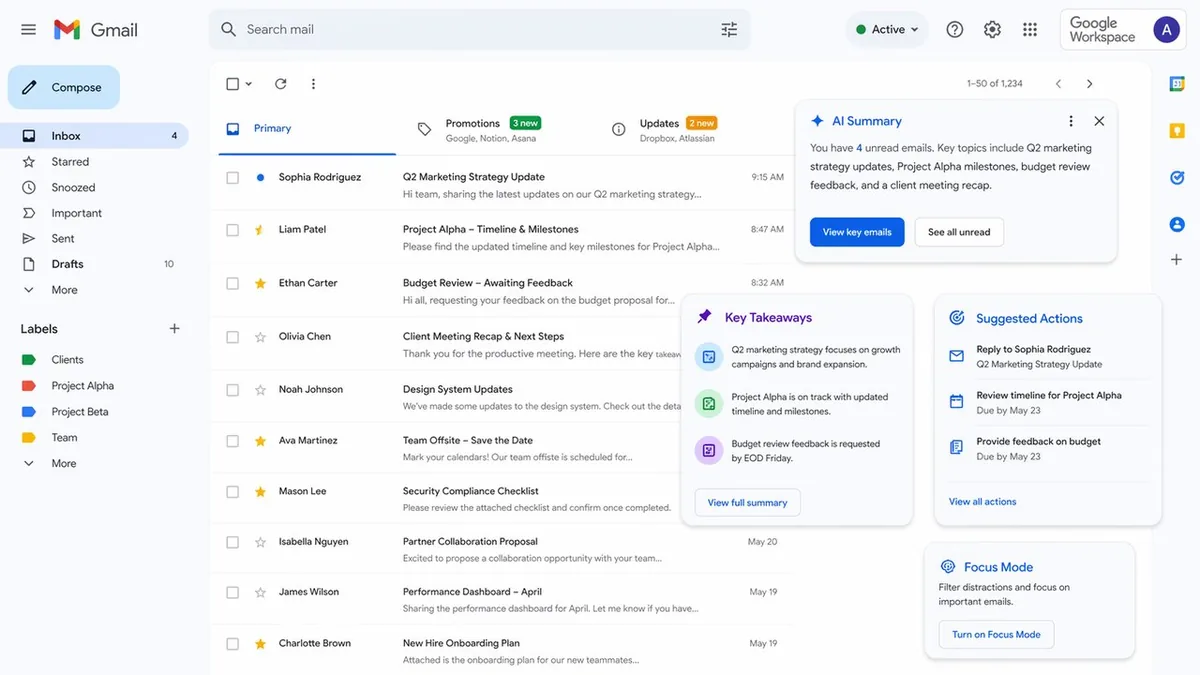
If you've used Google Search's AI Overviews and found yourself reading less of the actual page, you understand the tradeoff Google is now bringing to your work email. Gmail is getting AI-powered overviews for Workspace users — auto-generated summaries that surface what matters in your inbox without requiring you to read every email thread yourself. It sounds like productivity. It also comes with questions worth asking.
What's Actually Happening
Google is deploying Gemini-powered AI Overview cards in Gmail for Workspace enterprise users. When you open a long email thread or an inbox with multiple related messages, Gemini generates a summary of the key points, decisions, and action items — displayed as a card above the thread. You can see what's important without reading everything sequentially.
The feature also includes "Suggested Actions" — AI-generated prompts for what you should do next based on the email content. Reply to this person. Review this document. Confirm this meeting. It's Gmail becoming proactive rather than passive.
Why It Matters
Email overload is a genuine productivity problem. The average knowledge worker receives dozens to hundreds of emails daily, many of which contain buried decisions or action items. AI that surfaces what actually matters — without requiring you to excavate it — has clear value.
But the feature also represents a new kind of dependency: trusting an AI to tell you what matters in your own communications. If the summaries miss context, mischaracterize tone, or fail to flag something important, the cost is real. You stopped reading the email because you trusted the summary. That's a new failure mode. For more on how Google is building AI into every workplace surface, see our coverage of Google Chrome's AI assistant integration.
My Take
AI email summaries will be transformative for some workflows and dangerous for others. For high-volume, low-stakes email — updates, newsletters, routine threads — summarization is pure time savings. For sensitive negotiations, nuanced feedback, or complex approvals, skimming an AI summary instead of reading the actual words introduces real risk.
The deeper issue is that Gmail AI Overviews will train people to read less of their email. That's a cultural shift with second-order consequences: less careful reading of communications, more reliance on AI interpretation, and a slow erosion of the careful-reading habits that catch important nuances. Smart users will develop judgment about when to read and when to skim. Most users won't.
FAQ
What does Gmail AI Overview show? A summary card with key points, decisions, and action items from an email thread or related messages, plus suggested next actions.
Is this available now? Rolling out to Google Workspace enterprise users. Availability may vary by subscription tier — expect Workspace Business Standard and above first.
Can users turn it off? Google typically provides toggle options for AI features in enterprise deployments. IT administrators can configure availability per organization.
Are email contents used to train AI? Google states that Workspace data isn't used to train general models by default. Enterprise agreements typically include stronger data protection provisions.
Related Articles
- Google Is Turning Chrome Into an AI Coworker
- Google Meet's AI Note-Taking Now Works for In-Person Meetings