Google Is Turning Chrome Into an AI Coworker — Here's What That Actually Looks Like
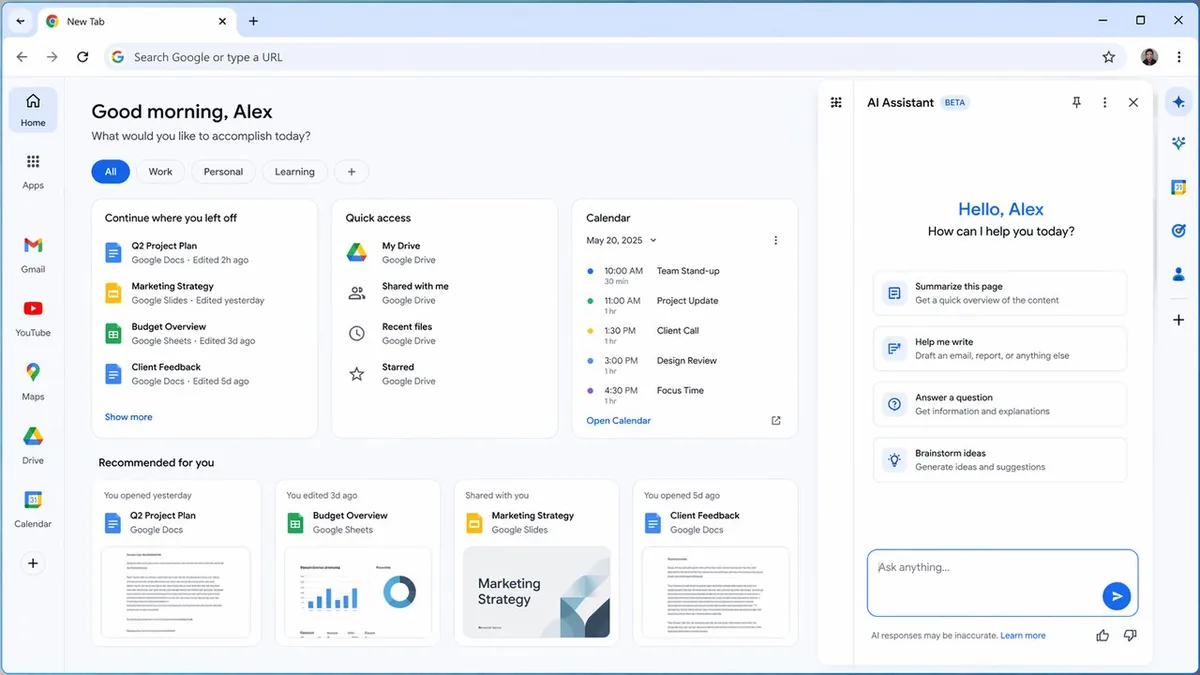
Your browser is about to become your AI coworker. Google announced it's embedding Gemini-powered AI assistant capabilities directly into Chrome for enterprise and workplace users — not as a tab you open, but as a panel integrated into the browser itself. Ask it to summarize the page you're reading, help you draft a reply to an email, or answer a question without leaving your current context. The browser is becoming the AI layer, not just the container for it.
What's Actually Happening
Google is rolling out an AI assistant panel within Chrome that can interact with the content of whatever page you're viewing. Enterprise users will see the AI panel available across their workday browsing — able to summarize articles, extract key points, suggest next actions, and draft responses based on what's on screen. The feature leverages Gemini and integrates with Google Workspace data for personalized, context-aware responses.
The workplace focus is deliberate. Google is targeting the same enterprise market where Microsoft's Copilot is embedded in Edge and Office. The AI browser war is a real competitive front — and Google needs Chrome to do more than just render web pages.
Why It Matters
Chrome has over 3 billion users. Even a fraction of them are enterprise workers who spend their entire workday in a browser tab. If Google can make the browser itself — not a specific app, not a separate tool — the AI layer for workplace productivity, it captures workflow value that previously required switching to a dedicated AI tool.
The strategic implication is that Google is betting on the browser as the universal AI interface, rather than letting productivity suites (like Teams + Copilot) own the enterprise AI experience. This is a direct challenge to Microsoft's Copilot strategy, which is deeply integrated into Office apps. For more on Google's AI workplace push, see our piece on Google Meet's AI note-taking expansion.
My Take
The browser as AI interface is a genuinely compelling idea — and Google is better positioned than anyone to execute it. Chrome's market share dominance combined with Workspace integration means Google can deliver contextually relevant AI assistance that a standalone AI tool can't match without access to your email, calendar, and documents.
The risk is the same as every ambient AI integration: users need to trust that the AI panel isn't reading everything they browse and storing it somewhere they can't control. Enterprise IT departments will have legitimate questions about data handling before rolling this out. Google's track record on enterprise data governance is mixed — and the answer to "where does my browsing data go when the AI processes it" will determine how quickly this gets adopted.
FAQ
What can the Chrome AI assistant do? Summarize pages, draft replies, answer questions based on on-screen content, and integrate with Workspace data for personalized responses.
Is this available to all Chrome users? The workplace-focused version is being rolled out to Google Workspace enterprise users first. Consumer availability may follow.
Does this replace Google Assistant? It's a different product — browser-native and context-aware to what you're currently viewing, rather than a general voice/text assistant.
How does this compare to Microsoft's Copilot in Edge? Similar concept, different ecosystem. Copilot integrates with Office; Chrome AI integrates with Workspace. The value depends on which productivity suite your organization uses.
Related Articles
- Google Meet's AI Note-Taking Now Works for In-Person Meetings
- Google Workspace Intelligence Wants to Know Everything About How You Work