Blu-ray - the Comprehensive Introduction and Guides on How to Play
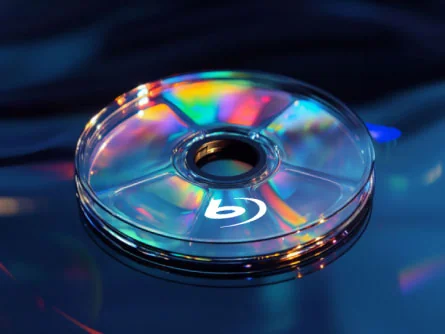
As a high-definition disc format introduced to consumers in 2006, Blu-ray discs create massive possibilities for the quality, color, and details of the image. Explore what Blu-ray is - its resolution and region, the difference between DVD and Blu-ray discs, and what a Blu-ray player is.
What Is Blu-ray
Blu-ray is a storage technology with high video and audio definition. It is designed to save HD movies, TV series and other video content.
What is a Blu-ray disc? It is a disc format launched by the Blu-ray Disc Association (BDA). "Blu" is the omitted form of "blue", which means it reads and writes data using a blue laser with a shorter wavelength.
It has far more capacity than a DVD because of its wavelength. The wavelength of a blue laser (405nm) is shorter than that of a red laser (650nm), which a DVD applies. A shorter laser wavelength makes the spots on the disc smaller, allowing more data to be stored in the same area of the disc.
Blu-ray Resolution
What is Blu-ray resolution? Actually, there are two main standards for Blu-ray resolution: 1080p and 4K.
1080p: This is the initial and most common resolution for Blu-ray technology and can also be called Full HD.
4K: It is the later resolution with the development of the technology and can also be called Ultra HD.
Here is a table for you to know the difference better:
| 1080p | 4K (UHD) | |
| Resolution | 1920x1080 pixels | 3840x2160 pixels |
| Color Gamut | BT.709 | BT.2020 |
| Dynamic Range | 100nit | 1,000 - 10,000nit |
| Bit Depth | 8-bit | 10-bit |
| Peak Video Bitrate | 40Mbps | 100Mbps |
| Codec | MPEG-4 AVC (H.264) | HEVC (H.265) |
| Capacity | 25GB, 50GB | 50GB, 66GB, 100GB |
| Effect | Clear | More clear |
Blu-ray Region
Blu-ray region refers to the regional code system for the Blu-ray disc. It is embedded into the Blu-ray disc to protect the copyright. The working principle is to control the issue time of movies or other playing content in different regions. For instance, a Blu-ray disc with Region A code usually can't be played in Region B or Region C unless they use some software to play or rip Blu-ray.
How to tell what region a Blu-ray is?
There are 3 regions for Blu-ray: Region A, Region B, and Region C, which is made by the Blu-ray Disc Association.
Region A: North America, Central America, South America, Japan, South Korea, Korea, Taiwan, Hongkong, and most areas in Southeast Asia.
Region B: Europe, Middle East, Africa, Australia and New Zealand
Region C: Chinese mainland, India, Russia, and Much of Central and South Asia.
What Is the Difference Between a DVD and Blu-ray
To be concise, Blu-ray is an upgrade to DVD. Here, we list their differences in terms of capacity, video quality, audio quality, and compatibility.
Capacity
DVD: A standard single-layer DVD can hold 4.7GB, while a dual-layer one can hold 8.5GB or so.
BD: A single-layer disc can hold 25GB, while a dual-layer disc can hold up to 50GB.
Video Quality
DVD supports 480p or 576p resolution while Blu-ray supports 1080p or even higher in a 4K UHD Blu-ray disc, which provides a clearer image and richer colors.
Audio Quality
DVD's audio formats are always compressed, while Blu-ray's are lossless.
Compatibility
The DVD player can only play DVDs, but Blu-ray Player can play both Blu-ray and DVDs.
How to Play Blu-ray
You can download professional software to play Blu-ray if you don't have a Blu-ray disc drive or BD-ROM drive on your computer. Here, you can try the software called Tipard Blu-ray Player. It is a user-friendly tool that allows you to play your favorite Blu-ray easily and quickly without quality loss.
- Download Tipard Blu-ray Player
You can get this software from Tipard's official website. Find the Tipard Blu-ray Player and download it with the detailed instructions. Run it on your computer after installation.
- Insert Blu-ray Disc in Your BD Driver
Put your desired Blu-ray disc in the BD driver (or the driver device).
- Load the disc
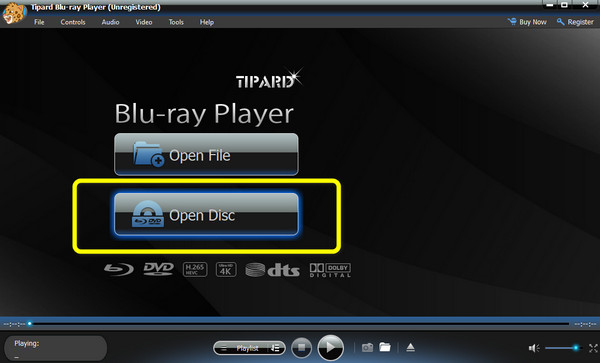
Hit the Open Disc option on your screen and then select the added disc on the program list. Click OK to load the targeted disc.
- Start to Play
You can hit Play Movie or the Play button (triangle-like) to play the disc you like.
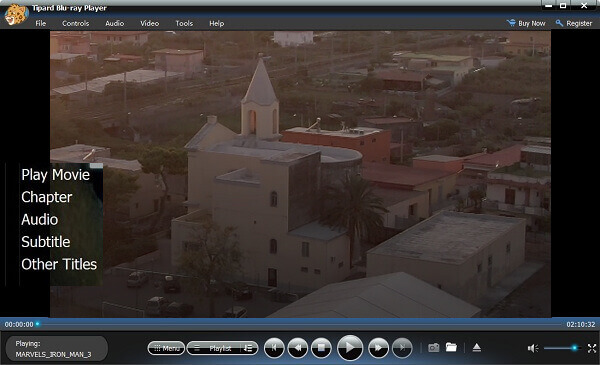
What's worth mentioning is that this tool can also be used to play ISO files.
Conclusion
To conclude, this article mainly introduced what a Blu-ray disc is in terms of its capacity, resolution, region, and differences from DVD, as well as how to play Blu-ray with the easiest software - Tipard Blu-ray Player. We hope you will find this article useful!