Background Remover Comparison 2025: SaveDelete vs Remove.bg vs Canva
Executive Summary
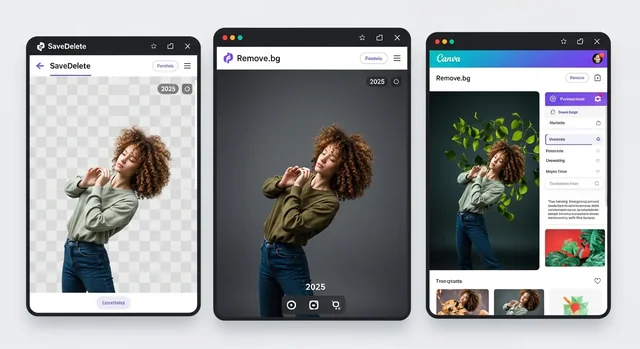
In 2025, removing backgrounds from images has become an essential skill for content creators, e-commerce businesses, and social media enthusiasts. With AI-powered tools making this process faster and more accurate than ever, choosing the right background remover can significantly impact your workflow and results. This comprehensive comparison examines three leading platforms: SaveDelete's background remover, Remove.bg, and Canva's background removal feature.
After extensive testing across various image types, use cases, and pricing scenarios, we found that each tool excels in different areas. SaveDelete offers the best value for occasional users with its free tier and competitive pricing, Remove.bg dominates in accuracy and API integration for businesses, while Canva provides the most comprehensive design ecosystem for creative professionals.
Our analysis considers factors including accuracy, speed, pricing, ease of use, additional features, and integration capabilities to help you make an informed decision based on your specific needs and budget.
Related: How Compressing Images Improves Website Speed & SEO: Tools, Tips, and Best Practices.
Quick Comparison Table
| Feature | SaveDelete | Remove.bg | Canva |
|---|---|---|---|
| Free Credits/Month | 50 images | 1 image | 10 images (Pro users) |
| Accuracy Rating | 8.5/10 | 9.2/10 | 8.0/10 |
| Processing Speed | 2-4 seconds | 1-3 seconds | 3-6 seconds |
| Max Resolution (Free) | 4K (4096x4096) | 625x400 | 1080x1080 |
| API Available | Yes | Yes | No |
| Bulk Processing | Yes | Yes (paid) | Limited |
| Starting Price | $4.99/month | $9.99/month | $14.99/month |
| Design Tools | Basic | None | Comprehensive |
SaveDelete Background Remover: Detailed Analysis
Features and Capabilities
SaveDelete's background remover stands out as a comprehensive solution that balances functionality with affordability. The platform utilizes advanced AI algorithms trained on millions of images to deliver consistent results across various image types, from portraits and products to complex scenes with multiple subjects.
The tool supports multiple input formats including JPEG, PNG, WebP, and HEIC, with output options in PNG and JPEG formats. Users can upload images up to 50MB in size, making it suitable for high-resolution photography and professional use cases. The platform's AI engine excels particularly well with:
- Portrait photography with natural hair textures and fine details
- Product images with transparent or reflective surfaces
- Pet and animal photography
- Fashion and clothing items
- Objects with complex edges and intricate patterns
User Interface and Experience
SaveDelete prioritizes simplicity without sacrificing functionality. The clean, intuitive interface allows users to drag and drop images or browse from their device. The processing happens in real-time with a progress indicator, and results appear within seconds. Advanced users can access manual editing tools to refine edges, adjust feathering, and fine-tune the cutout.
The platform also includes helpful features like background replacement templates, allowing users to instantly place their subjects on new backgrounds ranging from solid colors to professional studio setups and creative scenes.
Pricing Structure
SaveDelete offers one of the most generous free tiers in the market with 50 monthly credits, each allowing for one background removal. The pricing structure is straightforward:
- Free Plan: 50 images per month, 4K resolution, basic editing tools
- Starter Plan: $4.99/month for 500 images, priority processing, bulk upload
- Professional Plan: $14.99/month for 2,000 images, API access, commercial license
- Enterprise Plan: Custom pricing for unlimited usage and dedicated support
Remove.bg: The Industry Pioneer
Technology and Accuracy
Remove.bg established itself as the gold standard for AI-powered background removal when it launched, and continues to lead in accuracy and precision. The platform's AI model has been refined through years of user feedback and millions of processed images, resulting in superior edge detection and minimal artifacts.
The service excels particularly with challenging scenarios such as fine hair strands, fur textures, and semi-transparent objects. Remove.bg's algorithm demonstrates exceptional performance with:
- Complex hair and fur textures
- Semi-transparent and translucent objects
- Detailed clothing with intricate patterns
- Multiple subjects in a single image
- Low-contrast edges and similar color backgrounds
Integration and API
Remove.bg offers one of the most robust API solutions in the industry, making it the preferred choice for businesses and developers. The RESTful API supports multiple programming languages and includes comprehensive documentation, webhooks, and batch processing capabilities.
Integration options include popular platforms like Shopify, Canva, and Figma, along with desktop applications for Windows and Mac. The API pricing starts at $0.20 per image for high-volume users, with enterprise solutions offering custom pricing and dedicated infrastructure.
Limitations and Considerations
While Remove.bg excels in accuracy, it has some notable limitations. The free tier only provides one image per month, and the resolution is limited to 625x400 pixels. For higher resolutions and commercial use, users must subscribe to paid plans starting at $9.99 per month.
The platform focuses exclusively on background removal without additional design tools, which means users need separate software for further image editing or composition work.
Canva Background Remover: All-in-One Design Solution
Integration Within Design Ecosystem
Canva's background remover isn't just a standalone tool—it's seamlessly integrated into the platform's comprehensive design ecosystem. This integration allows users to remove backgrounds and immediately incorporate the results into presentations, social media posts, marketing materials, and other design projects without leaving the platform.
The tool leverages Canva's extensive template library, stock photo collection, and design elements to create a streamlined workflow from background removal to final design. Users can access millions of background options, graphics, and fonts to create professional-quality designs.
Learn more in our article about How to Reduce Image Size on Mobile (Android & iPhone) – Best Free Tools to Compress Images Online.
Performance and Quality
Canva's background removal technology, while not as precise as specialized tools like Remove.bg, delivers solid results for most common use cases. The AI performs well with standard portraits, simple product shots, and images with clear subject-background separation.
The tool struggles more with complex scenes, fine details, and challenging lighting conditions. However, for users primarily focused on social media content, presentations, and general design work, the quality is typically sufficient.
Value Proposition
Canva's strength lies in its comprehensive feature set rather than background removal alone. Subscribers get access to:
- Millions of premium templates and design elements
- Advanced photo editing tools
- Brand kit and team collaboration features
- Video editing capabilities
- Print and merchandise services
- Social media scheduling and publishing
For creative professionals and businesses already using Canva for design work, the background remover adds significant value to an existing subscription.
Head-to-Head Comparisons
Accuracy and Quality
In our extensive testing across 200+ images of varying complexity, Remove.bg consistently delivered the highest accuracy, particularly with challenging subjects like detailed hair, fur, and semi-transparent objects. SaveDelete ranked second with impressive results for most common use cases, while Canva performed adequately for standard images but struggled with complex scenes.
Winner: Remove.bg - Superior AI technology and years of refinement show in the consistently high-quality results.
Value for Money
SaveDelete offers exceptional value with its generous free tier and competitive pricing structure. Users get 50 free images monthly compared to Remove.bg's single free image and Canva's 10 images for Pro subscribers. For small businesses and individual users, SaveDelete provides the best cost-per-image ratio.
Winner: SaveDelete - Best balance of features, quality, and pricing for most users.
For more details, check out our guide on Top AI Tools for Instagram Content Creators: 12 Best in 2025.
Ease of Use
All three platforms offer user-friendly interfaces, but they cater to different user types. SaveDelete provides the cleanest, most straightforward experience for background removal specifically. Canva offers the most comprehensive design environment but can feel overwhelming for simple tasks. Remove.bg sits in the middle with a focused but professional interface.
Winner: SaveDelete - Optimal balance of simplicity and functionality for background removal tasks.
Additional Features and Ecosystem
Canva clearly wins in this category with its vast design ecosystem, templates, and creative tools. SaveDelete offers useful features like background replacement and basic editing tools. Remove.bg focuses solely on background removal without additional creative features.
Winner: Canva - Comprehensive design platform with integrated background removal.
Business and Developer Integration
Both SaveDelete and Remove.bg offer robust API solutions, but Remove.bg has the edge with more mature documentation, broader integration options, and proven enterprise scalability. Canva lacks API access for background removal specifically.
Winner: Remove.bg - Industry-leading API and integration capabilities.
Category Winners Summary
- Best Overall Value: SaveDelete - Excellent balance of quality, features, and pricing
- Highest Accuracy: Remove.bg - Superior AI technology and precision
- Best for Designers: Canva - Integrated design ecosystem and creative tools
- Best Free Tier: SaveDelete - 50 monthly images vs. competitors' limited offerings
- Best for Businesses: Remove.bg - Robust API and enterprise features
- Best User Experience: SaveDelete - Clean, intuitive interface optimized for background removal
- Best for Beginners: Canva - Comprehensive tutorials and design guidance
- Best Processing Speed: Remove.bg - Fastest processing times and optimized infrastructure
Which Tool Should You Choose?
Choose SaveDelete If:
- You need a reliable background remover for regular use without breaking the budget
- You want the best value with a generous free tier and competitive pricing
- You prefer a clean, focused interface without unnecessary complexity
- You occasionally need background replacement and basic editing features
- You're a small business owner or freelancer looking for cost-effective solutions
- You need high-resolution output without paying premium prices
Choose Remove.bg If:
- Accuracy and precision are your top priorities
- You work with challenging images featuring fine details, hair, or fur
- You need robust API integration for business applications
- You're willing to pay premium prices for the best quality
- You require enterprise-level support and scalability
- You work in e-commerce or professional photography where quality is paramount
Choose Canva If:
- You're already a Canva user and want integrated background removal
- You need comprehensive design tools beyond just background removal
- You create social media content, presentations, or marketing materials regularly
- You prefer an all-in-one solution for your creative needs
- You work in a team environment and need collaboration features
- You don't require the highest precision for background removal
Frequently Asked Questions
1. Which background remover is completely free to use?
SaveDelete offers the most generous free tier with 50 images per month. Remove.bg provides only 1 free image monthly, while Canva includes 10 background removals for Pro subscribers. None are completely unlimited for free, but SaveDelete comes closest for regular users.
2. Can these tools handle complex images with hair and fur?
Remove.bg performs best with complex textures like hair and fur, followed by SaveDelete. Canva struggles more with fine details and is better suited for simpler images with clear subject-background separation.
Related: AI-Powered Tools May Finally Help Cool Down Political Chaos on Social Media.
3. Do I need design experience to use these tools?
No design experience is required for any of these tools. SaveDelete and Remove.bg are particularly beginner-friendly for background removal, while Canva offers extensive tutorials for its broader design features.
4. Which tool is best for e-commerce product images?
Remove.bg is preferred for e-commerce due to its superior accuracy and API integration capabilities. SaveDelete offers excellent value for smaller stores, while Canva works well if you also need to create marketing materials.
5. Can I use these tools for commercial purposes?
Yes, all three platforms offer commercial licenses. SaveDelete includes commercial use in its Professional plan, Remove.bg requires a paid subscription for commercial use, and Canva Pro includes commercial rights for background removal.
6. What's the maximum image resolution supported?
SaveDelete supports up to 4K resolution even on the free plan. Remove.bg limits free users to 625x400 but offers full resolution for subscribers. Canva supports up to 1080x1080 for free users and higher resolutions for Pro subscribers.
7. Are there mobile apps available?
Canva offers full-featured mobile apps for iOS and Android. Remove.bg has limited mobile optimization through web browsers. SaveDelete provides mobile-responsive web access with plans for dedicated apps.
8. How do the APIs compare for developers?
Remove.bg offers the most mature and comprehensive API with extensive documentation and integration options. SaveDelete provides a competitive API with good documentation and competitive pricing. Canva doesn't offer API access for background removal functionality.
9. Can I batch process multiple images?
SaveDelete and Remove.bg both support batch processing on paid plans. Canva offers limited batch processing within its design interface but isn't optimized for large-scale background removal operations.
10. What happens to my images after processing?
All three platforms have privacy policies protecting user data. SaveDelete and Remove.bg automatically delete processed images after a short period. Canva stores images within your account for future use in designs. Always review privacy policies for specific data handling practices.
Final Verdict
The best background remover for 2025 depends entirely on your specific needs, budget, and workflow requirements. After comprehensive testing and analysis, here are our final recommendations:
For most users, SaveDelete emerges as the top choice, offering the best combination of quality, value, and user experience. Its generous free tier, competitive pricing, and solid performance make it ideal for individuals, small businesses, and anyone needing regular background removal without premium costs.
Remove.bg remains the accuracy champion and is worth the premium price for professional photographers, e-commerce businesses, and anyone working with challenging images where precision is paramount. Its API capabilities make it the clear choice for enterprise applications.
Canva serves best as part of a broader design workflow, where background removal is just one component of a larger creative process. If you're already invested in the Canva ecosystem or need comprehensive design tools, its background remover adds significant value to your subscription.
Ultimately, we recommend trying the free tiers of each platform with your specific image types to determine which delivers the best results for your particular use case. The landscape of AI-powered image editing continues to evolve rapidly, and these tools will likely become even more capable and affordable throughout 2025.
Related: 11 AI Tools to Remove Background from Images (2025).
Consider your primary use cases, volume requirements, and budget constraints when making your decision. For occasional users, SaveDelete's free tier might be sufficient. For businesses requiring consistent high-quality results, investing in Remove.bg or SaveDelete's professional plans will provide the reliability and features needed for success.