Best Application Security Tools for SDLC (2025): Top SAST & DAST Solutions
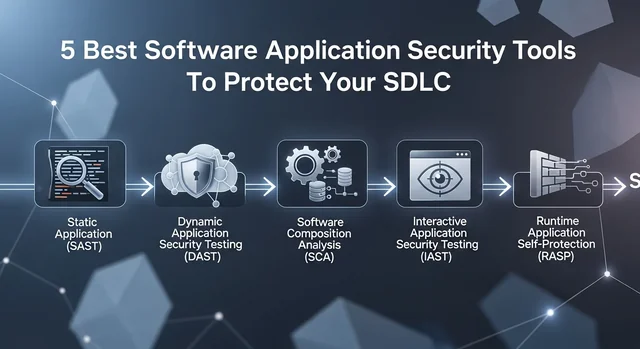
Application security has become a critical cornerstone of modern software development, with 82% of vulnerabilities originating at the application layer. As cyber threats evolve and become more sophisticated in 2025, organizations can no longer afford to treat security as an afterthought. The shift-left security approach—integrating security testing early in the Software Development Life Cycle (SDLC)—has proven essential for building resilient applications while maintaining development velocity.
This comprehensive guide explores the top 10 application security tools for 2025, covering Static Application Security Testing (SAST), Dynamic Application Security Testing (DAST), and hybrid solutions that can seamlessly integrate into your DevSecOps pipeline. Whether you're a startup looking for cost-effective solutions or an enterprise requiring comprehensive security coverage, this article will help you choose the right tools for your specific needs.
Understanding SAST vs DAST vs IAST vs SCA: The Four Pillars of Application Security
Before diving into specific tools, it's crucial to understand the different types of application security testing methodologies available in 2025:
Learn more in our article about Best Free Firewall Software for Windows (2025): Top 10 Picks.
Static Application Security Testing (SAST)
SAST tools analyze source code, bytecode, or binary code without executing the application. They scan for vulnerabilities during the development phase, making them ideal for early detection of security flaws. SAST excels at finding issues like SQL injection vulnerabilities, buffer overflows, and insecure coding practices. The main advantage is early detection, but SAST can produce false positives and may miss runtime-specific vulnerabilities.
Dynamic Application Security Testing (DAST)
DAST tools test running applications from the outside, simulating real-world attacks without access to source code. They're excellent at finding runtime vulnerabilities, authentication issues, and configuration problems. DAST provides a hacker's perspective but can only test what's accessible through the application interface and typically comes later in the development cycle.
Interactive Application Security Testing (IAST)
IAST combines the benefits of both SAST and DAST by analyzing applications from within during runtime. It provides real-time vulnerability detection with low false positive rates and detailed remediation guidance. IAST tools instrument the application code to monitor security during testing phases.
Software Composition Analysis (SCA)
SCA tools focus on identifying vulnerabilities in third-party components, open-source libraries, and dependencies. With modern applications containing up to 90% third-party code, SCA has become indispensable for maintaining secure software supply chains.
Top 10 Application Security Tools for 2025
1. Checkmarx SAST
Checkmarx remains the enterprise leader in static application security testing, supporting over 25 programming languages including Java, .NET, Python, JavaScript, and Go. The platform offers comprehensive vulnerability detection with advanced data flow analysis and minimal false positives.
Key Features:
- Multi-language support with deep semantic analysis
- Integration with major IDEs and CI/CD pipelines
- Compliance reporting for SOX, PCI DSS, and OWASP Top 10
- Advanced remediation guidance with code snippets
- Incremental scanning for faster results
Pricing: Enterprise pricing starts at approximately $15,000 annually for small teams, with custom pricing for larger organizations.
2. Veracode
Veracode offers a comprehensive cloud-based application security platform combining SAST, DAST, SCA, and manual penetration testing services. Their platform is particularly strong for organizations requiring extensive compliance reporting.
Key Features:
- Cloud-native platform with no infrastructure requirements
- Binary analysis without source code access
- Extensive third-party integrations
- Professional services and security consulting
- Detailed compliance and executive reporting
Pricing: Subscription-based pricing starting around $2,000 per application annually, with volume discounts available.
3. Snyk
Snyk has revolutionized developer-first security with its focus on open-source vulnerability management and container security. The platform excels at SCA and offers excellent developer experience with IDE integrations.
Key Features:
- Extensive open-source vulnerability database
- Container and Infrastructure as Code scanning
- Real-time monitoring of production applications
- Automated pull request generation for fixes
- Free tier for open-source projects
Pricing: Free tier available; paid plans start at $25 per developer per month.
4. Semgrep
Semgrep offers lightweight, fast static analysis with custom rule creation capabilities. It's particularly popular among security teams who want to create organization-specific security rules.
Key Features:
- Custom rule creation with simple syntax
- Fast scanning with minimal resource usage
- Strong CI/CD integration
- Community-driven rule repository
- Multi-language support
Pricing: Open-source version available; Semgrep Code starts at $22 per developer per month.
5. GitLab SAST
GitLab's integrated SAST solution provides seamless security testing within the GitLab ecosystem. It's ideal for teams already using GitLab for version control and CI/CD.
Key Features:
- Native integration with GitLab CI/CD pipelines
- Automatic vulnerability detection in merge requests
- Security dashboard with trend analysis
- Compliance framework support
- No additional tool installation required
Pricing: Included with GitLab Ultimate at $99 per user per month.
Learn more in our article about Best Google Rank Checker Tools in 2025: Complete Guide with Pricing & Comparison.
6. Invicti (formerly Netsparker)
Invicti specializes in proof-based DAST scanning, providing concrete evidence that vulnerabilities are exploitable. This approach significantly reduces false positives and provides clear remediation priorities.
Key Features:
- Proof-based scanning with exploit verification
- Comprehensive web application coverage
- REST API and GraphQL testing
- Integration with issue tracking systems
- Authenticated scanning capabilities
Pricing: Standard edition starts at approximately $4,000 annually per application.
7. Burp Suite
Burp Suite remains the industry standard for manual web application security testing. The 2025 version includes enhanced automation features while maintaining its powerful manual testing capabilities.
Key Features:
- Comprehensive manual testing toolkit
- Advanced automated scanning engine
- Extensive extension marketplace
- Professional-grade intercepting proxy
- Detailed vulnerability reporting
Pricing: Professional edition at $449 per user annually; Enterprise edition starts at $4,995 annually.
8. Acunetix
Acunetix provides SMB-friendly DAST solutions with strong web application scanning capabilities and competitive pricing. It's particularly effective for organizations with multiple web applications requiring regular security assessments.
Key Features:
- Fast and accurate web vulnerability scanning
- Network security scanning capabilities
- Compliance reporting templates
- Integration with popular development tools
- Malware detection and monitoring
Pricing: Standard license starts at $5,500 annually for unlimited scans.
9. SonarQube
SonarQube combines code quality analysis with security vulnerability detection, making it popular among development teams focused on overall code health.
See also: How Does Antivirus Software work?.
Key Features:
- Combined code quality and security analysis
- Extensive language support (29+ languages)
- Quality gate enforcement
- Technical debt measurement
- Strong IDE and CI/CD integration
Pricing: Community edition free; Developer edition starts at $150 per developer annually.
10. OWASP ZAP
OWASP ZAP (Zed Attack Proxy) is the leading open-source DAST tool, offering enterprise-grade features without licensing costs. It's actively maintained by the security community and provides excellent value for budget-conscious organizations.
Key Features:
- Completely free and open-source
- Active community development and support
- Automated and manual testing capabilities
- API testing support
- Extensive plugin ecosystem
Pricing: Free and open-source.
Application Security Tools Comparison Table
| Tool | Type | Starting Price | Best For | Free Option |
|---|---|---|---|---|
| Checkmarx | SAST | $15,000/year | Enterprise SAST | No |
| Veracode | SAST/DAST/SCA | $2,000/app/year | Comprehensive platform | No |
| Snyk | SCA/SAST | $25/dev/month | Open-source security | Yes |
| Semgrep | SAST | $22/dev/month | Custom rules | Yes |
| GitLab SAST | SAST | $99/user/month | GitLab ecosystem | No |
| Invicti | DAST | $4,000/year | Proof-based DAST | No |
| Burp Suite | DAST | $449/user/year | Manual testing | Yes (limited) |
| Acunetix | DAST | $5,500/year | SMB web scanning | No |
| SonarQube | SAST | $150/dev/year | Code quality + security | Yes |
| OWASP ZAP | DAST | Free | Open-source DAST | Yes |
How to Choose the Right Application Security Tool
Selecting the appropriate application security tool depends on several critical factors that align with your organization's specific needs and constraints:
CI/CD Integration Requirements
Modern application security tools must integrate seamlessly with your existing development pipeline. Look for tools that offer native integrations with your version control system, build tools, and deployment platforms. The best tools provide APIs, webhooks, and pre-built plugins for popular platforms like Jenkins, Azure DevOps, and GitHub Actions.
Programming Language Support
Ensure the tool supports all programming languages and frameworks used in your organization. While some tools excel at Java and .NET analysis, others may have better support for modern languages like Go, Rust, or Kotlin. Consider your technology roadmap and future language adoption plans.
False Positive Management
High false positive rates can overwhelm development teams and reduce tool adoption. Evaluate tools based on their accuracy, customization capabilities, and ability to suppress irrelevant findings. Tools with machine learning capabilities often improve accuracy over time.
Compliance and Regulatory Requirements
Different industries have varying compliance requirements. Ensure your chosen tool can generate reports for relevant standards such as PCI DSS, SOX, HIPAA, or industry-specific regulations. Some tools offer pre-configured compliance templates that can significantly reduce reporting overhead.
Scalability and Performance
Consider your organization's size and growth trajectory. Enterprise-grade tools should handle large codebases efficiently and support multiple concurrent scans. Cloud-based solutions often provide better scalability compared to on-premises deployments.
See also: Best Ahrefs Alternatives 2025: Complete SEO Tools Comparison Guide.
Budget and Total Cost of Ownership
Beyond licensing costs, consider implementation time, training requirements, and ongoing maintenance. Open-source tools may have lower upfront costs but require more internal expertise to maintain and customize effectively.
Best Practices for DevSecOps Implementation
Successfully implementing application security tools requires more than just technology selection. Follow these best practices to maximize the effectiveness of your DevSecOps initiative:
Start with Developer Education
Invest in secure coding training for your development team. Developers who understand common vulnerabilities are more likely to write secure code and effectively use security tools. Consider certification programs like OWASP's secure coding practices or vendor-specific training.
Implement Progressive Security Gates
Don't overwhelm teams by implementing all security checks simultaneously. Start with critical vulnerabilities and gradually expand coverage. Use security gates that block builds only for high-severity issues while providing visibility into lower-priority findings.
Automate Remediation Where Possible
Modern tools offer automated fix suggestions and pull request generation. Leverage these capabilities to reduce manual effort and accelerate remediation. Tools like Snyk and GitHub's Dependabot can automatically update vulnerable dependencies.
Establish Clear Ownership and Accountability
Define clear roles and responsibilities for security findings. Establish SLAs for vulnerability remediation based on severity levels. Create metrics and dashboards that provide visibility into security posture and remediation progress.
Integrate Security Testing Across the SDLC
Don't rely on a single testing phase. Implement SAST during development, DAST during integration testing, and SCA for dependency management. Use IAST for runtime analysis during QA testing phases.
Foster a Security-First Culture
Make security everyone's responsibility, not just the security team's. Recognize and reward developers who proactively identify and fix security issues. Share security metrics and success stories to build momentum.
Frequently Asked Questions (FAQ)
What is shift-left security and why is it important?
Shift-left security refers to integrating security testing and practices early in the software development lifecycle, rather than treating security as a final checkpoint. This approach is important because it's significantly more cost-effective to fix vulnerabilities during development than in production. Studies show that fixing a vulnerability in production can cost 100 times more than addressing it during the coding phase.
SAST vs DAST: Which is better for my organization?
Neither SAST nor DAST is inherently better—they serve complementary purposes. SAST excels at finding vulnerabilities early in development and can analyze all code paths, while DAST provides a realistic attacker's perspective and finds runtime issues. The best approach is to use both: SAST for early detection and DAST for validation and runtime-specific vulnerabilities.
Are free application security tools sufficient for enterprise use?
Free tools like OWASP ZAP and SonarQube Community can provide significant value, especially for smaller organizations or specific use cases. However, enterprises typically require additional features like advanced reporting, compliance templates, professional support, and extensive integrations that are only available in commercial solutions. A hybrid approach using both free and commercial tools is often most effective.
How do I integrate application security tools into my CI/CD pipeline?
Integration typically involves adding security scanning stages to your build pipeline using APIs, CLI tools, or plugins. Start by adding SAST scans during the build phase and SCA checks during dependency resolution. Configure quality gates that fail builds for critical vulnerabilities while allowing warnings for lower-severity issues. Most modern tools provide detailed integration documentation for popular CI/CD platforms.
What's the difference between IAST and traditional security testing?
IAST (Interactive Application Security Testing) combines elements of both SAST and DAST by analyzing applications from within during runtime. Unlike traditional methods that analyze code statically or test externally, IAST instruments the application to monitor security during execution. This provides more accurate results with fewer false positives and better context for remediation.
How often should I run application security scans?
The frequency depends on your development velocity and risk tolerance. For SAST, run scans on every commit or at least daily for active development branches. DAST scans can be run less frequently—typically during integration testing or weekly for production applications. SCA should run continuously to monitor for new vulnerabilities in dependencies. Critical applications may require more frequent scanning.
What should I look for in application security tool reporting capabilities?
Effective reporting should provide multiple views for different stakeholders: detailed technical information for developers, trend analysis for security teams, and executive summaries for management. Look for tools that offer customizable dashboards, compliance mapping, risk scoring, and integration with ticketing systems. The ability to track remediation progress and generate audit trails is also crucial.
How do I handle false positives in security scanning tools?
False positives are inevitable but manageable. Choose tools with good accuracy rates and customization options. Implement a triage process to quickly identify and suppress false positives. Many tools allow you to create custom rules or whitelist specific findings. Train your team to distinguish between false positives and acceptable risks, and continuously refine your tool configuration based on feedback.
Can application security tools slow down development velocity?
When implemented poorly, security tools can slow development. However, with proper implementation, they can actually improve velocity by catching issues early when they're cheaper to fix. Use incremental scanning, parallel execution, and smart scheduling to minimize impact. Focus on blocking only critical issues and provide clear, actionable remediation guidance to developers.
What's the ROI of implementing application security tools?
The ROI of application security tools is substantial when considering the cost of data breaches, which averaged $4.45 million in 2023. Beyond breach prevention, these tools reduce remediation costs, improve compliance posture, and can accelerate development by providing early feedback. Many organizations see ROI within the first year through reduced security incidents and faster vulnerability resolution.
You might also be interested in How Compressing Images Improves Website Speed & SEO: Tools, Tips, and Best Practices.
Implementing the right application security tools is crucial for maintaining robust security posture in 2025's threat landscape. By understanding the different types of security testing, carefully evaluating tools based on your specific requirements, and following DevSecOps best practices, organizations can build a comprehensive security program that protects applications throughout their lifecycle while supporting development velocity and business objectives.