Top 10 Free Microsoft Products Worth Checking Out
By Jaspal Singh
We always find the best free softwares from a trustworthy source or company. But finding such free softwares become difficult sometimes because there are lots of free softwares floating around the web.
Although, Microsoft is not a company that people associated with free softwares. But my friends, there are plenty of softwares that Microsoft offers, which are free to use and really worth checking out. I am not saying about Internet Explorer because that is worst browser which I experienced till know. There are many other Microsoft products that are really great and which are completely free to use.
So, have a look on SaveDelete's compilation of Top 10 Free Microsoft Products worth checking out.
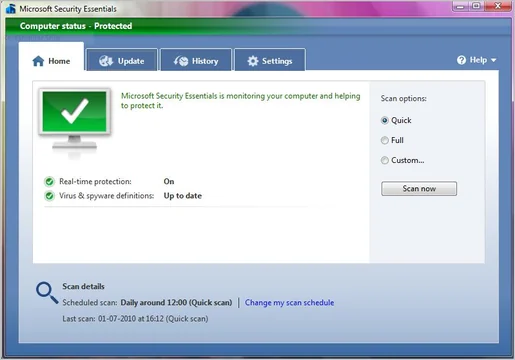
1) Microsoft Security Essentials : Microsoft Security Essentials provides real-time protection for your home PC that guards against viruses, spyware, and other malicious software. Microsoft Security Essentials is a free download from Microsoft that is simple to install, easy to use, and always kept up to date so you can be assured your PC is protected by the latest technology. But for using, you windows OS should be original. Click here to get detailed article on Microsoft Security Essentials.
 2) Windows Live Writer : Writer makes it easy to share your photos and videos on almost any blog service—Windows Live, WordPress, Blogger, LiveJournal,TypePad, and many more.
 3) Process Explorer v12.04 : The Process Explorer display consists of two sub-windows. The top window always shows a list of the currently active processes, including the names of their owning accounts, whereas the information displayed in the bottom window depends on the mode that Process Explorer is in: if it is in handle mode you'll see the handles that the process selected in the top window has opened; if Process Explorer is in DLL mode you'll see the DLLs and memory-mapped files that the process has loaded. Process Explorer also has a powerful search capability that will quickly show you which processes have particular handles opened or DLLs loaded.
 4) Microsoft Visual Studio 2010 Express : Visual Studio 2010 is packed with new and enhanced features that simplify the entire development process from design to deployment. Customize your workspace with multiple monitor support. Create rich applications for SharePoint and the Web. Target multiple versions of the .NET Framework with the same tool. Eliminate the dreaded "no repro" problem with IntelliTrace. And much more.
 5) Photosynth : Photosynth takes your photos, mashes them together and recreates a 3D scene out of them that anyone can view and move around in. Different than static photos and video, Photosynth allows you to explore details of places, objects, and events unlike any other media. You can’t stop video, move around and zoom in to check out the smallest details, but with Photosynth you can. And you can’t look at a photo gallery and immediately see the spatial relation between the photos, but with Photosynth you can.
 6) Window SteadyState 2.5 : Whether you manage computers in a school computer lab or an Internet cafe, a library, or even in your home, Windows SteadyState helps make it easy for you to keep your computers running the way you want them to, no matter who uses them. Windows SteadyState provides a more effective way to help defend shared computers from changes by untrusted users and unwanted software installations. It can also help safeguard system resources.
 7) Windows Live SkyDrive : With SkyDrive, you can embed public or shared folders on Windows Live Spaces. Everyone can see what’s public, but only people you’ve granted permission can see your shared folders. And you will also get free 25 GB online storage thatmeans you can Store, access, and share your files online with friends or co-workers, from anywhere.
 8 ) Bing Maps : Bing Maps delivers a truly immersive experience that connects people to the world. Now you can create custom solutions and connect people to your ideas. With the new Bing Maps APIs, you can develop map experiences for your website—or you can reach even more people by hosting your Map App on Bing Maps.
 9) Microsoft Research WorldWide Telescope : The WorldWide Telescope (WWT) is aenvironment that enables your computer to function as a virtual telescope—bringing together imagery from the best ground and space-based telescopes in the world for a seamless exploration of the universe.
 10) SyncToy 2.1 : SyncToy 2.1 is a free application that synchronizes files and folders between locations. Typical uses include sharing files, such as photos, with other computers and creating backup copies of files and folders.


2) Windows Live Writer : Writer makes it easy to share your photos and videos on almost any blog service—Windows Live, WordPress, Blogger, LiveJournal,TypePad, and many more.
3) Process Explorer v12.04 : The Process Explorer display consists of two sub-windows. The top window always shows a list of the currently active processes, including the names of their owning accounts, whereas the information displayed in the bottom window depends on the mode that Process Explorer is in: if it is in handle mode you'll see the handles that the process selected in the top window has opened; if Process Explorer is in DLL mode you'll see the DLLs and memory-mapped files that the process has loaded. Process Explorer also has a powerful search capability that will quickly show you which processes have particular handles opened or DLLs loaded.
4) Microsoft Visual Studio 2010 Express : Visual Studio 2010 is packed with new and enhanced features that simplify the entire development process from design to deployment. Customize your workspace with multiple monitor support. Create rich applications for SharePoint and the Web. Target multiple versions of the .NET Framework with the same tool. Eliminate the dreaded "no repro" problem with IntelliTrace. And much more.
5) Photosynth : Photosynth takes your photos, mashes them together and recreates a 3D scene out of them that anyone can view and move around in. Different than static photos and video, Photosynth allows you to explore details of places, objects, and events unlike any other media. You can’t stop video, move around and zoom in to check out the smallest details, but with Photosynth you can. And you can’t look at a photo gallery and immediately see the spatial relation between the photos, but with Photosynth you can.
6) Window SteadyState 2.5 : Whether you manage computers in a school computer lab or an Internet cafe, a library, or even in your home, Windows SteadyState helps make it easy for you to keep your computers running the way you want them to, no matter who uses them. Windows SteadyState provides a more effective way to help defend shared computers from changes by untrusted users and unwanted software installations. It can also help safeguard system resources.
7) Windows Live SkyDrive : With SkyDrive, you can embed public or shared folders on Windows Live Spaces. Everyone can see what’s public, but only people you’ve granted permission can see your shared folders. And you will also get free 25 GB online storage thatmeans you can Store, access, and share your files online with friends or co-workers, from anywhere.
8 ) Bing Maps : Bing Maps delivers a truly immersive experience that connects people to the world. Now you can create custom solutions and connect people to your ideas. With the new Bing Maps APIs, you can develop map experiences for your website—or you can reach even more people by hosting your Map App on Bing Maps.
9) Microsoft Research WorldWide Telescope : The WorldWide Telescope (WWT) is aenvironment that enables your computer to function as a virtual telescope—bringing together imagery from the best ground and space-based telescopes in the world for a seamless exploration of the universe.
10) SyncToy 2.1 : SyncToy 2.1 is a free application that synchronizes files and folders between locations. Typical uses include sharing files, such as photos, with other computers and creating backup copies of files and folders.
Bonus program
11) Windows Live Photo Gallery : With Photo Gallery, it's a snap to get your photos and videos from your camera to your PC. Find your favorite photos and share them with friends and family. Make your great photos look even better, and create impressive panoramic photos too.