14 Best Freeware Apps Every Mac Owner Should Know
By Jaspal Singh
There are many reasons that Mac rule over Windows because of some great features like fast booting time, easy file sharing, excellent graphics and don't forget cool Mac applications. I think that Mac OS X is the most advanced operating system out there.
I prefer Mac OS X because of excellent apps which helps me to improve productivity and make any task a lot easier. In this article, I am sharing some freeware Mac apps for those who just purchased a new Mac and don't know what to install.
All these apps listed here are pretty useful and free to download. So, have a look on SaveDelete's compilation of 14 Best Freeware Mac Apps Every Mac Owner Should Know.
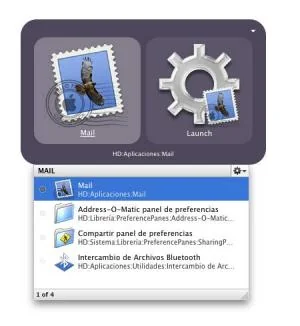
1) Quicksilver : Quicksilver is a computer utility software program for Mac OS X. It is essentially a graphical shell for the OS X operating system aimed at increasing user efficiency. It allows users to use the keyboard to rapidly perform tasks such as launching applications, manipulating files and data, running scripts, or sending e-mail.
 2) Firefox : Mozilla Firefox is a free and open source web browser descended from the Mozilla Application Suite and managed by Mozilla Corporation. Latest Firefox features include tabbed browsing, spell checking, incremental find, live bookmarking, a download manager,private browsing, etc. And Firefox add-ons will add mostly any functionality you'll need.
 3) Adium : Adium is a free instant messaging application for Mac OS X that can connect to AIM, MSN, Jabber, Yahoo, Facebook and many more. Adium is written using Mac OS X's Cocoa API, released under the GNU GPLand developed by the Adium team.
 4) Evernote : Evernote is a free suite of software and services designed for notetaking and archival.Evernote supports a number of operating system platforms (including Android, OSX, Windows and WebOS), and also offers online synchronization and backup service.
 5) Gimp : GIMP (short for the GNU Image Manipulation Program) is a free software raster graphics editor. It is primarily employed as an image retouching and editing tool. In addition to freeform drawing, GIMP can accomplish essential image workflow steps such as resizing, editing, and cropping photos, combining multiple images, and converting between different image formats. GIMP can also be used to create basic animated images in the GIF forma.
 6) TweetDeck : TweetDeck is a popular Adobe AIR desktop Twitter application. You can connect with multiple account in Twitter and also stay connected with Facebook, Linkedin, Myspace account at the same time. It is compatible with several operating systems including Microsoft Windows, Mac OS X and Linux.
 7) Carbon Copy Cloner : Carbon Copy Cloner (CCC) is a Mac OS X application that can be used for creating data backups or complete images of your computer. It has an simple and intuitive interface.
 8 ) Picasa : Picasa is free photo editing software from Google that makes your pictures look great. Sharing your best photos with friends and family is as easy as pressing a button. The latest version for Mac has also included Name tags with images.
 9) GeekTool : GeekTool is a PrefPane (System Preferences module) for Mac OS 10.5. It let you display on your desktop different kind of informations, provided 3 default plugins : File plugin to monitor MacOS X activity with /var/log/system.log, or any file that you want to follow.Shell mode to launch custom scripts or commands. Image mode helps you monitor bandwith usage, CPU loads, etc.
 10) VLC : VLC media player is a highly portable multimedia player and multimedia framework capable of reading most audio and video formats (MPEG-2, MPEG-4, H.264, DivX, MPEG-1, mp3, ogg, aac ...) as well as DVDs, Audio CDs VCDs, and various streaming protocols.
 11) iSquint : iSquint is an iPod video conversion app for Mac OS X. It's many times faster than QuickTime Pro, works with almost all popular video formats, and it's infinitely easy and free.
 12) uTorrent : µTorrent is a freeware, closed source BitTorrent client by BitTorrent, Inc. It is available for Microsoft Windows and Mac OS X. The program is designed to use minimal computer resources while offering functionality comparable to larger BitTorrent clients such as Vuze or BitComet.
 13) Burn : There are a lot of ways to approach burning discs. Burn keeps it simple, but still offers a lot of advanced options. It can copy discs or use disk images to recreate your discs. With one drive Burn still will be able to copy a disc, by temporary saving the disc.
 14) NeoOffice : NeoOffice is a full-featured set of office applications (including word processing, spreadsheet, and presentation programs) for Mac OS X.
 Now, it's your time to tell us which Mac Application you prefer the most and if you feel any other app which you want to see in this list. Please be kind and share with us in the comments section below.
2) Firefox : Mozilla Firefox is a free and open source web browser descended from the Mozilla Application Suite and managed by Mozilla Corporation. Latest Firefox features include tabbed browsing, spell checking, incremental find, live bookmarking, a download manager,private browsing, etc. And Firefox add-ons will add mostly any functionality you'll need.
3) Adium : Adium is a free instant messaging application for Mac OS X that can connect to AIM, MSN, Jabber, Yahoo, Facebook and many more. Adium is written using Mac OS X's Cocoa API, released under the GNU GPLand developed by the Adium team.
4) Evernote : Evernote is a free suite of software and services designed for notetaking and archival.Evernote supports a number of operating system platforms (including Android, OSX, Windows and WebOS), and also offers online synchronization and backup service.
5) Gimp : GIMP (short for the GNU Image Manipulation Program) is a free software raster graphics editor. It is primarily employed as an image retouching and editing tool. In addition to freeform drawing, GIMP can accomplish essential image workflow steps such as resizing, editing, and cropping photos, combining multiple images, and converting between different image formats. GIMP can also be used to create basic animated images in the GIF forma.
6) TweetDeck : TweetDeck is a popular Adobe AIR desktop Twitter application. You can connect with multiple account in Twitter and also stay connected with Facebook, Linkedin, Myspace account at the same time. It is compatible with several operating systems including Microsoft Windows, Mac OS X and Linux.
7) Carbon Copy Cloner : Carbon Copy Cloner (CCC) is a Mac OS X application that can be used for creating data backups or complete images of your computer. It has an simple and intuitive interface.
8 ) Picasa : Picasa is free photo editing software from Google that makes your pictures look great. Sharing your best photos with friends and family is as easy as pressing a button. The latest version for Mac has also included Name tags with images.
9) GeekTool : GeekTool is a PrefPane (System Preferences module) for Mac OS 10.5. It let you display on your desktop different kind of informations, provided 3 default plugins : File plugin to monitor MacOS X activity with /var/log/system.log, or any file that you want to follow.Shell mode to launch custom scripts or commands. Image mode helps you monitor bandwith usage, CPU loads, etc.
10) VLC : VLC media player is a highly portable multimedia player and multimedia framework capable of reading most audio and video formats (MPEG-2, MPEG-4, H.264, DivX, MPEG-1, mp3, ogg, aac ...) as well as DVDs, Audio CDs VCDs, and various streaming protocols.
11) iSquint : iSquint is an iPod video conversion app for Mac OS X. It's many times faster than QuickTime Pro, works with almost all popular video formats, and it's infinitely easy and free.
12) uTorrent : µTorrent is a freeware, closed source BitTorrent client by BitTorrent, Inc. It is available for Microsoft Windows and Mac OS X. The program is designed to use minimal computer resources while offering functionality comparable to larger BitTorrent clients such as Vuze or BitComet.
13) Burn : There are a lot of ways to approach burning discs. Burn keeps it simple, but still offers a lot of advanced options. It can copy discs or use disk images to recreate your discs. With one drive Burn still will be able to copy a disc, by temporary saving the disc.
14) NeoOffice : NeoOffice is a full-featured set of office applications (including word processing, spreadsheet, and presentation programs) for Mac OS X.
Now, it's your time to tell us which Mac Application you prefer the most and if you feel any other app which you want to see in this list. Please be kind and share with us in the comments section below.