How to Deal With Old Gadgets: Recover Files From iPods, Cameras and MP3 Players
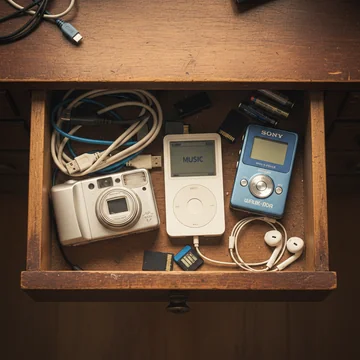
Somewhere in your home, there's probably a drawer — or a box, or a shelf — holding relics of a bygone tech era. A classic white iPod with a click wheel. A silver point-and-shoot digital camera. A tangle of USB cables you're not sure still fit anything. If you've been meaning to deal with these old gadgets but never got around to it, now's the time.
The good news: your old files — music, photos, videos — aren't necessarily lost. The key is knowing how to retrieve them before you decide whether to recycle, sell, or pass the devices along.
Find the Right Cables (Yes, This Is the Hard Part)
Most older gadgets connect to a computer via USB, but the connector type has changed repeatedly over the years. Early iPods used FireWire, while later models switched to Apple's 30-pin dock connector and eventually Lightning. Other devices used Mini-USB, Micro-USB, or proprietary plugs.
If you've lost the original cable, retailers like Best Buy and Amazon carry replacements. Just be sure to identify the exact plug type — and note that many newer computers only have USB-C ports, so you may need an adapter or USB-C hub. Also, beware of cheap "FireWire to USB" converters online; they're typically fraudulent since the technologies are fundamentally different.
Recovering Music From an iPod
Apple's iPod, introduced 25 years ago and officially retired in 2022, was designed to copy music in only one direction — from computer to iPod. This was an anti-piracy measure, but it means getting your music back requires some workaround.
If your iPod holds the only copy of tracks you ripped from CDs, you'll need third-party software. Tools like iExplorer, iMazing, Sharepod, or TouchCopy (starting around $30) can display the iPod's contents onscreen and let you selectively copy music, playlists, and videos back to your Mac or Windows PC.
Critical warning: If you connect your iPod to Apple's Music app (or iTunes) on a computer with a different library, do NOT let it automatically sync — it could erase everything on the device. Always choose to "manually manage" the iPod first.
Other MP3 Players Are Usually Easier
Non-Apple MP3 players — including Sony's digital Walkmans — often function as simple external hard drives. Connect them via USB, and you can browse and copy files directly using Windows File Explorer or Mac's Finder. Some devices used Windows Media Player for file management; a quick web search for your specific model should turn up the right instructions.
Getting Photos Off Old Cameras
For digital cameras, connect via the appropriate USB cable and your computer's default photo import tool should recognize it. If it doesn't, browse the device as an external drive to find and copy the image files manually.
Can't find the cable? Many laptops have built-in SD card reader slots. Pop the memory card out of the camera and insert it directly. If your laptop lacks a reader, inexpensive USB SD card adapters are widely available.
What to Do After You've Rescued Your Files
Once you've recovered everything, back it up immediately — to a cloud service, an external hard drive, or both. Then you have several options for the old hardware:
- Recycle it: Erase the device and take it to an electronics recycler. Many retailers like Best Buy accept old gadgets.
- Sell it: Vintage iPods and cameras have a surprisingly active resale market, especially among collectors.
- Repair it: If your device has a fixable issue like a loose headphone jack, iFixit offers step-by-step repair guides, replacement parts (including iPod batteries), and even an AI-powered FixBot for troubleshooting.
- Hand it down: Gen Z has shown genuine interest in older tech. Passing an iPod or point-and-shoot camera to a younger user gives it a second life and offers them a screen-free creative outlet.
The Bottom Line
That drawer of old gadgets doesn't have to be a graveyard. With the right cable and a few minutes of effort, you can rescue years of music and memories. And whether you choose to recycle, sell, or gift those devices, at least you'll know nothing valuable was left behind.