Google's Gemini Revolution in Chrome: How AI is Transforming Web Browsing in 2025
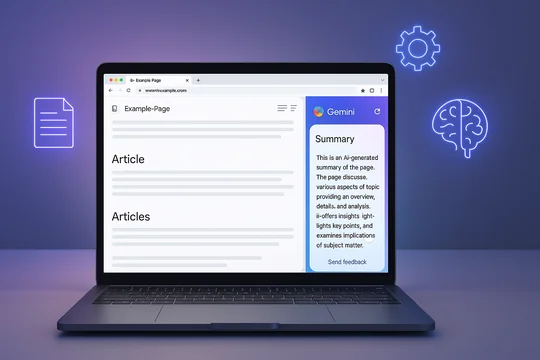
The landscape of web browsing is undergoing a fundamental transformation as Google aggressively integrates its Gemini AI model directly into Chrome. What started as experimental features for select users has rapidly evolved into a comprehensive AI-powered browsing experience that promises to revolutionize how we interact with online content. From instant page summaries to leaked evidence of upcoming agentic browsing capabilities, Google is positioning Chrome as more than just a browser—it's becoming an intelligent assistant that actively helps users navigate and understand the web.
The Evolution of Gemini in Chrome: From Concept to Reality
Google's journey to integrate Gemini into Chrome represents a strategic shift in how the company envisions the future of web browsing. Unlike previous AI implementations that required users to copy URLs and navigate to separate applications, the new Gemini integration creates a seamless, contextual experience directly within the browser environment.
The rollout has been methodical yet ambitious. Initially previewed in September 2024 for Mac users, the feature set has expanded rapidly across platforms. Android users are now experiencing the benefits of instant page summaries through a simple gesture—holding the power button while browsing automatically triggers the Gemini overlay with contextual options. This evolution from a cumbersome multi-step process to an intuitive single action demonstrates Google's commitment to reducing friction in AI interactions.
What makes this integration particularly significant is its universal availability across different browsing contexts. Whether users are reading articles in Chrome Custom Tabs, browsing Discover feeds, checking Google Search results, or scrolling through the Google News app, Gemini's summarization capabilities remain consistently accessible. This ubiquity ensures that AI assistance becomes a natural part of the browsing experience rather than an optional add-on.
Understanding the Page Summarization Feature
The cornerstone of Gemini's Chrome integration is its sophisticated page summarization capability. When activated, the feature displays three primary options above the prompt bar: "Summarize page," "Share screen with Live," and "Ask about page." Each serves a distinct purpose in helping users extract value from web content more efficiently.
The summarization process itself is remarkably intelligent. Rather than providing generic overviews, Gemini analyzes the specific content visible on the page and generates contextually relevant summaries. The AI uses a carefully crafted prompt: "Please provide a summary using the text of this web page. Be concise but thorough, addressing key points in easy to understand language." This approach ensures summaries are both comprehensive and accessible to users regardless of their familiarity with the subject matter.
Behind the scenes, Google has made interesting technical decisions about this feature. All page summaries currently utilize Gemini 2.5 Flash, even for users who have upgraded to the 2.5 Pro version in the main Gemini app. This choice likely reflects a balance between processing speed and quality—Flash provides near-instantaneous results while maintaining sufficient accuracy for summarization tasks.
The visual implementation deserves special attention. When users select the summarization option, a delightful animation featuring red, yellow, green, and blue waves radiates outward, creating a sense of energy and intelligence. The summary then appears as a floating window that users can expand for more detail or use as a launching point for follow-up questions. This design philosophy emphasizes both functionality and user delight—core principles in Google's approach to AI integration.
Cross-Platform Availability: Android, iOS, and Beyond
One of Gemini in Chrome's most impressive achievements is its cross-platform consistency. The feature isn't limited to Android devices where Google has traditionally held more control; iOS users are beginning to see the same capabilities arrive in their Chrome browsers.
For iOS users, the integration represents a particularly significant development. Previously confined to using the standalone Gemini app, iPhone and iPad users can now access AI assistance without leaving their browsing context. The feature announces itself through a "Get started" banner, and once enabled, provides the same summarization and query capabilities available on Android. Users need to opt-in explicitly, giving Chrome permission to send webpage data to Google's servers—a transparency measure that respects user privacy preferences while enabling powerful AI features.
The implementation on iOS does face some unique challenges. The fastest way to access Gemini features is currently through the Page Tools menu (the three-dot menu), which adds an extra tap compared to Android's power button shortcut. However, this minor inconvenience is offset by the feature's reliability and consistency across different types of web content.
Currently, the feature appears limited to users in the United States with their Chrome language set to English, but Google's track record suggests broader international rollout is imminent. This measured approach allows Google to refine the feature based on initial user feedback before scaling globally.
The Future of Browsing: Contextual Tasks and Agentic Capabilities
While current features are impressive, leaked information and experimental flags in Chrome Canary reveal Google's even more ambitious plans for Gemini integration. The discovery of "Contextual tasks" flags suggests Chrome is preparing to introduce agentic browsing capabilities—essentially allowing the browser to perform complex tasks autonomously on behalf of users.
Windows Latest's investigation into these experimental features revealed a sidebar interface reminiscent of Microsoft Edge's Copilot integration but with potentially more sophisticated capabilities. When force-enabled, the Contextual tasks option appears in the "More Tools" section of the context menu, opening a sidebar that currently shows a basic Google homepage. While the interface remains rough and unpolished—with sizing issues and limited functionality—its mere existence confirms Google's serious investment in browser-level AI agents.
The implications of agentic browsing are profound. Google has hinted that these capabilities could transform time-consuming tasks like online grocery shopping from 30-minute ordeals into three-click experiences. By analyzing open tabs, browsing history, and user preferences, Gemini could intelligently suggest purchases, compare options across multiple sites, and even complete transactions with minimal user intervention.
This vision extends beyond simple automation. Google is developing multi-instance Gemini capabilities, allowing users to run separate AI queries in different tabs simultaneously. Instead of focusing on one task at a time, users could have Gemini researching flight options in one tab while summarizing research papers in another, all within the same browser session.
Technical Architecture and Performance Considerations
The technical implementation of Gemini in Chrome reveals careful optimization decisions. The choice to use Gemini 2.5 Flash for all summarization tasks, regardless of user subscription level, indicates Google's priority on response speed and resource efficiency. Flash models are designed for rapid inference, making them ideal for real-time browsing assistance where users expect immediate results.
The system's ability to maintain conversation context is particularly noteworthy. Queries initiated through Chrome's summarization feature automatically appear in the main Gemini app, allowing users to continue conversations seamlessly across different interfaces. This continuity is achieved through Google's account synchronization infrastructure, ensuring that AI interactions remain connected regardless of where they begin.
From a performance perspective, the integration appears to have minimal impact on browser speed or resource consumption. The AI processing occurs on Google's servers rather than locally, meaning even devices with modest specifications can access these advanced features. This cloud-based approach also ensures that improvements to Gemini's capabilities immediately benefit all users without requiring browser updates.
Privacy, Data Handling, and User Control
With great power comes great responsibility, and Google has implemented several measures to address privacy concerns around Gemini's Chrome integration. Users must explicitly opt into the feature, acknowledging that webpage data will be sent to Google for processing. This transparency is crucial for building trust, especially given the sensitive nature of browsing data.
The system operates on a per-request basis—webpage content is only transmitted to Google's servers when users actively invoke Gemini features. There's no continuous monitoring or automatic data collection from pages users visit. This approach balances functionality with privacy, ensuring users maintain control over when and how their browsing data is used for AI processing.
Google has also implemented granular controls within the Gemini interface. Users can rate responses as good or bad, helping improve the system while maintaining agency over their AI interactions. The ability to delete conversation history and manage data retention settings provides additional privacy protections for security-conscious users.
Comparing Gemini to Competitor Solutions
Google's Gemini integration in Chrome enters a competitive landscape where Microsoft's Edge Copilot and other browser AI solutions have already established presence. However, Google's approach offers several distinct advantages.
Unlike Edge's Copilot, which often feels like a separate application embedded in the browser, Gemini's integration appears more native and contextually aware. The ability to trigger summaries through simple gestures rather than navigating menus reduces friction significantly. Additionally, Gemini's connection to Google's broader ecosystem—including Search, Maps, and other services—provides a more comprehensive AI experience.
The quality of summaries also stands out. While competitor solutions often provide generic overviews, Gemini's summaries demonstrate superior understanding of context and nuance. This advantage likely stems from Google's vast training data and sophisticated language models, which benefit from years of search query analysis and web content indexing.
Real-World Applications and Use Cases
The practical applications of Gemini in Chrome extend far beyond simple summarization. Students researching complex topics can quickly digest academic papers and extract key insights. Professionals monitoring industry news can efficiently process multiple articles and identify trends. Shoppers can compare product reviews across different sites without reading every detail manually.
Consider a typical research scenario: A user investigating renewable energy policies across different countries would traditionally spend hours reading through government documents, news articles, and analysis papers. With Gemini's summarization, they can quickly extract key points from each source, ask follow-up questions about specific aspects, and maintain a coherent research thread across multiple browsing sessions.
For business users, the upcoming agentic capabilities promise even greater productivity gains. Imagine preparing for a client meeting by having Gemini automatically compile relevant market data, competitor analysis, and recent news—all while you focus on strategic planning. The AI could even draft initial presentation outlines based on the gathered information, dramatically accelerating preparation time.
Looking Ahead: The Road to Intelligent Browsing
As we look toward the remainder of 2025 and beyond, Google's vision for Gemini in Chrome represents just the beginning of a fundamental shift in how we interact with the web. The progression from passive browsing to active AI assistance marks a paradigm shift comparable to the transition from desktop to mobile computing.
Future developments likely include deeper integration with Google Workspace, allowing Gemini to not only summarize content but automatically organize it into documents, spreadsheets, or presentations. We might see predictive browsing, where Gemini anticipates user needs and pre-loads relevant information before it's explicitly requested.
The potential for personalization is particularly exciting. As Gemini learns individual user preferences and patterns, it could customize summaries to emphasize personally relevant information, filter out redundant content, and even suggest alternative sources that align with user interests and expertise levels.
Conclusion: Embracing the AI-Powered Web
Google's integration of Gemini into Chrome represents more than a feature update—it's a glimpse into the future of human-computer interaction. By making AI assistance contextual, intuitive, and universally accessible, Google is democratizing advanced technology that was once the province of specialized applications.
For users, the message is clear: the web is becoming more intelligent, more helpful, and more responsive to individual needs. Whether you're a casual browser seeking quick information or a power user managing complex research, Gemini in Chrome offers tools that can genuinely transform your online experience.
As these features continue to roll out and evolve, staying informed and experimenting with new capabilities will be crucial. The browsers of tomorrow won't just display web pages—they'll understand them, interact with them, and help us navigate the ever-expanding digital universe with unprecedented ease and intelligence.
The revolution in web browsing has begun, and with Gemini at its core, Chrome is leading the charge toward a more intelligent, efficient, and user-centric internet experience. The only question remaining is not whether to embrace these changes, but how quickly we can adapt to and benefit from them.