Google Launches Windows Desktop App With Spotlight-Style Search and Chrome Skills for AI Shortcuts
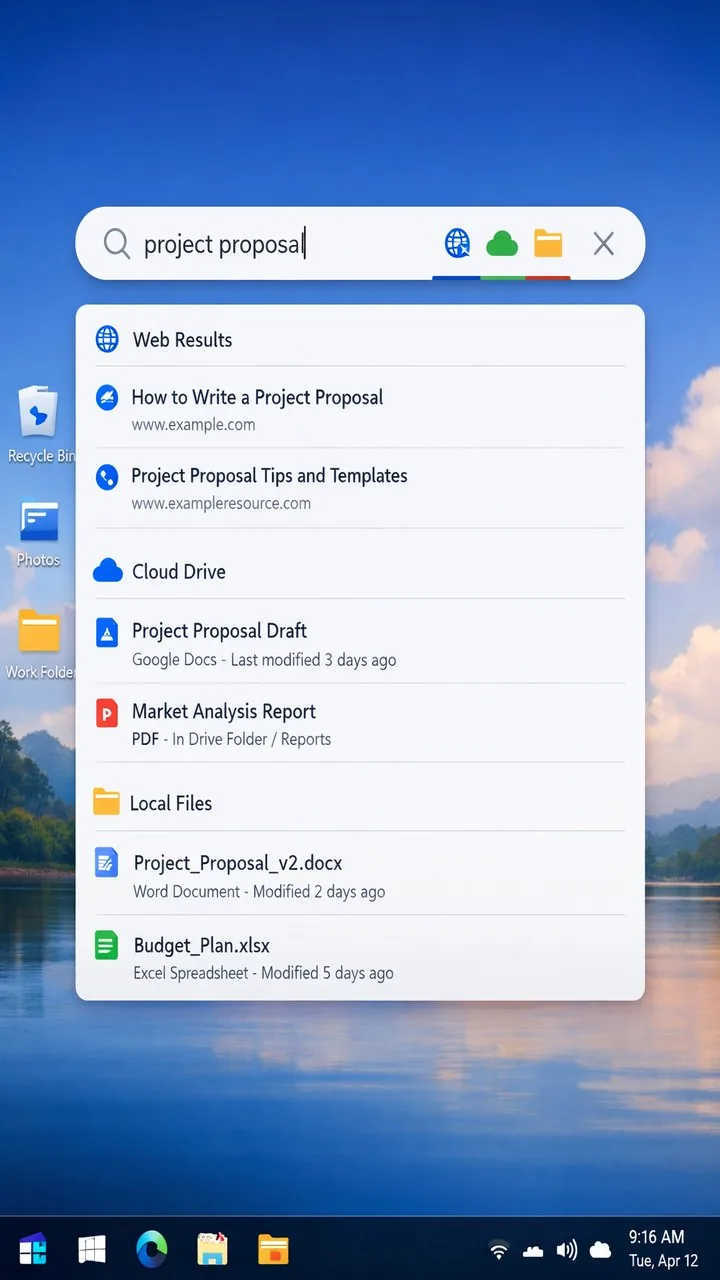
Google has released a new Windows desktop application that brings a macOS Spotlight-style search experience to PC users, enabling unified search across the web, Google Drive, and local files from a single floating interface. The app also includes a screen sharing feature, making it one of Google's most ambitious desktop software efforts in years.
What the Google Desktop App Does
The app functions as a universal search layer for Windows users. A keyboard shortcut summons a compact search box that queries the web via Google Search, scans your Google Drive files, and indexes local files on your machine — all in one place. Results are presented in a unified interface, similar to how macOS Spotlight blends system, app, and web results. The screen sharing feature allows users to share their display directly from the app, likely for use with Google Meet or AI-powered assistance features.
Google Bringing AI Search to the Desktop
The app is part of Google's broader strategy to extend its AI-enhanced search capabilities beyond the browser. With Gemini powering Google Search's AI Overviews, the desktop app is positioned to bring similar AI-assisted results — summarized answers, contextual suggestions, and document search — to the Windows desktop experience. This gives Google a presence in the user's workflow that doesn't require opening a browser at all.
Chrome Skills: Keyboard-Shortcut AI Prompts
Google also launched Chrome Skills, a companion feature that lets users create and run repeatable AI prompts directly in Chrome via keyboard shortcuts. Users can define their own Skills or choose from more than 50 presets covering tasks like summarizing a page, translating text, or drafting a reply to an email. The keyboard shortcut activation makes AI assistance feel native rather than something accessed through a side panel or extension menu.
Taking on Microsoft and Apple
The Google desktop app positions the company directly against Microsoft's Copilot, which is deeply integrated into Windows 11, and Apple's Spotlight and Siri, which dominate the macOS experience. Google's advantage is its search quality and the depth of Drive integration for the millions of professionals who live in Google Workspace. The challenge will be getting Windows users — many of whom have grown accustomed to Copilot — to install and adopt a competing desktop layer from Google.
The Bottom Line
Google's new Windows desktop app and Chrome Skills are a deliberate push to make Google AI an ambient presence in the daily computing experience — not just a destination you visit in a browser tab. For heavy Google Workspace users on Windows, this could genuinely improve productivity. The real test is whether it's polished enough to displace the default tools that Microsoft and Apple have already built into their operating systems.
Related Articles
- WhatsApp Is Finally Getting Scheduled Messages
- Meta and Broadcom Expand MTIA Chip Partnership
- OpenAI Launches GPT-5.4 Cyber Dedicated Cybersecurity Model