Clicks Communicator Smartphone Signals the Return of Real Keyboards
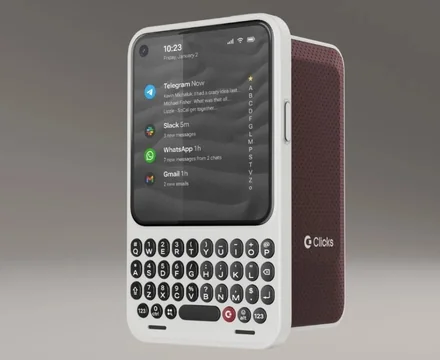
Clicks Communicator Smartphone: Why a Keyboard-First Phone Is Back
Clicks Technology is stepping into bold territory with the launch of its first-ever smartphone—and it looks unapologetically like a modern BlackBerry. In an era dominated by endless scrolling and notification overload, the Clicks Communicator smartphone is betting on a simple idea: some people want their phones to help them work, not distract them.
This launch matters because it challenges the assumption that more apps, more screen time, and more features always equal progress. Instead, Clicks is positioning focus as a premium feature.
Key Facts: What Clicks Just Announced
Clicks unveiled two new products ahead of CES in Las Vegas:
-
Clicks Communicator smartphone: A $499 Android phone with a physical keyboard, designed as a second, work-focused device
-
Power Keyboard: A $79 snap-on, slide-out keyboard compatible with phones, tablets, TVs, and more
The Communicator runs Android 16, supports global 5G, includes a 4,000 mAh battery, and offers expandable storage up to 2TB. Early-bird buyers can secure the phone for $399 with a deposit before February 27.
Why the Clicks Communicator Smartphone Matters
The bigger story isn’t nostalgia—it’s intent. The Clicks Communicator smartphone is purpose-built for people who write, message, and manage information all day. Lawyers, journalists, founders, developers, and operators often carry two phones already. Clicks is leaning into that reality rather than fighting it.
Unlike mainstream smartphones, the Communicator avoids addictive social media and gaming apps by design. Instead, it uses Niagara Launcher to prioritize tools like Gmail, Slack, WhatsApp, Telegram, and calendar apps. The result is a productivity-focused smartphone that feels closer to a work instrument than a digital playground.
This reflects a broader trend: digital minimalism as a competitive advantage. As more professionals burn out on attention-hijacking apps, devices that respect focus are becoming more appealing.
The Signal Light and Prompt Key: Small Details, Big Shift
One of the most interesting features is the customizable Signal Light, a physical indicator that glows in different colors depending on who is messaging you. VIP texts might pulse purple, while group chats glow green.
This matters because it reduces cognitive load. Instead of checking your screen constantly, you can understand urgency at a glance.
The Prompt Key adds another layer. It allows quick voice dictation or note recording, and Clicks has hinted at future AI integrations. While nothing is live yet, the hardware is clearly designed with AI workflows in mind—think meeting summaries, voice-to-task capture, or smart reminders.
Physical Keyboard Phones Aren’t Dead—They’re Evolving
Clicks isn’t alone in believing the physical keyboard smartphone still has a future. What’s different now is who it’s for. This isn’t a mass-market device. It’s a tool for people who value speed, accuracy, and tactile feedback over screen real estate.
Notably, the keyboard is touch-sensitive, letting users scroll and navigate without lifting their fingers. Combined with features like a headphone jack, physical SIM tray, airplane mode switch, and swappable back covers, the phone leans hard into functional design.
As Clicks CEO Adrian Li put it, the company’s earlier success shipping over 100,000 keyboards globally proved there’s “growing demand for purpose-built products that help people communicate with confidence.”
Practical Implications: Who Should Consider This Phone?
The Clicks Communicator smartphone won’t replace your iPhone or Pixel—and that’s the point. It’s best suited for:
-
Professionals who write or message constantly
-
People already carrying a second work phone
-
Users looking to reduce distractions without sacrificing capability
-
Fans of BlackBerry-style phones who want modern Android support
If you don’t want to switch phones entirely, the Power Keyboard offers a lower-commitment way to reclaim tactile typing across multiple devices.
Comparison: Clicks Communicator vs Modern Smartphones
| Feature | Clicks Communicator | Typical Flagship Phone |
|---|---|---|
| Primary Focus | Productivity & messaging | Apps & entertainment |
| Keyboard | Physical + touch-sensitive | On-screen only |
| Social Media | Limited by design | Fully supported |
| Custom Alerts | Signal Light | Screen notifications |
| Use Case | Second/work phone | Primary device |
Bottom Line: If focus is your priority, Clicks offers something mainstream phones don’t even try to solve.
FAQ: Clicks Communicator Smartphone
[FAQ SCHEMA RECOMMENDED: Yes]
Q: What is the Clicks Communicator smartphone designed for?
A: The Clicks Communicator smartphone is designed as a productivity-focused, secondary phone for professionals who spend much of their day typing, messaging, and managing work communications.
Q: Does the Clicks Communicator support social media apps?
A: The device intentionally limits access to addictive social media and gaming apps, prioritizing messaging and productivity tools instead.
Q: Is the Clicks Communicator a replacement for a regular smartphone?
A: No. Clicks positions it as a companion or work phone rather than a full replacement for a mainstream smartphone.
Q: When will the Clicks Communicator ship?
A: Early-bird orders are expected to ship later this year, according to the company.
Final Thoughts: A Bet on Focused Tech
The Clicks Communicator smartphone isn’t trying to win everyone over. Instead, it’s carving out space for people who want technology to feel intentional again. As digital fatigue grows, this kind of focused hardware may shift from niche to necessary.
Sometimes, the future of smartphones looks a lot like the past—just smarter.