Claude WordPress Connector: Smarter Site Insights
Claude’s New WordPress Connector Could Change How You Run Your Site
If you run a WordPress site, you already know the “admin work” never ends. Checking traffic. Reviewing comments. Digging through posts to find what’s underperforming. Keeping track of plugins.
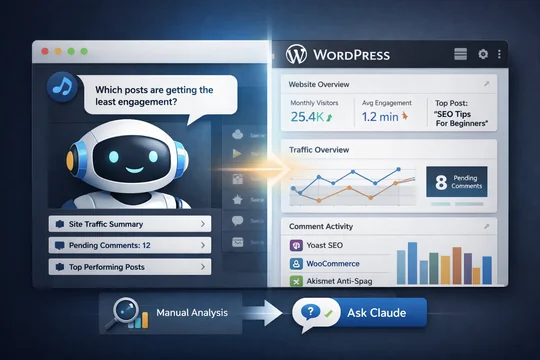
Now imagine asking an AI assistant: “Which posts are getting the least engagement?” and getting a useful answer in seconds—without opening five tabs and three dashboards.
That’s the promise behind the Claude WordPress connector, a new integration that could make WordPress site management feel a lot less like spreadsheet therapy.
WordPress has launched a Claude connector that lets site owners share certain back-end data with Anthropic’s chatbot.
Key Facts: What WordPress Just Announced
WordPress has released a new connector that links WordPress accounts to Claude, Anthropic’s AI chatbot.
Here’s what matters most:
-
Site owners can choose what data to share with Claude
-
The connector provides read-only access, meaning Claude can’t edit your site
-
Users can revoke access anytime
-
Once connected, Claude can answer questions about site performance, posts, comments, and plugins
-
WordPress provides template prompts like “Show me pending comments” and “Which posts are generating the most discussion?”
In short: Claude becomes a “data interpreter” for your WordPress site—without becoming an editor (yet).
Why the Claude WordPress Connector Matters (More Than It Sounds)
At first glance, this might feel like a small feature update. Another AI integration. Another chatbot add-on.
But it’s bigger than that, because it points to a shift that’s happening across the entire creator economy:
1) WordPress is moving from “dashboard” to “conversation”
Most site owners don’t struggle because they lack data.
They struggle because the data is scattered across:
-
WordPress admin
-
Google Analytics
-
SEO tools
-
comment queues
-
performance plugins
The Claude WordPress connector introduces a new model: you don’t hunt for answers—you ask for them.
This is the same reason ChatGPT, Claude, and Gemini are being integrated into everything from email to spreadsheets. The future UI is increasingly… a question box.
2) It lowers the skill barrier for real optimization
A lot of WordPress site growth advice assumes you’re comfortable with analytics.
But many creators, small business owners, and bloggers aren’t. They don’t know what bounce rate means. They don’t know what “engagement” should look like.
If Claude can summarize performance in plain language, it could help more site owners make smarter decisions—without needing to become amateur analysts.
3) It’s the first step toward AI-powered site operations
Right now, Claude can only read.
But WordPress has hinted before that it may eventually support “write access” for MCP integrations. That’s where things get serious.
Because the moment AI can:
-
draft posts inside WordPress
-
update pages
-
respond to comments
-
manage plugins
-
optimize metadata
…you’re no longer using WordPress the same way.
You’re supervising WordPress.
What You Can Actually Do With It Today (And What You Can’t)
Let’s be real: a connector doesn’t magically grow your traffic.
What it can do is remove friction from tasks that normally take too long.
Here are practical ways the connector could help immediately:
-
Identify content that’s underperforming
Ask: “Which posts have low engagement but high traffic?”
That’s a strong signal for content refresh opportunities. -
Spot what your audience responds to
Ask: “Which posts generate the most discussion?”
That helps you double down on formats and topics that actually connect. -
Speed up comment moderation
Ask: “Show me pending comments.”
This is small, but it’s a daily pain point for many site owners. -
Get a quick plugin overview
Ask: “What plugins are installed on my main site?”
Useful for audits, security reviews, and cleanup.
But here’s what you can’t do yet:
-
You can’t ask Claude to publish a post
-
You can’t ask Claude to delete spam comments
-
You can’t ask Claude to install or remove plugins
-
You can’t ask Claude to fix your theme
It’s insight-first, action-later.
The Bigger Prediction: WordPress Is Preparing for AI Workflows
This is where the trend gets interesting.
WordPress isn’t just adding AI for novelty. It’s laying groundwork for a world where:
-
site owners talk to their CMS like an assistant
-
analytics becomes conversational
-
content planning becomes AI-driven
-
routine admin work becomes automated
And the Claude integration is particularly notable because it’s not “WordPress’s own AI.”
It’s WordPress acknowledging that creators want choice—they want to connect the AI they already prefer.
That’s a smart move, and it’s likely where the market is heading:
CMS platforms becoming AI-neutral hubs, instead of locking people into one assistant.
Comparison: Before vs After the Claude WordPress Connector
| Feature | Before Connector | With Claude Connector |
|---|---|---|
| Getting performance insights | Manual digging through dashboards | Ask Claude questions in plain English |
| Comment queue visibility | Navigate admin menus | Ask for pending comments instantly |
| Content engagement analysis | Requires tools + interpretation | Claude summarizes patterns quickly |
| Plugin inventory | Check plugin page manually | Claude can list installed plugins |
| Risk of unwanted edits | N/A | None (read-only access) |
Bottom Line: If you manage multiple posts, comments, or sites, the Claude connector is a practical time-saver today—and a preview of where WordPress is going next.
FAQ SECTION:
Q: What is the Claude WordPress connector?
A: The Claude WordPress connector is a new integration that lets you connect your WordPress site data to Claude, Anthropic’s AI chatbot. It allows Claude to read selected back-end data so you can ask questions about traffic, posts, comments, and plugins.
Q: Can Claude edit my WordPress site through the connector?
A: No. Right now, Claude only gets read-only access. That means it can view the data you allow, but it cannot publish posts, change settings, delete comments, or install plugins. You stay fully in control.
Q: What kind of WordPress data can Claude access?
A: Claude can access specific site data depending on what you choose to share. Examples include traffic summaries, post performance, comment queues, and plugin lists. WordPress also allows you to revoke access at any time.
Q: Is the Claude WordPress connector safe to use?
A: It can be safe if you limit access to only the data Claude needs. Since it’s read-only, the risk of site damage is low. The bigger consideration is privacy—site owners should be intentional about what back-end information they share.
Q: Will WordPress allow AI write access in the future?
A: Possibly. WordPress has previously suggested it may eventually offer write access through MCP integrations. If that happens, AI assistants like Claude could potentially handle editorial and admin tasks directly inside WordPress.