ChatGPT Translate: How to Use OpenAI's New AI Translation Tool (2026 Guide)
OpenAI Launches ChatGPT Translate: A Game-Changer for AI-Powered Translation
In January 2026, OpenAI made waves in the translation industry with the launch of ChatGPT Translate, a dedicated AI translation tool available at chatgpt.com/translate. This new service leverages the advanced language understanding capabilities of GPT-4 and its successors to provide contextually accurate translations that go far beyond simple word-for-word conversion.
Unlike traditional translation tools that often struggle with nuance, cultural context, and tone, ChatGPT Translate promises to deliver translations that maintain the original meaning, style, and intent of the source text. This comprehensive guide will walk you through everything you need to know about OpenAI's newest offering and how it compares to existing translation services.
What Makes ChatGPT Translate Different?
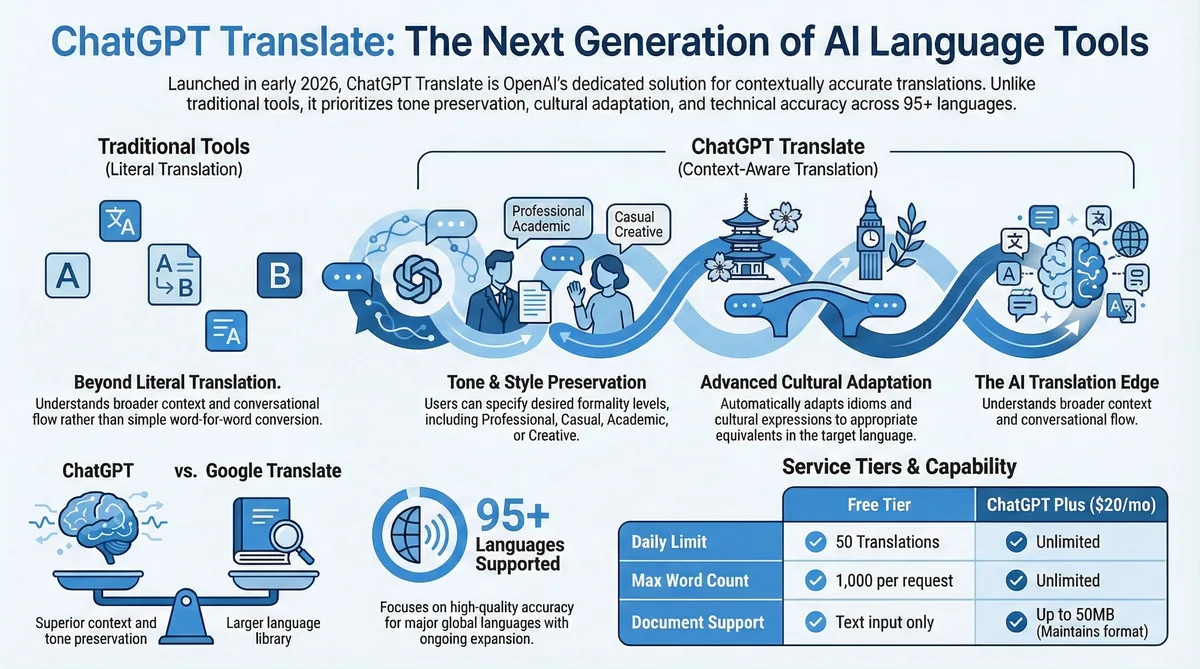
ChatGPT Translate represents a significant leap forward in machine translation technology. Built on OpenAI's latest language models, this tool understands context, cultural nuances, and maintains conversational flow in ways that traditional statistical machine translation cannot match.
Related: Canva vs Adobe: Why Free Affinity Tools Are a Game-Changer for Creators.
Key Features of ChatGPT Translate
- Context-Aware Translation: Understands the broader context of conversations and documents
- Tone Preservation: Maintains the original tone, whether formal, casual, humorous, or technical
- Cultural Adaptation: Adapts expressions and idioms to culturally appropriate equivalents
- Real-Time Conversation Mode: Enables live translation for voice and text conversations
- Document Translation: Handles entire documents while maintaining formatting
- Industry-Specific Terminology: Recognizes and correctly translates technical jargon across various fields
- Multilingual Support: Currently supports over 95 languages with ongoing expansion
- Explanation Mode: Provides reasoning behind translation choices when requested
How to Use ChatGPT Translate: Step-by-Step Guide
Getting Started
Using ChatGPT Translate is straightforward, whether you're a free user or have a ChatGPT Plus subscription. Here's how to get started:
- Navigate to the Platform: Visit chatgpt.com/translate or access the translation feature through the main ChatGPT interface
- Select Your Languages: Choose your source and target languages from the dropdown menus
- Choose Your Mode: Select from text translation, document upload, or conversation mode
- Input Your Content: Type, paste, or upload the content you want translated
- Customize Settings: Adjust tone, formality level, and cultural adaptation preferences
- Generate Translation: Click translate and review the results
Advanced Features and Settings
ChatGPT Translate offers several advanced options that set it apart from competitors:
Tone and Style Adjustment
Users can specify the desired tone for their translation:
- Formal/Professional
- Casual/Conversational
- Academic/Technical
- Creative/Literary
- Business/Corporate
Context Refinement
The tool allows users to provide additional context about:
- Target audience (age group, profession, cultural background)
- Purpose of translation (business communication, academic paper, casual conversation)
- Industry or field (medical, legal, technical, marketing)
- Regional preferences (American vs. British English, Latin American vs. European Spanish)
ChatGPT Translate vs. Google Translate: Comprehensive Comparison
While Google Translate has dominated the translation space for years, ChatGPT Translate brings several advantages to the table. Here's a detailed comparison:
| Feature | ChatGPT Translate | Google Translate |
|---|---|---|
| Language Support | 95+ languages (expanding) | 130+ languages |
| Context Understanding | Excellent - maintains conversation flow | Good - improving with neural networks |
| Tone Preservation | Excellent - customizable tone settings | Limited - often loses nuance |
| Cultural Adaptation | Advanced - adapts idioms and expressions | Basic - literal translations common |
| Technical Accuracy | High - specialized terminology support | Moderate - struggles with technical terms |
| Document Translation | Yes - maintains formatting | Yes - basic formatting preservation |
| Real-time Conversation | Yes - with context memory | Yes - through mobile app |
| Pricing | Free tier + $20/month Plus | Free with premium API pricing |
| Offline Support | No | Yes (limited languages) |
| Camera Translation | Coming soon | Yes |
Translation Quality Comparison
Independent testing has shown that ChatGPT Translate excels particularly in:
- Literary and Creative Texts: Better preservation of style and artistic intent
- Business Communications: More natural and professional tone
- Conversational Content: Maintains dialogue flow and personality
- Technical Documentation: Superior handling of specialized terminology
- Cultural References: Better adaptation of culturally specific content
Pricing and Subscription Options
OpenAI offers ChatGPT Translate through multiple pricing tiers to accommodate different user needs:
Free Tier
- Up to 50 translations per day
- Maximum 1,000 words per translation
- Basic language pairs
- Standard processing speed
ChatGPT Plus ($20/month)
- Unlimited translations
- Priority processing
- Advanced tone and context controls
- Document translation up to 50MB
- Conversation mode with extended memory
- All language pairs
Enterprise Solutions
- Custom pricing based on usage
- API integration capabilities
- Advanced security and privacy features
- Dedicated support
- Custom model training options
Best Use Cases for ChatGPT Translate
Professional Applications
Business Communications: ChatGPT Translate excels at translating emails, reports, and presentations while maintaining professional tone and cultural sensitivity. The tool understands business context and can adapt language appropriately for different corporate cultures.
Related: Top 7 Best Video Player for Windows PC.
Legal and Medical Documents: With its advanced understanding of specialized terminology, ChatGPT Translate provides more accurate translations of technical documents, though professional review is still recommended for critical applications.
Academic Research: Researchers can use the tool to translate academic papers, maintaining the formal tone and technical accuracy required in scholarly work.
Creative and Personal Use
Literary Translation: The AI's ability to understand and preserve creative elements makes it valuable for translating poetry, literature, and creative writing while maintaining artistic intent.
Social Media and Marketing: Content creators can translate posts and marketing materials while preserving brand voice and cultural relevance for different markets.
Personal Communication: For everyday conversations, the tool maintains personality and tone, making international communication more natural and engaging.
Related: 15 Best Project Management Software 2026: Top Expert Picks.
Limitations and Considerations
While ChatGPT Translate represents a significant advancement, users should be aware of certain limitations:
Current Limitations
- Internet Dependency: Requires stable internet connection (no offline mode yet)
- Processing Time: More complex translations may take longer than simple tools
- Language Coverage: Still expanding language support compared to established competitors
- Visual Translation: Camera-based translation features are still in development
- Real-time Voice: Voice translation accuracy varies with accent and audio quality
Best Practices for Optimal Results
- Provide context when translating ambiguous terms
- Specify target audience and purpose
- Review and refine translations for critical applications
- Use the explanation feature to understand translation choices
- Break down very long documents into sections for better accuracy
Future Developments and Roadmap
OpenAI has announced several upcoming features for ChatGPT Translate:
Planned Features (2026)
- Visual Translation: Camera-based text translation similar to Google Lens
- Offline Mode: Limited offline translation capabilities for premium users
- Voice Cloning: Maintain speaker's voice characteristics in audio translations
- Integration APIs: Seamless integration with popular productivity tools
- Collaborative Translation: Team-based translation projects with version control
Long-term Vision
OpenAI envisions ChatGPT Translate becoming a comprehensive language bridge that not only translates words but also facilitates true cross-cultural communication by adapting content for different cultural contexts and communication styles.
Getting the Most Out of ChatGPT Translate
Pro Tips for Better Translations
- Use Context Prompts: Always provide background information about your translation needs
- Specify Tone Requirements: Clearly indicate whether you need formal, casual, or technical language
- Leverage Conversation Mode: For ongoing projects, use conversation mode to build context over multiple interactions
- Review and Iterate: Use the refinement features to improve translations based on your specific needs
- Combine with Human Expertise: For critical translations, use ChatGPT Translate as a first draft and have human experts review
Frequently Asked Questions
Is ChatGPT Translate more accurate than Google Translate?
ChatGPT Translate generally provides more contextually accurate and culturally appropriate translations, especially for conversational content and creative materials. However, accuracy can vary depending on the language pair and type of content. For basic translations, both tools perform well, but ChatGPT Translate excels in maintaining tone and context.
Can I use ChatGPT Translate for free?
Yes, OpenAI offers a free tier with up to 50 translations per day and a maximum of 1,000 words per translation. For unlimited access and advanced features, you'll need a ChatGPT Plus subscription at $20 per month.
For more details, check out our guide on 25 Best Game Apps for iPad Available For Free Download.
Does ChatGPT Translate work offline?
Currently, ChatGPT Translate requires an internet connection. However, OpenAI has announced that offline capabilities are in development and will be available for premium users later in 2026.
How many languages does ChatGPT Translate support?
As of January 2026, ChatGPT Translate supports over 95 languages, with ongoing expansion planned. While this is fewer than Google Translate's 130+ languages, OpenAI focuses on quality over quantity, ensuring better translation accuracy for supported languages.
Can I translate entire documents with ChatGPT Translate?
Yes, ChatGPT Plus subscribers can upload and translate entire documents up to 50MB while maintaining original formatting. Free users are limited to text input with a 1,000-word maximum per translation.
Is ChatGPT Translate suitable for professional or business use?
Absolutely. ChatGPT Translate is particularly strong in business contexts, maintaining professional tone and understanding industry-specific terminology. However, for critical legal or medical documents, professional human review is still recommended.
How does ChatGPT Translate handle cultural context and idioms?
One of ChatGPT Translate's strongest features is its ability to adapt cultural expressions and idioms to appropriate equivalents in the target language, rather than providing literal translations that might not make sense culturally.
Can I use ChatGPT Translate for real-time conversations?
Yes, ChatGPT Translate includes a conversation mode that can handle real-time text and voice translation while maintaining context throughout the conversation. This feature is available for both free and premium users, though premium users get extended conversation memory.
Does ChatGPT Translate store my translations?
OpenAI follows strict privacy guidelines. Translations are processed securely, and users can control data retention settings. Enterprise users have additional privacy and security options, including the ability to prevent data storage entirely.
When will camera translation be available?
OpenAI has announced that visual translation capabilities, including camera-based text translation, are in development and expected to launch later in 2026. This will allow users to translate text in images and real-world signs using their device's camera.
Related: Why AI as a Productivity Tool Beats the Job-Killer Narrative.
ChatGPT Translate represents a significant evolution in AI-powered translation technology, offering superior context understanding and cultural adaptation compared to traditional tools. While it may not yet match Google Translate's language coverage or offline capabilities, its advanced AI understanding makes it an excellent choice for users who prioritize translation quality and contextual accuracy over basic word-for-word conversion.