Adobe Premiere Elements: The Ultimate Beginner's Guide to Video Editing in 2025
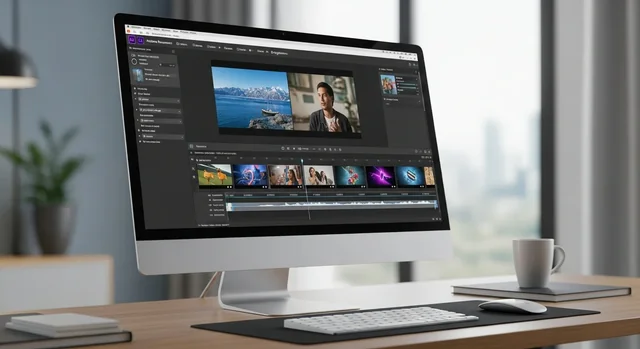
Adobe Premiere Elements 2025: Revolutionary AI-Powered Video Editing for Everyone
Content creation has exploded in 2025, with over 4.8 billion videos uploaded daily across social platforms. Whether you're crafting Instagram Reels, YouTube shorts, or preserving family memories, Adobe Premiere Elements 2025 emerges as the perfect solution for creators who demand professional results without the complexity of enterprise-grade software.
This latest iteration represents Adobe's most significant update to their consumer video editing platform, featuring a completely redesigned interface that mirrors Premiere Pro's sleek aesthetics, groundbreaking AI capabilities powered by Adobe Sensei, and native support for Apple's M3 silicon architecture. With over 15 million active users worldwide, Premiere Elements continues to democratize video editing for creators at every level.
What Makes Adobe Premiere Elements 2025 Special?
Adobe Premiere Elements 2025 is a consumer-focused video editing software that combines professional-grade features with an intuitive learning curve. Unlike its professional sibling Premiere Pro, Elements focuses on guided workflows, automated processes, and smart suggestions that help users create compelling content without extensive technical knowledge.
You might also be interested in 30+ Highly Useful Photoshop Video Tutorials.
The 2025 version introduces several game-changing features that position it as a serious contender in the crowded video editing market. From AI-powered auto-editing to advanced color grading tools, this software package delivers remarkable value for content creators, small businesses, and hobbyist filmmakers.
Revolutionary Interface Design
The most immediately noticeable change in Premiere Elements 2025 is its stunning new interface that closely resembles Premiere Pro's professional layout. The redesigned workspace features:
- Unified Timeline: Grouped video and audio tracks that automatically organize related content
- Contextual Panels: Smart workspace adaptation based on your current editing task
- Quick Tools Menu: One-click access to frequently used features and effects
- Enhanced Preview Window: Real-time playback with improved scrubbing controls
- Customizable Workspace: Drag-and-drop panel arrangement for personalized workflows
Adobe Sensei AI: The Game-Changing Intelligence
Adobe's artificial intelligence platform, Sensei, takes center stage in the 2025 release with two revolutionary features that dramatically reduce editing time while improving output quality.
Smart Tags: Automated Content Organization
The Smart Tags feature uses machine learning to automatically analyze and categorize your video content. This AI-powered system can identify:
- People and faces in your footage
- Objects and locations
- Activities and events
- Lighting conditions and camera movements
- Audio characteristics and speech patterns
This intelligent tagging system makes finding specific clips effortless, especially when working with large video libraries. Content creators report saving up to 40% of their editing time thanks to this automated organization feature.
Auto Reframe: Multi-Platform Content Creation
Auto Reframe represents one of the most practical AI implementations in video editing software. This feature automatically adjusts your content for different aspect ratios and platforms:
- YouTube (16:9): Optimized for desktop and TV viewing
- Instagram Stories (9:16): Vertical format for mobile consumption
- TikTok (9:16): Portrait orientation with enhanced subject tracking
- Facebook Posts (1:1): Square format for social media feeds
- Twitter Videos (16:9 or 1:1): Flexible formatting for maximum engagement
The AI intelligently tracks subjects and maintains optimal framing across different aspect ratios, eliminating the tedious manual work of reformatting content for multiple platforms.
Professional-Grade Features for Consumer Users
Advanced Color Correction Tools
Premiere Elements 2025 introduces professional color grading capabilities previously exclusive to high-end software:
- White Balance Correction: One-click color temperature adjustment with manual fine-tuning options
- Color Curves: Precise control over highlights, shadows, and mid-tones
- LUT Support: Import and apply professional color lookup tables
- Skin Tone Enhancement: AI-powered portrait optimization
- Selective Color Adjustment: Target specific color ranges for precise corrections
Enhanced Audio Capabilities
Audio quality can make or break video content, and Premiere Elements 2025 delivers professional-level audio tools:
- Voice-Over Narration Tool: Built-in recording with noise reduction and EQ
- Audio Ducking: Automatic background music volume adjustment during speech
- Spectral Display: Visual audio editing with frequency analysis
- Multi-Track Mixing: Professional-style audio mixing board
- Audio Effects Library: Over 50 professional audio effects and filters
Creative Assets and Templates
Adobe has significantly expanded the creative resources available in Elements 2025:
For more details, check out our guide on How to Add Video to Twitter and Share it After Adding.
- 100 Adobe Stock Title Templates: Professional animated titles and lower thirds
- Motion Graphics Library: Over 200 animated elements and transitions
- Sound Effects Collection: Royalty-free audio library with 500+ sounds
- Background Music: Curated collection of mood-appropriate tracks
- Overlay Effects: Light leaks, film grain, and vintage effects
Platform Support and Performance
Apple M3 Silicon Optimization
Premiere Elements 2025 fully embraces Apple's latest M3 silicon architecture, delivering unprecedented performance on Mac systems:
- Native ARM Support: No emulation layer required for maximum efficiency
- Hardware Acceleration: GPU-optimized rendering for 4K and 8K content
- Memory Efficiency: Unified memory architecture support for faster processing
- Battery Life: Up to 60% longer editing sessions on MacBook models
- Export Speed: 3x faster video rendering compared to Intel-based systems
System Requirements and Compatibility
Adobe has optimized Premiere Elements 2025 for modern hardware while maintaining backward compatibility:
| Component | Windows Requirements | Mac Requirements |
|---|---|---|
| Operating System | Windows 11 (64-bit) v22H2 or later | macOS 13.0 (Ventura) or later |
| Processor | Intel Core i5 or AMD Ryzen 5 | Apple M1/M2/M3 or Intel Core i5 |
| Memory | 8 GB RAM (16 GB recommended) | 8 GB RAM (16 GB recommended) |
| Storage | 8 GB available space | 8 GB available space |
| Graphics | DirectX 12 compatible | Metal compatible |
Pricing and Licensing Changes for 2025
Adobe has restructured Premiere Elements pricing for 2025, moving from perpetual licenses to a more flexible three-year licensing model:
Current Pricing Structure
- 3-Year License: $299.99 (includes all updates and new features)
- Annual Subscription: $119.99/year (monthly billing available at $12.99/month)
- Student Discount: 40% off with valid educational credentials
- Photoshop + Premiere Elements Bundle: $399.99 for 3-year license
- Upgrade from Previous Version: $199.99 for existing users
What's Included
The licensing fee includes comprehensive value beyond just the software:
- Full access to Adobe Stock title templates and assets
- Regular feature updates and performance improvements
- Customer support via chat, phone, and community forums
- Cloud storage for project backup and synchronization
- Mobile app companion for iOS and Android
Premiere Elements vs Premiere Pro: Which Should You Choose?
Understanding the differences between Adobe's two video editing platforms helps determine the best fit for your needs and budget:
| Feature | Premiere Elements 2025 | Premiere Pro 2025 |
|---|---|---|
| Target Audience | Consumers, hobbyists, small businesses | Professional editors, studios, agencies |
| Learning Curve | Beginner-friendly with guided workflows | Steep learning curve, professional training recommended |
| Pricing | $299.99 (3-year license) | $22.99/month (Creative Cloud subscription) |
| AI Features | Smart Tags, Auto Reframe | Advanced AI with custom training options |
| Timeline Tracks | Unlimited video/audio tracks | Unlimited with advanced nesting |
| Color Grading | Basic color correction and curves | Professional Lumetri Color panel |
| Motion Graphics | Template-based with customization | Full After Effects integration |
| Collaboration | Basic project sharing | Team Projects and Productions |
Comparing Alternatives: Premiere Elements vs Competition
The video editing software market offers numerous alternatives to Premiere Elements. Here's how it stacks up against popular competitors in 2025:
For more details, check out our guide on How to Create Photo Slideshow Videos on YouTube.
| Software | Price | AI Features | Ease of Use | Best For |
|---|---|---|---|---|
| Adobe Premiere Elements | $299.99 (3-year) | Smart Tags, Auto Reframe | Excellent | Content creators, hobbyists |
| Final Cut Pro | $299.99 (lifetime) | Object tracking, auto color balance | Good | Mac users, YouTube creators |
| DaVinci Resolve | Free / $295 (Studio) | AI color matching, face detection | Moderate | Color grading enthusiasts |
| Filmora | $69.99/year | AI portrait, auto beat sync | Excellent | Social media content |
| CyberLink PowerDirector | $99.99/year | AI sky replacement, object removal | Good | Windows users, 360° video |
Real-World Applications and Use Cases
Social Media Content Creation
Premiere Elements 2025 excels at creating engaging social media content with features specifically designed for modern platforms:
- Auto Reframe: Instantly adapt content for Instagram, TikTok, and YouTube
- Quick Export Presets: Optimized settings for each social platform
- Trending Effects: Regular updates with popular filters and transitions
- Hashtag Suggestions: AI-powered recommendations based on content analysis
Business and Marketing Videos
Small businesses and entrepreneurs benefit from professional features without enterprise complexity:
- Brand Templates: Consistent styling across all video content
- Lower Third Graphics: Professional name plates and information displays
- Screen Recording: Built-in capture for tutorials and demonstrations
- Multi-Camera Editing: Sync and switch between multiple camera angles
Family and Personal Projects
Elements remains the gold standard for preserving and enhancing personal memories:
- Auto Movie Creation: AI-generated highlight reels from your footage
- Slideshow Templates: Professional photo montages with music
- Stabilization: Fix shaky handheld footage automatically
- Noise Reduction: Clean up audio from family gatherings and events
Getting Started: Your First Project
Premiere Elements 2025 streamlines the onboarding process with intelligent project setup and guided tutorials:
Project Creation Workflow
- Import Media: Drag and drop files or use the built-in organizer
- Choose Template: Select from guided edits or start with a blank timeline
- AI Analysis: Let Smart Tags categorize your content automatically
- Basic Assembly: Use Quick Tools to arrange clips and add transitions
- Enhancement: Apply color correction, audio mixing, and effects
- Export: Choose platform-specific presets for optimal quality
Essential Keyboard Shortcuts
Mastering these shortcuts significantly accelerates your editing workflow:
- Spacebar: Play/pause timeline playback
- I/O Keys: Set in and out points for clip selection
- Ctrl+Z (Cmd+Z): Undo last action
- Ctrl+K (Cmd+K): Cut clip at playhead position
- Ctrl+D (Cmd+D): Apply default transition
- Ctrl+M (Cmd+M): Open export dialog
Performance Optimization Tips
Maximize Premiere Elements 2025 performance with these proven optimization strategies:
See also: How to Download and Save Celebrity Photos from Instagram.
Hardware Recommendations
- Storage: Use SSD drives for media storage and scratch disks
- Memory: 32GB RAM for 4K editing, 16GB minimum for HD
- Graphics: Dedicated GPU with 4GB+ VRAM for effects rendering
- Monitor: Dual display setup for efficient workspace management
Software Settings
- Proxy Media: Enable automatic proxy generation for large files
- Hardware Acceleration: Enable GPU acceleration in preferences
- Auto-Save: Set frequent automatic project saves
- Cache Management: Regular cleanup of media cache files
Frequently Asked Questions
Is Adobe Premiere Elements 2025 worth upgrading from previous versions?
Yes, the 2025 version offers significant improvements including the new Pro-style interface, AI-powered Smart Tags and Auto Reframe features, enhanced color correction tools, and native Apple M3 support. The upgrade price of $199.99 provides excellent value for these substantial enhancements.
Can I use Premiere Elements for commercial projects?
Absolutely. The commercial license allows you to create and sell content made with Premiere Elements. However, be aware that some included Adobe Stock templates may require additional licensing for commercial use.
How does the 3-year licensing model work?
The new 3-year license provides full access to Premiere Elements for three years, including all updates and new features released during that period. After three years, you can continue using the software but won't receive new updates without purchasing a new license.
Does Premiere Elements work offline?
Yes, Premiere Elements functions fully offline after initial activation. Internet connection is only required for software activation, updates, and accessing Adobe Stock content.
Can I edit 4K and 8K video in Premiere Elements 2025?
Yes, Premiere Elements 2025 supports 4K editing on all supported systems and 8K editing on high-performance systems with adequate hardware. The software includes optimized codecs for efficient high-resolution video processing.
Is there a mobile app companion?
Yes, Adobe provides Premiere Elements mobile apps for iOS and Android that allow basic editing and project synchronization with the desktop version. However, advanced features remain exclusive to the desktop application.
How does Auto Reframe handle complex scenes with multiple subjects?
Auto Reframe uses advanced AI to identify and prioritize subjects based on movement, face detection, and scene composition. It can track multiple subjects and make intelligent decisions about framing, though manual adjustment may be needed for complex scenes.
Can I import projects from other video editing software?
Premiere Elements 2025 supports importing from various formats including XML from Final Cut Pro, EDL files, and direct import from many consumer video editing applications. However, effects and advanced features may not transfer completely.
What's the difference between the subscription and 3-year license?
The 3-year license ($299.99) provides a lower total cost for long-term users, while the annual subscription ($119.99/year) offers flexibility to cancel anytime. Both include the same features and updates during the active period.
Learn more in our article about Post Pictures to Twitter as you think with Mind Reader App ( Literally ).
Does Premiere Elements include virus protection or system optimization tools?
No, Premiere Elements is purely video editing software. Adobe focuses exclusively on editing features and doesn't include system utilities or security software, ensuring optimal performance and stability for video editing tasks.