A Simple Guide to Linking Your PAN with Aadhaar
1. Why You Need to Link Your PAN and Aadhaar
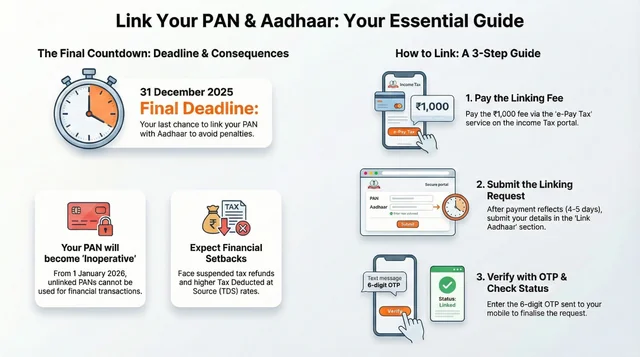
This guide provides a simplified, step-by-step process for linking your Permanent Account Number (PAN) with your Aadhaar card. It is a mandatory requirement, and the official deadline to complete the linking process is December 31, 2025. Understanding the steps is crucial to ensure you remain compliant with tax regulations.
What Happens if You Don't Link Them?
Failing to link your PAN with Aadhaar by the deadline will lead to several significant financial consequences starting from January 1, 2026. These include:
- Your PAN will become inoperative, meaning it cannot be used for major financial or tax-related transactions. (This means you cannot open a bank account, invest in mutual funds, or sell property.)
- Any pending income tax refunds will be suspended.
- You will be subject to a higher tax deduction at source (TDS) on your income.
To avoid these issues, it's important to gather the necessary items and complete the process.
2. Before You Begin: A Quick Checklist
To ensure a smooth linking process, please have the following items ready before you start:
- A valid PAN
- An Aadhaar number
- A registered mobile phone (to receive the one-time password or OTP)
- A payment method (net banking, debit card, or UPI) for the mandatory Rs 1,000 fee
Important Note on Fees A mandatory fee of Rs 1,000 is required for linking if your PAN was issued before July 1, 2017, and has not been linked previously.
Once you have these items and are prepared to pay the fee, you're all set to begin the simple, two-part process below.
3. The Linking Process: A Step-by-Step Guide
The process is broken down into two main stages: first, paying the mandatory fee, and second, submitting the actual linking request on the tax portal.
Part 1: Paying the Rs 1,000 Fee
- Go to the Income Tax Department’s e-Filing portal (https://www.incometax.gov.in/iec/foportal/).
- Under the 'Quick Links' section on the homepage, select the Link Aadhaar option.
- Enter your PAN and Aadhaar details, then choose to pay through the e-Pay Tax service.
- You will be prompted to re-enter your PAN and then verify your mobile number with the OTP you receive.
- On the payment details page, select the Income Tax option. For the Assessment Year (AY), choose 2025-26 (since you are paying the fee in the current Financial Year 2024-25). Then, set the payment category to Other Receipts (500).
- The amount of Rs 1,000 will be auto-filled. Confirm this amount and complete the payment using net banking, a debit card, or UPI.
Important: You must wait four to five working days for the payment to be processed before proceeding to Part 2. Do not attempt to submit the linking request immediately after payment, as it will fail.
Part 2: Submitting the Linking Request
You should only proceed with these steps after your payment has been successfully processed and is reflected on the portal.
- Return to the Link Aadhaar section on the e-Filing portal homepage.
- Enter your PAN and Aadhaar number and click the Validate button.
- You should see a confirmation message that says, "Your payment details are verified."
- Proceed by entering your name exactly as it appears on your Aadhaar card and your mobile number.
- Tick the box to agree to validate your Aadhaar details. Then, tick the second box only if your Aadhaar card contains just your year of birth, not your full date of birth.
- Enter the six-digit OTP sent to your registered mobile number to finalize and complete the linking request.
Once you have submitted the request, you can easily check its status online.
4. How to Check Your Linking Status
You can verify whether your PAN and Aadhaar have been successfully linked at any time without needing to log into the portal.
Follow these simple steps to check your status:
- On the e-Filing portal homepage, find and select Link Aadhaar Status under the 'Quick Links' section.
- Enter your PAN and Aadhaar details.
- The linking status will be displayed directly on the screen.
Here is what the different status messages mean:
- Successful: A green checkmark will appear, confirming that your PAN is successfully linked to your Aadhaar.
- Pending: You will see a message indicating that your request has been sent to UIDAI for validation. This means the process is still underway and you may need to check back later.