How to use Cloud Apps and Software
By Jaspal Singh
So what is ‘cloud’ and why should I care?
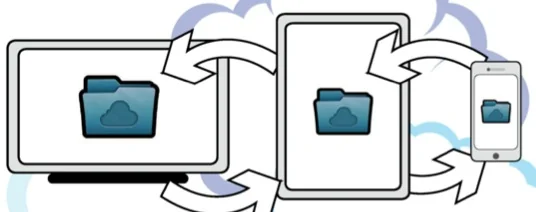
Mobile cloud computing basically means that tasks and data are stored off device, on the internet, rather than installed on individual devices.
This means your information, such as internet bookmarks, documents, music and even movies do not need to be copied or stored on every piece of technology you own – it gets uploaded to a storage space on the internet and you can retrieve it at will on anything from your iPad to your Samsung Galaxy S3 to your workplace computer (as long as they all have an internet connections).
Modern cloud computing has moved beyond this simple lockbox-type approach, and has merged into ‘services’ – these can combine almost every element of computer or mobile device usage, from email to social networking.
This can range from a company that lets you store documents and photos, through to a restaurant website that saves your eating preference in the cloud and offers you suggestions for your favourite foods. This could be anywhere in the world, using GPS.
Most people would’ve experienced a form of cloud usage pretty early on in their internet experience – through web based email, such as Yahoo Mail, Hotmail (now Outlook) and Gmail. This is effectively ‘offsite’ cloud email – rather than it being stored and sent from your hard drive.
Ever been backpacking and Emailed photos of Machu Picchu to yourself, so you could retrieve them when you got back to the first world? You were effectively using Gmail as a cloud storage service for your photos.
See Also : What's the Best Cloud Backup?
 If their security fails, yours does. We have seen this a few times recently, such as Sony Playstation’s servers being hacked (hundreds of thousands of user profiles and credit card details were leaked on to the internet). Is this somewhere you really want you, or your company’s private financial data (such as your monthly budgets, or confidential HR documents), stored, out of your control?
It also raises legal questions – whereas in the UK you can pursue legal action against an accountant who loses your papers (actual physical papers we mean), and even gain insurance for these kinds of situations, the laws concerning Cloud companies and their duty of care for your data is still unclear internationally.
How does Aunt Maude from Hull go after multinational Google (based in California) for breach of privacy if her bank statements have been stolen by a third party?
If their security fails, yours does. We have seen this a few times recently, such as Sony Playstation’s servers being hacked (hundreds of thousands of user profiles and credit card details were leaked on to the internet). Is this somewhere you really want you, or your company’s private financial data (such as your monthly budgets, or confidential HR documents), stored, out of your control?
It also raises legal questions – whereas in the UK you can pursue legal action against an accountant who loses your papers (actual physical papers we mean), and even gain insurance for these kinds of situations, the laws concerning Cloud companies and their duty of care for your data is still unclear internationally.
How does Aunt Maude from Hull go after multinational Google (based in California) for breach of privacy if her bank statements have been stolen by a third party?
 Texts can now be sent over the internet, similar to a Skype call (which will one day replace phone calls too). Apple now has iMessage built in (blue coloured text messages to those that also have iMessage enabled, as opposed to the green of a traditional, paid for SMS) – but this will only work for Apple devices. Other popular cloud based messaging services include WhatsApp – which works on both Android and Apple devices, and Viber, which combines Skype-style internet phone calling with text messaging.
Google
Google hasn’t become a major tech multinational by chance. Its cloud offerings are mostly free, and include Gmail, Google Drive (storage) and Google Docs (document creation and edit- ing). The Google Play Store, home of all its apps, music, movies and books, is pay per item. The Chrome Web browser will sync bookmarks, search histories and your logins through your accounts. Overall, Google’s cloud offerings are more ‘techie’ and less user friendly than Apple’s or Dropbox. The incorpora- tion of Google Docs makes it a powerful tablet work tool for the road warrior. As with Apple, the first 5GB is free. Plans are: Free to 5GB 25GB is $2.50 (£1.50) per month - £18 per year (30GB total) 1TB is $50 (£31) per month 16TB is $800 (£500) per month
Key uses for cloud
1. Syncing address book contacts, web browser book marks, user preferences and other personalisations across all your devices – For example, the Google Chrome web browser’s book marks will appear on your PCs browser, your smartphone and your tablet. More importantly, a contact’s details saved from an email on your PC will appear in your phone’s address book – without you having to re-enter that data on every device in front of you. 2. Photos – through inbuilt programs such as Apple’s photostream, any photos taken on your iPhone will be downloaded to your tablet automatically. Very handy for those that need to do photo editing. 3. Work – Users of Microsoft’s Office 365 or Google’s Docs will appreciate this wholeheartedly. Any documents written in Google Docs go straight into the cloud and can be retrieved at any time for editing – very useful for long trips to get work done on the laptop or tablet, or if you just need to type a few quick notes into your smartphone while on a site visit. Office 365 takes this further (it’s also a subscription service) and is integrated directly into Microsoft Office for ‘lightweight’ editing offsite. 4. Social Media – while not traditionally grouped with cloud computing in most minds, Facebook and Twitter follow all the cloud principles – all your data, photos and posts are stored offsite in a company’s server banks. These raise more privacy issues, as due to the Terms and Conditions you usually sever complete ownership rights when using these sites (see Privacy) 5. Save for later – One of the best features of the Cloud is one of the simplest: there are a variety of apps (see box) that allow you to save your online experience for later. Simply bookmark a page, and Instapaper will save web pages for later, it even morphs all your saved bookmarks into a newspaper format. 6. Backup – The most obvious, and an integration of all of the above. Quite simply, storing vital documents and treasured memories in the cloud means that if your house is burned down, or your phone stolen by thugs, the information is untouched. With Apple devices, for example, you can literally walk into a store the next day, buy a replacement, connect to the internet and your phone will be as it was at the last backup – contacts, photos, documents, emails and all. Most cloud apps (such as Dropbox) now have desktop clients, so you can simply drag and drop files to a folder, and they will automatically sync across all your devices.Privacy Issues
One of the scary issues for those using Cloud Services is simple – you are placing your trust in the hands of a foreign entity – namely a faceless company, probably half way across the world, storing your private documents and even your own personality data.
If their security fails, yours does. We have seen this a few times recently, such as Sony Playstation’s servers being hacked (hundreds of thousands of user profiles and credit card details were leaked on to the internet). Is this somewhere you really want you, or your company’s private financial data (such as your monthly budgets, or confidential HR documents), stored, out of your control?
It also raises legal questions – whereas in the UK you can pursue legal action against an accountant who loses your papers (actual physical papers we mean), and even gain insurance for these kinds of situations, the laws concerning Cloud companies and their duty of care for your data is still unclear internationally.
How does Aunt Maude from Hull go after multinational Google (based in California) for breach of privacy if her bank statements have been stolen by a third party?
Big Brother
Privacy advocates are also concerned about data spying – although those that use Facebook or Twitter on their phones sign elaborate disclaimers (the legality of which is cloudy) before use, these companies, and Google too, want to sell you advertis- ing. They aren’t providing a public service. They want to see what your hobbies are, what kind of food you like and where you do these activities. On smartphones, this is manifested through GPS tracking: so if you go to the Manchester CBD KFC once a week it detects a pattern, and may place ads on your app or so- cial network advising you of specials on in that store. Some customers love this kind of integra- tion, seeing it as a neat modern service. Others are worried about the implications of such ‘benign’ observing.The death of the text message
The death of SMS text messaging has long been exaggerated. But the more smartphone users boost their data usage, the more redundant the old text message will become.
Texts can now be sent over the internet, similar to a Skype call (which will one day replace phone calls too). Apple now has iMessage built in (blue coloured text messages to those that also have iMessage enabled, as opposed to the green of a traditional, paid for SMS) – but this will only work for Apple devices. Other popular cloud based messaging services include WhatsApp – which works on both Android and Apple devices, and Viber, which combines Skype-style internet phone calling with text messaging.
Cloud Stats
Cloud means everything is synced across all your devices - music, email and addresses..- 72 hours of video uploaded toYoutube every minute of the day (source: Youtube)
- 10.8 exabytes: Global internet data traffic from mobiles (per month) by 2016 (source: Cisco)
- $45 billion: the amount the mobile cloud market will reach in 2016 (source: Reportlinker)
- 54 per cent: the amount of Linkedin respondents citing security as their top concern with cloud (source: Linkedin)
- $160 billion: the size of the cloud computing market by 2013 (source: Merrill Lynch)