How To Set Up Your Favorite Video As Desktop Wallpaper
By Jaspal Singh
Are you bored of your current desktop wallpaper? Have you ever think of set up video as wallpaper on your desktop?
Some time before, this option was available only for Window Vista Ultimate users. As this is not a default function of Windows, but by simple tweaking, you can set any video as a wallpaper on any windows version.
Personally, I don't find setting up video wallpaper in the background useful but it is definitely a cool trick to share with our readers.
Firstly, you have to install free VLC Media Player to perform this simple trick for setting up any video for your desktop wallpaper. Now open VLC and select "preferences" from "tools" option.
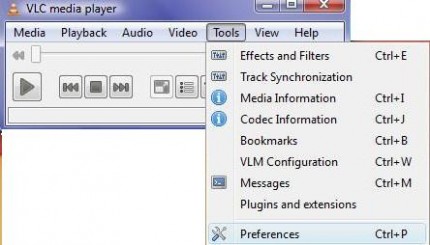 Tools > Preferences
Under "preferences" windows, click "video" option and select "DirectX video output". Click on save before existing VLC.
Tools > Preferences
Under "preferences" windows, click "video" option and select "DirectX video output". Click on save before existing VLC.
 Video > Output > DirectX video output
Now, run any video file in VLC media player and right click on the screen. Click on "video" option and click on "DirextX wallpaper". You are done setting up video wallpaper on your desktop.
Video > Output > DirectX video output
Now, run any video file in VLC media player and right click on the screen. Click on "video" option and click on "DirextX wallpaper". You are done setting up video wallpaper on your desktop.
 Video < DirectX Wallpaper
If you are using Windows Aero theme, you will receive a warning and your current theme will automatically change into Windows Basic theme.
Video < DirectX Wallpaper
If you are using Windows Aero theme, you will receive a warning and your current theme will automatically change into Windows Basic theme.
 Warning message
Enjoy your video wallpaper on your desktop and when you want to switch back to your previous settings, click on "video" and close out "DirectX wallpaper".
Warning message
Enjoy your video wallpaper on your desktop and when you want to switch back to your previous settings, click on "video" and close out "DirectX wallpaper".
 Dektop Video Wallpaper
This might not be a productive but surely be a cool trick to impress your friends or to get rid of your old boring wallpapers.
Dektop Video Wallpaper
This might not be a productive but surely be a cool trick to impress your friends or to get rid of your old boring wallpapers.
Tools > Preferences
Under "preferences" windows, click "video" option and select "DirectX video output". Click on save before existing VLC.
Video > Output > DirectX video output
Now, run any video file in VLC media player and right click on the screen. Click on "video" option and click on "DirextX wallpaper". You are done setting up video wallpaper on your desktop.
Video < DirectX Wallpaper
If you are using Windows Aero theme, you will receive a warning and your current theme will automatically change into Windows Basic theme.
Warning message
Enjoy your video wallpaper on your desktop and when you want to switch back to your previous settings, click on "video" and close out "DirectX wallpaper".
Dektop Video Wallpaper
This might not be a productive but surely be a cool trick to impress your friends or to get rid of your old boring wallpapers.