How To Listen Thousands Of Radio Stations Online For Free
By Jaspal Singh
If you are tired of Winamp, Spotify, iTunes, Window Media Player, or any other software you use to listen music, why don't you try listening online radio for a change. Ya I know, you must be thinking that finding radio stations online is a pain.
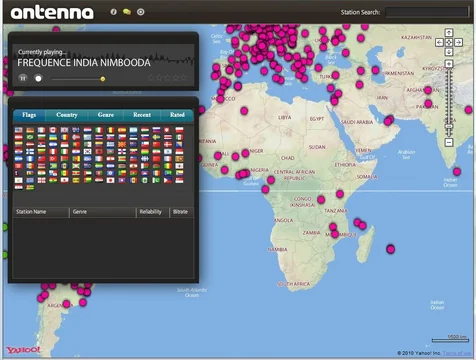
But don't worry my friends, in this article, I am sharing a Adobe Air based application called Antenna that solves the problem by combining vast list of radio stations with a map interface. This software is really very easy to use. You can discover thousands of radio stations from all around the globe based on country and genre.
Beyond that you have a history of recently browsed stations and even rate the ones you like most and return to them later easily later. The best part of the software is it takes only a minute to install and works seamlessly without any advertisements.
The application also have built-in search tool and option to record online music into your PC. Let's see it in action to understand Antenna application better.
After installing and starting the application you will see the Antenna home screen like the image below. The left side will show you the browsing panel where you search for the radio stations and based on the radio stations you choose, the background map will navigate you to the station's location.
 To start listening, browse stations based on category ranging from 'flags', 'country', and 'Genre'.
 Recording Audio
You can also record the song which you are listening to. To start recording click on "Round white button" which will turn into red color when you click it. It means recording is in the progress.
Recording Audio
You can also record the song which you are listening to. To start recording click on "Round white button" which will turn into red color when you click it. It means recording is in the progress.
 When you done recording the song, click on "red button", a pop-up window will appear which shows the information where the file is being saved.
 Advantages of Antenna
To start listening, browse stations based on category ranging from 'flags', 'country', and 'Genre'.
Recording Audio
You can also record the song which you are listening to. To start recording click on "Round white button" which will turn into red color when you click it. It means recording is in the progress.
When you done recording the song, click on "red button", a pop-up window will appear which shows the information where the file is being saved.
Advantages of Antenna
- Thousands of Radio Stations to choose from
- No registration or Sign-up required
- Crystal clear sound
- Chat option is also available with other Antenna users
- Nice interface design
- Not all radio stations work
- Quirkiness in Recording function