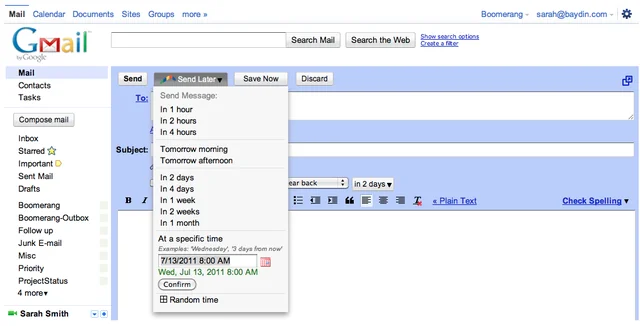
If you’ve written someone an email you don’t want them to read until later, you can use Boomerang Mail to delay its delivery.
This useful add-on for Firefox and Chrome lets you schedule emails to be sent on the day and at the time of your choice. Just click the Send Later button at the top of the message window and choose a date.
You can delay up to 10 emails a month for free, or pay $4.99 for unlimited scheduling.
There is also a Free extension called Right in Box available for chrome and Firefox that can do this job for you. Here is a link to that post http://getdigitize.com/schedules-emails-for-later-in-gmail/
It will definitely help me, I need such facility so I can send emails later.
Very helpful too know. Wonder how many people will use this too look like they are working when they’re not!
This a very interesting feature, which will help me a lot with my work. Thank you for sharing this trick with me.
I have tried Now so very nice and helpful so Thanks for shearing this add-on.
Very helpful article. Glad to know about the addon which helps in communicating efficiently.
This is something I have been asked in the past how to do and I have always directed people to other services that offer this. Its nice to know there is a way to do it in Gmail. Thanks for the share very useful!
I had not noticed this feature in Gmail before. Thanks for the tip.
I visited you for first time… nice blog by the way… keep writing….
Excelent post, I liked to!!!
This is a nice add-on for gmail users.