How to Remove Ghost Hardware from your PC
By Jaspal Singh
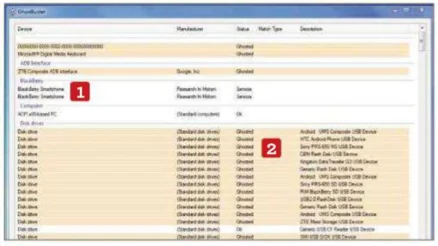
Each time you plug a device into your computer, your PC automatically adds information to the Registry. If you stop using the device, its Registry files can linger on.
These hardware 'ghosts' can slow down your PC. Get rid of them all in one go with GhostBuster.
GhostBuster : GhostBuster.codeplex.com | XP / Vista / 7
Step 1 : GhostBuster automatically scans your Registry each time you open the program. You will see a list of all your devices and drivers. Any that Ghostbuster thinks are not in use will be highlighted as Ghosted in the Status column.
 Step 2 : Some drivers are used for your computer's graphics and audio programs, and removing these may cause problems during playback of videos and music. GhostBuster identifies these as Services. Don't remove these files.
 Step 3 : To add hardware to the removal list, right-click its entry and choose Add device. To add everything in a section, right-click one part and choose Add Class. Items added to the removal list will be shown in red.
 Step 4 : To undo selections, right-click the unwanted entries and choose Remove Device or Remove Class. To show only the ghosted devices, right-click any entry and click hide Unfiltered Devices. You can look up the details of each driver in Properties.
 Step 5 : Before removing anything, tick the Create System Restore Checkpoint box. This way, if you accidentally delete something your PC needs or you have any other problems, you can roll back your changes.
 Step 6 : The number of ghosts to remove is shown in the bottom-left corner. Click Remove Ghosts. You may need to give GhostBuster administrator rights, when prompted. A restore point will be created, the ghost hardware will be removed and your PC will be rebooted.

Step 2 : Some drivers are used for your computer's graphics and audio programs, and removing these may cause problems during playback of videos and music. GhostBuster identifies these as Services. Don't remove these files.
Step 3 : To add hardware to the removal list, right-click its entry and choose Add device. To add everything in a section, right-click one part and choose Add Class. Items added to the removal list will be shown in red.
Step 4 : To undo selections, right-click the unwanted entries and choose Remove Device or Remove Class. To show only the ghosted devices, right-click any entry and click hide Unfiltered Devices. You can look up the details of each driver in Properties.
Step 5 : Before removing anything, tick the Create System Restore Checkpoint box. This way, if you accidentally delete something your PC needs or you have any other problems, you can roll back your changes.
Step 6 : The number of ghosts to remove is shown in the bottom-left corner. Click Remove Ghosts. You may need to give GhostBuster administrator rights, when prompted. A restore point will be created, the ghost hardware will be removed and your PC will be rebooted.