Every OS has some problems now and then, Windows is the most used OS but it has flaws. Even though with every other version of Windows it keeps getting improved but sometimes its too troublesome.
Its always nice to have some software which can heal or troubleshoot our annoyance. Gathering Troubleshooting software is not very easy and it takes time to learn how each one works. To make things easier we have selected the best softwares for troubleshooting in Windows OS.
And the best thing is, all these tools are free of cost. They will not cost you a single penny. Few days back we have posted Best Free Anti-Virus which was very helpful to you guys, which was shown by your comments and feedbacks. I hope today these tools will make your Windows free from the glitches it gives now and then.
Don’t forget to
subscribe to our RSS-feed and
follow us on Twitter for recent updates.
Best And Free Softwares for Troubleshooting in Windows
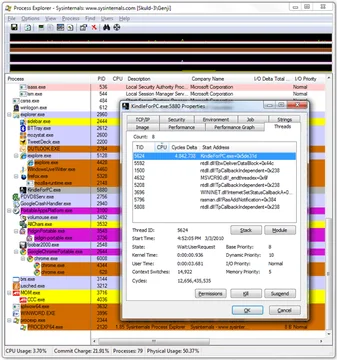
Process Explorer : Process Explorer make it useful for tracking down DLL-version problems or handle leaks, and provide insight into the way Windows and applications work.
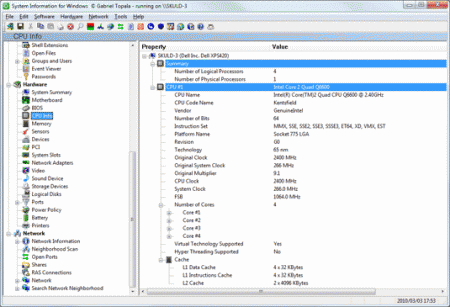
SIW : SIW is an advanced System Information for Windows tool that gathers detailed information about your system properties and settings and displays it in an extremely comprehensible manner.
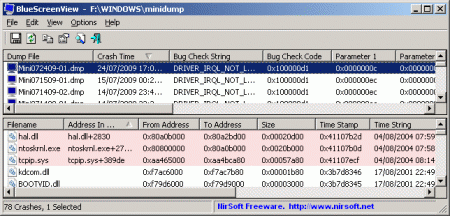
BlueScreenView : Blue Screen of Death, or BSOD for short. BlueScreenView scans your system for these files and produces a report from them, which you can read within BlueScreenView itself or save to HTML for separate analysis. Each line in the report describes the BSOD’s crash code, the time and date of its occurrence, any parameters that might have been passed with the crash (useful for debugging), and a slew of other minor details. The results are searchable, so you can hunt for a particular crash code, driver, or DLL that you think might be present.
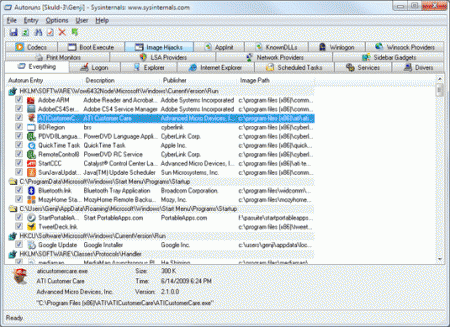
Autoruns : This utility, which has the most comprehensive knowledge of auto-starting locations of any startup monitor, shows you what programs are configured to run during system bootup or login, and shows you the entries in the order Windows processes them. These programs include ones in your startup folder, Run, RunOnce, and other Registry keys. You can configure Autoruns to show other locations, including Explorer shell extensions, toolbars, browser helper objects, Winlogon notifications, auto-start services, and much more. Autoruns goes way beyond the MSConfig utility bundled with Windows Me and XP.
If you have used any of these and any other tool which makes your Windows away from Troubles, please share it with us. I will be happy to add your tried and tested version.


Pingback: Tweets that mention Best And Free Softwares for Troubleshooting in Windows -- Topsy.com
Pingback: Best And Free Softwares for Troubleshooting in Windows » Windows, Softwares, Troubleshooting, Free, View, Even » Make Computers
I have been using SIW for a couple of years now, it’s been a great tool to have around when having trouble in Windows.
nice software but I not use that. thank you
roomeyda´s last [type] ..10 Tips Blogging Yang Sehat
hhmmmm,, I already use this software. thanks for sharing
health and loan´s last [type] ..Auto insurance rates – reduction strategy
Pingback: Best And Free Softwares for Troubleshooting in Windows « Netcrema – creme de la social news via digg + delicious + stumpleupon + reddit
Pingback: === popurls.com === popular today
Pingback: Best And Free Softwares for Troubleshooting in Windows : Popular Links : eConsultant
These some very nice utilities to troubleshoot Windows. Bookmarking the post for later reference.
~~ Sarah ~~
HowToPlaza´s last [type] ..How to make money writing online
Pingback: Buy Xanax Online Without Prescription – GSM Hacks | Rx Drugs Blog
Pingback: Best And Free Softwares for Troubleshooting in Windows
Great software,. I want to use this software. Thanks for sharing.
Home Gadgets´s last [type] ..Sheath Knives Shaped Toolkit Silhouettes-Cutlery Toolkit by Rafael Morgan
Pingback: Hubpages Free Traffic Video Tutorial Series. | Hayabusa MMA
very good list of softwares
healthy´s last [type] ..The Age of Hormones
Well Microsoft Fix it and The Ultimate Tweaker are also good programs that you can use
Mad Geek @beingPC´s last [type] ..Some cool features of Windows Live Messenger Beta or Wave 4
I like autorun so much.
We usually run something we don’t need but don’t know. Clean start up is very good way to boost up your computer.
SexyContent´s last [type] ..Optimizing Tools Ashampoo WinOptimizer 2010 Advanced
thanks for sharing:) really cool information, i like it
Really fascinating article many thanks for sharing We have added your web site to my bookmarks and will examine back again By the way this can be a tiny off topic but I truly like your blogs layout.
Hiren’s boot cd and memtest are some other good troubleshooting tools to start with. In most cases, Google and experience are your best tools though.
Almost everyone that makesmoney on the internet (even the millionaires) do so through affiliate marketing. Being successful in affiliate marketing involves applying the formula that makes other affiliate marketers successful. For instance, autoblogging. Autoblogging has been one of the least well-known forms of making money for quite some time… primarily because it’s quite difficult to make a good auto-blog. Yet, when done right, it can provide you with a lifetime of passive income with the only real work required being the setting up process. Video Marketing, and several other marketing strategies are all designed to drive traffic to your site, can be incorporated gradually in order to raise the position your site appears in the search engine results page when someone searches for a term related to your site. And yet, even this can be totally automated.